Find Internet Providers For Your Home

Unlike water or trash, home internet isn’t tied to a single utility company. Your choices — whether fiber, cable, 5G home internet, or satellite — depend entirely on the physical lines and wireless signals reaching your specific address.
Start Here
Connection Type vs. Internet Provider: What’s the Real Difference?
When you’re moving into a new home and setting up your utilities, it is easy to focus only on the brand name on the monthly bill. But there is a major distinction that often gets overlooked: the difference between your internet service provider and your connection type.
Think of your provider as the company that manages your account, sends the bill, and handles customer service. Your connection type, on the other hand, is the physical highway — whether that is glass fiber lines, copper TV cable, cell towers, or satellite signals — carrying data straight into your living room.
Confusing the two is one of the most common reasons households end up overpaying for frustrating lag, spotty coverage, and disappointing speeds.
Why Your Physical Connection Sets the Rules
No matter how great a promotional offer looks in an advertisement, your physical connection type establishes the hard technical limits of your home network. That line or signal dictates:
Latency
Responsiveness and lag
Known technically as latency, this is the split-second delay it takes for data to travel back and forth. Low latency is what keeps your video calls smooth and prevents annoying stutter during online gaming.
Speed
Upload Speeds
Most connection types can download a movie quickly, but work-from-home tasks — like backing up large files, screen sharing, or sending high-definition video — depend on upload power. Some connections match your download and upload speeds evenly, while others slow uploads down to a small fraction of your total bandwidth.
Reliability
Weather and Reliability
Buried cables are well-protected from high winds, summer heat, and electrical storms. Wireless and satellite connections, while convenient in rural spots, are far more vulnerable to heavy rain or peak-hour neighborhood congestion.
At the end of the day, you cannot sign up for a blazing-fast fiber plan if the only wire running to your home is an older copper phone line. Before you get attached to a specific brand or package, we always recommend checking which physical network types actually reach your new address first.minating at your residence consists of legacy copper telephone wire or un-upgraded coaxial cable.
Your Internet Service Provider: Choosing Your Plan and Terms
Once the physical lines are in place, the internet service provider (ISP) is the company that actually turns on your service. Think of the ISP as the management layer: they route your web traffic, send out your router, and manage your billing.
While the physical connection dictates your home’s speed potential, your provider decides:
- Monthly plan pricing: Base rates, introductory discounts, and the scheduled price jumps that kick in once your promotional period wraps up.
- Contract terms: Whether you are locked into a 12-to-24-month agreement with early termination fees, or free to keep things flexible with a month-to-month plan.
- Data limits: Whether you enjoy truly unlimited internet or have a monthly cap — often around 1.2 terabytes (TB) — with added fees if your household streams and downloads heavily.
- Equipment and support: Monthly modem and router rental charges, self-installation kits, whole-home Wi-Fi guarantees, and customer service availability when you need a hand.
In short, the physical lines running to your street set your home’s performance ceiling. Your retail provider simply packages that capability into the plan details, equipment, and monthly bill that arrive at your door.
Connection Types
Four Types of Residential Internet Delivery Networks
Residential broadband in the United States is delivered across four primary network architectures. Understanding how each medium functions helps you anticipate real-world reliability, equipment setups, and energy usage.
| Network Architecture | Physical Transmission Medium | Typical Latency | Peak Bandwidth Capacity | Best Suited For |
| Fiber-to-the-Home (FTTH) | Pure glass optical strands transmitting pulses of light | 5 – 15 ms | 300 to 8,000 Mbps (Symmetrical) | Multi-user homes, remote workers, creators, and online gamers |
| Hybrid Fiber-Coaxial (Cable) | Fiber backbones transitioning to copper coaxial television lines | 15 – 25 ms | 100 to 2,000 Mbps (Asymmetrical) | General streaming, suburban households, and multi-device entertainment |
| 5G Fixed Wireless (FWA) | Mid-band and high-frequency cellular radio spectrum | 30 – 60 ms | 75 to 500 Mbps (Dynamic/Shared) | Renters, apartments, budget-conscious movers, and simple setups |
| LEO Satellite | Low-Earth orbit satellite constellations using radio frequency links | 25 – 60 ms | 40 to 220+ Mbps (Asymmetrical) | Rural properties, cabins, and remote regions lacking ground lines |
Commercial Wireline Systems (Cable & Fiber)
Commercial cable and fiber operators provide the vast majority of suburban and urban internet connections. Upgraded cable systems deliver high download speeds, but their copper drop wires limit upload bandwidth. Pure fiber optic networks bring optical glass directly into the living space, unlocking identical upload and download speeds and eliminating peak-hour slowdowns.
Compare Fiber and Cable Internet Service
5G Home Internet (Fixed Wireless)
By broadcasting surplus 5G cellular capacity directly to an indoor gateway, mobile network operators provide a wire-free alternative to traditional cable. Because 5G home internet requires no professional technician visits, exterior wiring modifications, or drilling, it has become a preferred choice for renters and movers.
Municipal Broadband and Utility Cooperatives
Like municipal power grids and electric cooperatives, hundreds of communities across America operate their own public telecommunications networks. Often deployed by municipal light plants or rural electric co-ops, these networks deliver community-owned fiber with transparent flat-rate pricing, zero contracts, and no arbitrary data caps.
Sustainable Utility Note: Standby Power and Equipment Efficiency
Utility efficiency extends directly to your network hardware. Pure fiber networks utilize Passive Optical Networks (PON), which move data over unpowered optical splitters, using substantially less grid power than legacy cable plants with powered amplifiers every few blocks.
Inside your home, hardware matters:
- A combined 5G wireless gateway acts as both receiver and Wi-Fi router, typically drawing 12 to 18 watts of continuous power.
- A fiber setup often pairs a separate Optical Network Terminal (ONT) with a standalone router, drawing 20 to 35 watts around the clock.
- Selecting energy-efficient, Energy Star-rated networking equipment can save 70 to 150 kWh of continuous electricity each year, lowering your home’s phantom utility load.
How Internet Gets to Your Home
Where Your Home Internet Actually Comes From
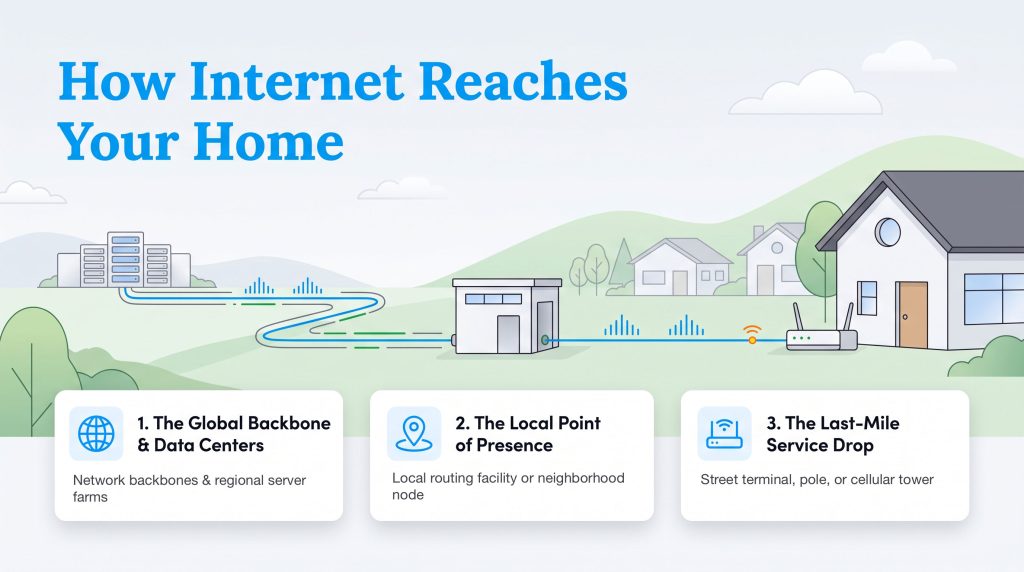
Flipping a switch draws instantaneous electricity from the regional grid, and typing a URL connects your home to a global data network in milliseconds.
The journey of household data follows three distinct steps:
- The Global Backbone & Data Centers: Tier-1 network backbones and regional server farms store and transmit web traffic across massive cross-country optical fiber routes.
- The Local Point of Presence (PoP): Your provider receives incoming data at a local routing facility or neighborhood node, translating high-capacity traffic into residential distribution streams.
- The Last-Mile Service Drop: Data travels the final physical leg from the street terminal, pole, or cellular tower directly into your home’s modem, gateway, or ONT.
In a competitive market with multiple providers, two competing companies might offer services on the same block using entirely separate physical lines. Understanding which physical lines reach your building helps you select a plan built on reliable infrastructure rather than marketing hype.
Comparing Plans
What You Get to Choose, and How: Plans, Speeds, and Contracts
Choosing an internet plan requires balancing monthly pricing, hardware expenses, and contractual fine print. Retail broadband plans fall into three structural categories:
Fixed Term Contract Plans
How They Work: You lock in an advertised promotional rate for 12 or 24 months in exchange for a binding annual contract.
Watch Out For: Introductory pricing cliffs. When the contract period ends, monthly charges frequently jump by $20 to $40 per month. Canceling service early triggers early termination fees (ETFs) that can cost hundreds of dollars.
BEST FOR: Settled Homeowners
No-Contract Month-to-Month Plans
How They Work: Standard pricing with no annual service agreements or cancellation penalties.
Key Benefit: Complete flexibility. You can adjust speed tiers, pause service, or cancel anytime without financial penalty.
BEST FOR: Renters, students, temporary residents, and frequent movers.
Unlimited vs. Data-Capped Plans
Unlimited Data: Common across fiber networks and 5G wireless plans, giving you unrestricted uploading and downloading with no extra fees.
Data Caps (Typically 1.2 TB): Many cable providers enforce a monthly limit of 1,200 Gigabytes. Exceeding this limit triggers automated charges—often $10 for each additional 50 GB block.
BEST FOR: Heavy streamers, remote workers, and gamers.
How to Read the FCC Broadband Facts Label
Just as deregulated electricity customers use the state-mandated Electricity Facts Label to detect hidden utility charges, broadband consumers now have a standardized federal disclosure tool: the FCC Broadband Facts Label.
Broadband providers are legally required to display these nutrition-style labels at online checkout and inside customer account portals.
| Broadband Label Section | What It Discloses | What You Should Check Before Enrolling |
| Base Monthly Price | The standalone service charge before taxes and optional equipment. | Confirm whether the advertised price includes auto-pay and paperless billing discounts. |
| Introductory Rate & Term | The promotional discount amount and exact duration before rates increase. | Calculate the standard post-promotional cost to see what you will pay in year two and beyond. |
| Monthly Provider Surcharges | Gateway leasing fees, Wi-Fi network tools, and local infrastructure maintenance charges. | Separate mandatory government fees from discretionary company surcharges. |
| One-Time Upfront Fees | Professional technician installation, activation fees, and self-install kit shipping costs. | Ask customer service to waive one-time activation and shipping fees before completing checkout. |
| Typical Speeds & Latency | Realistic, verified download speeds, upload speeds, and ping measured during peak hours. | Focus on typical upload speeds if your home handles frequent video meetings or cloud storage. |
| Data Included & Overage Rates | Monthly data allowance (in GB) and the dollar cost assessed for each extra data tier. | Verify if heavy streaming or competitive gaming will push your household past monthly limits. |
Coverage Map
Internet Access by State
How many residents in each state can get home broadband (100/20 Mbps) and gigabit (1,000 Mbps) service. Switch between the two, then select a state to see where it ranks and compare its providers.
Select a state on the map, from the rankings, or from the menu above to see its broadband and gigabit access.
Most Connected
Least Connected
Share of residents with access to fixed home internet at each speed tier. Source FCC National Broadband Map.
Check Availability
Check Internet Availability in Your State
Federal rules set broad national standards, but broadband access varies significantly from state to state.
Check Your Exact Address
Statewide coverage statistics provide a high-level overview, but broadband infrastructure stops and starts at specific neighborhood boundaries. Your street address determines which physical connections enter your home.
Browse Internet Providers by State
Select your state from the directory below to explore localized carrier availability, county-by-county fiber expansion projects, municipal networks, and public assistance programs:
- Alabama
- Alaska
- Arizona
- Arkansas
- California
- Colorado
- Connecticut
- Delaware
- Florida
- Georgia
- Hawaii
- Idaho
- Illinois
- Indiana
- Iowa
- Kansas
- Kentucky
- Louisiana
- Maine
- Maryland
- Massachusetts
- Michigan
- Minnesota
- Mississippi
- Missouri
- Montana
- Nebraska
- Nevada
- New Hampshire
- New Jersey
- New Mexico
- New York
- North Carolina
- North Dakota
- Ohio
- Oklahoma
- Oregon
- Pennsylvania
- Rhode Island
- South Carolina
- South Dakota
- Tennessee
- Texas
- Utah
- Vermont
- Virginia
- Washington
- West Virginia
- Wisconsin
- Wyoming
- Washington, D.C.
Top Providers
Major Internet Providers: The Largest Broadband Companies
America’s broadband market includes major national carriers alongside regional telecommunications operators. These seven providers account for the majority of residential connections nationwide:
- AT&T Fiber
Fiber with speeds up to 5 Gbps - Verizon Home Internet
Fiber & 5G with speeds up to 5 Gbps - Xfinity
Hybrid Fiber-Coax Cable with speeds up to 2 Gbps - Spectrum
Hybrid Fiber-Coax Cable & Fiber with speeds up to 7 Gbps - T-Mobile Home Internet
Fiber & 5G with speeds up to 2 Gbps - gFiber
Fiber with speeds up to 8 Gbps - Starlink
LEO Satellite with speeds up to 400 Mbps
Choosing
What’s the Right Internet Plan for My Home?
Selecting the right broadband tier requires looking beyond top advertised download speeds to match plans with your household’s actual daily usage. Follow this four-step decision framework to secure reliable performance without overspending.
Calculate Peak Concurrent Demand
Internet sizing depends on your home’s peak concurrent digital activity. If three people stream 4K video while another hosts a Zoom call and a gaming console downloads an update in the background, your network must support all of those activities simultaneously.
Prioritize Physical Medium and Latency Over Top Download Numbers
A symmetrical 300 Mbps fiber plan with 10 ms ping consistently outperforms an asymmetrical 1,000 Mbps cable connection with 20 Mbps upload and 40 ms ping during video conferencing, working from home, and real-time gaming. Prioritize stable latency and balanced upload speeds over marketing claims.
Hunt for Fees in the Fine Print
Review the FCC Broadband Facts Label before enrolling in a plan. Check the equipment rental charges ($12 to $15 per month for modems), verify when introductory promotional discounts end, and confirm whether the plan enforces a 1.2 TB data cap with overage fees.
Align the Contract with Your Living Situation
If you are renting or expect to relocate within a year or two, avoid plans with 12-to-24-month commitments. Stick with no-contract fiber providers or 5G home internet to eliminate the risk of early termination fees.
Household Sizing & Bandwidth Matrix
| Household Profile & Use Case | Recommended Download Speed | Recommended Upload Speed | Target Latency & Jitter | Monthly Data Budget | Best Connection Match |
| Solo Resident / Basic Use: Web browsing, email, occasional HD video streaming. | 25 – 50 Mbps | 3 – 10 Mbps | Under 100 ms ping | Under 300 GB | 5G Home Internet or Entry-Level Cable |
| Small Household (2–3 Users): Simultaneous HD/4K streams, remote work, casual online gaming. | 100 – 300 Mbps | 20 – 100 Mbps | Under 40 ms ping / Under 30 ms jitter | 500 to 800 GB | Mid-Tier Fiber or Standard Cable |
| Connected Family (4+ Users): Multiple 4K video streams, competitive gaming, smart home devices. | 500 – 1,000 Mbps | 100 – 1,000 Mbps (Symmetrical) | Under 20 ms ping / 0% packet loss | 1,000 GB (1 TB) or Unlimited | Gigabit Fiber-to-the-Home (FTTH) |
| High-Bandwidth Creator / Pro: Large cloud backups, 4K livestreaming, local media server hosting. | 1,000 – 5,000+ Mbps | 1,000 – 5,000+ Mbps (Symmetrical) | Under 10 ms ping / 0% packet loss | Unlimited Data Required | Multi-Gigabit Fiber (FTTH) |
Understanding Throughput: Megabits vs. Megabytes
A common point of confusion for shoppers is the difference between megabits per second (Mbps) and megabytes per second (MB/s).
ISPs advertise speeds in megabits (lowercase “b”), but computers and gaming consoles measure file sizes and downloads in megabytes (uppercase “B”). Because there are eight bits in one byte, real-world download time is calculated using this formula:
Download Duration (seconds) = File Size in Megabytes (MB)*Network Bandwidth in Megabits per Second (Mbps)
A 60-gigabyte (60,000 MB) video game download requires approximately 4,800 seconds (about 80 minutes) on a standard 100 Mbps broadband connection, compared to just 480 seconds (about 8 minutes) on a gigabit (1,000 Mbps) fiber connection.
Using this calculation helps you right-size your bandwidth, ensuring you don’t overpay for multi-gigabit speeds your household doesn’t need.
Setting up Internet
Moving and Installation Logistics
Coordinating your internet transition alongside other essential home utilities prevents costly service overlaps and unexpected installation delays.
The Move-In Internet Checklist
- 2 to 4 Weeks Before Moving: Run your new ZIP code through our provider lookup tool to verify available infrastructure. Review your current service agreement for early termination fees. If staying with your current provider, schedule an address transfer to waive new activation charges.
- 1 Week Before Moving: Schedule a professional installation appointment or order a self-installation kit to ensure hardware arrives before moving day.
- Moving Day: Leave your old internet active until you finish vacating so security cameras and smart devices stay online. Once you arrive at your new residence, set up your gateway and run an Ethernet-connected speed test to verify you are receiving the bandwidth listed on your Broadband Facts label.
- Within 48 Hours After Moving: Return all leased modems, routers, and power adapters to your previous provider’s drop-off store or ship them using a tracked prepaid return label. Always demand and keep a physical return receipt. This documentation is your only defense against unreturned equipment charges that routinely run between $100 and $300.
Self-Installation vs. Professional Installation
- Self-Installation (Free to $15): The provider mails a pre-configured gateway directly to your doorstep. You connect it to an active coaxial wall jack, an existing optical port, or a standard wall outlet (for 5G wireless). It takes 15 minutes, requires no appointments, and works well for renters.
- Professional Installation ($50 to $150): A certified field technician visits your property during a multi-hour appointment window. This is necessary if your home has never had fiber lines installed, if exterior wiring is degraded, or if you need an Optical Network Terminal mounted and tested.
Equipment Economics: Renting vs. Buying
Renting a modem or gateway from a cable company typically costs $12 to $15 per month ($144 to $180 per year).
Purchasing your own certified DOCSIS 3.1 cable modem and Wi-Fi 6 router requires an upfront investment of $120 to $180, meaning the equipment pays for itself in under a year.
However, many pure fiber and 5G wireless providers now include their gateway hardware at no additional charge, making third-party purchases unnecessary in those markets.
Go Deeper
Broadband Guides & Comparisons
Explore our library of consumer guides to diagnose speed issues, compare connection technologies, and lower your monthly broadband expenses:
- Best Rural Internet Providers
- How Much Speed Do I Need?
- Download vs. Upload Speed
- How Much Internet Data Do I Need?
- Fiber vs. 5G Home Internet
- Cable vs. 5G Home Internet
- 5G Home Internet vs. Satellite
- Best Internet Providers for Students
- How to Read Your Internet Speed Test Results
- Tips for Saving on Internet
- Apartment Internet Setup Guide
- How To Fix Slow Internet
- How to Cancel and Transfer Utilities When Moving Out
FAQ
Frequently Asked Questions About Home Internet
What is the difference between broadband internet and Wi-Fi?
Why are upload speeds on fiber so much faster than cable?
How do data caps work, and will I be charged extra?
What should I look for on the FCC Broadband Facts label?
Should I lease a gateway from my ISP or buy my own router?
How far in advance should I arrange internet for a new home?
Editorial Authority & Review Standards
About the Authors

David has been an integral part of some of the biggest utility sites on the internet, including InMyArea.com, HighSpeedInternet.com, BroadbandNow.com, and U.S. News, with more than 15 years writing about, compiling, and analyzing utility data.
Editorial Independence & Commercial Transparency
UtilitiesForMyHome.com is dedicated to providing clear, objective utility information. We do not accept pay-to-play placement: no utility, internet service provider, or waste management company can pay to alter their service territory, artificially inflate speed ratings, or secure higher placement within our search results.
Provider rankings are generated using a weighted algorithm prioritizing verified address-level availability, pricing transparency, and real-world network performance. While we earn commissions from some providers when users enroll through our site links, our commercial partnerships never influence our editorial ratings, reviews, or recommendations.
Check Availability at Your Address
Have feedback or spotted outdated local information? Report Missing or Inaccurate Data to trigger an investigation by our data research team.