
Read our hands-on review to see if T-Mobile 5G Home Internet delivers the speeds and reliability you need to replace your traditional cable provider.
Key Takeaways
- T-Mobile Home Internet offers an affordable, contract-free alternative to traditional cable providers with truly unlimited data and transparent pricing.
- Real-world speeds and network reliability depend heavily on your home’s proximity to a 5G tower and local peak-hour congestion.
- Installation takes just 15 minutes with the simple plug-and-play T-Mobile 5G Gateway and the intuitive T-Life app.
Moving into a new home is stressful enough without having to wait around all afternoon for a cable technician, which is exactly why our T-Mobile 5G Home Internet review focuses on how this wireless alternative simplifies your entire utility setup. We have spent extensive time testing and evaluating this service to see if it can genuinely replace your traditional wired connection while eliminating frustrating hidden fees, sudden price hikes, and restrictive data caps. T-Mobile is betting big on residential fixed-wireless technology, leveraging its expansive cellular network to deliver a plug-and-play Wi-Fi gateway directly to your living room. While we love the transparent pricing and straightforward plans, real-world performance depends heavily on your new address and local peak-hour congestion. It is crucial to understand exactly what you are signing up for before officially cutting the cord on your cable provider.
Pros and Cons of T-Mobile 5G
Before diving into the fine print and technical specifications, here is a quick, skimmable look at the major benefits and drawbacks of setting up this wireless broadband service in your new residence. Taking a moment to weigh these factors ensures the service aligns perfectly with your household’s daily internet habits.
Pros:
- Simple, transparent pricing with no hidden annual contracts or equipment rental fees.
- A risk-free 15-day money-back guarantee to test the network connection at your new address.
- Incredibly easy 15-minute self-installation utilizing the intuitive T-Life mobile app.
- Generous multi-line discounts available for current T-Mobile wireless phone customers.
Cons:
- Real-world download speeds and upload speeds are highly variable and heavily location-dependent.
- Upload speeds in particular can struggle and fluctuate during heavy network congestion.
- Noticeable latency spikes make it less than ideal for competitive online multiplayer gaming.
- Requires close physical proximity to a reliable 5G cellular tower for optimal home performance.
T-Mobile Home Internet Plans and Pricing
| Plan Name | Price | Download Speeds | Connection Type | |
|---|---|---|---|---|
| Home Internet Backup | $20 /month | Up to 318 Mbps | 5G | Check Availability |
| Rely Home Internet | $35 /month | Up to 354 Mbps | 5G | Check Availability |
| Amplified Home Internet | $45 /month | Up to 498 Mbps | 5G | Check Availability |
| All-In Home Internet | $55 /month | Up to 498 Mbps | 5G | Check Availability |
| Fiber 500 | $75 /month | Up to 500 Mbps | Fiber | Check Availability |
| Fiber 1 Gig | $85 /month | Up to 1000 Mbps | Fiber | Check Availability |
| Fiber 2 Gig | $80 /month | Up to 2 Gbps | Fiber | Check Availability |
*pricing and speeds may vary by location.
T-Mobile offers a straightforward lineup under their 5G Home Internet and Fiber services. T-Mobile home internet price structures are incredibly easy to understand because they bake the taxes and fees right into the advertised cost. You will not find a frustrating line item for a “broadcast TV fee” or a “gateway rental charge” tacked onto your monthly bill.
Their 5G Home Internet tier comes in standalone configurations, as well as premium Amplified options that include a mesh Wi-Fi node to help extend coverage across larger, multi-story homes. Meanwhile, their newer Fiber option operates on a completely different technology, offering symmetrical wired speeds in select markets. If you are actively looking for T-Mobile home internet deals during your move, bundling your wireless phone plan with your home broadband is where the savings get serious. T-Mobile heavily encourages multi-service loyalty by slashing the monthly cost of your internet down to just $35 per month when you maintain an active premium voice line on the same account.
| Plan Type | Monthly Cost (with AutoPay) | Data Cap | Best For |
|---|---|---|---|
| 5G Home Internet (Standalone) | $50 / mo. | Unlimited | Standard households without existing T-Mobile cellular plans |
| 5G Home Internet (Bundled) | $35 – $45 / mo. | Unlimited | Current T-Mobile wireless customers looking to maximize savings |
| T-Mobile Fiber (Select Markets) | $55 – $75 / mo. | Unlimited | Users in fiber-ready zip codes who need gigabit download speeds |
Current Deals and Ways to Save
To maximize your value, you need to understand the exact multi-line discount requirements. The aggressively advertised $35 per month internet price point requires you to have at least one active premium voice line, typically on plans like Go5G Plus or Go5G Next. If you are on an older, grandfathered plan or an entry-level tier like Essentials, your bundled price will likely drop to $45 per month instead.
Beyond the monthly rate discounts, T-Mobile frequently runs promotional hardware rebates and streaming perks to incentivize cord-cutters. By subscribing, you often gain access to free streaming perks, such as complimentary subscriptions to Hulu (with Ads), Netflix on Us, or discounted Paramount+ access. Additionally, T-Mobile regularly offers hardware rebates for new sign-ups during major moving seasons. These promotions rotate frequently but commonly feature incentives like free Apple AirPods, Blink outdoor security camera packages, or $100 to $200 prepaid Mastercard gift cards. Always check the current active promos page before officially placing your order to ensure you capitalize on these sign-up bonuses.
Hidden Fees and Service Guarantees
T-Mobile is refreshingly upfront with its costs, which helps alleviate the financial anxiety often associated with relocating. You will face a standard one-time connection charge of $35 when starting your 5G Home Internet service, but the company explicitly guarantees the absence of monthly equipment rental fees and restrictive data overage charges. The modem and router combination device is included entirely for free as part of your active subscription.
Furthermore, the provider backs their service with a highly appealing five-year Price Lock guarantee. This specific guarantee means that your core base rate for the home internet service is locked and will not increase for 60 full months, provided you maintain your qualifying plan and address. This is a massive relief compared to standard cable companies that famously spike your rates by 30% or more after a 12-month promotional period ends.
Network Information and Real-World Speeds
When reviewing T-Mobile home internet speed, it is vital to differentiate between theoretical maximum network capabilities and the actual tested speeds you will experience on a busy Tuesday evening. Because fixed-wireless internet relies on local cellular towers rather than dedicated underground fiber-optic lines, your performance depends heavily on geography, interference, and tower congestion.
In real-world testing, T-Mobile states that the majority of 5G Home Internet customers experience download speeds ranging from 87 Mbps to 415 Mbps, with upload speeds hovering between 14 Mbps and 56 Mbps. For standard households, this is plenty of bandwidth to stream Netflix in 4K, browse the web, and support an entire house full of smart home devices simultaneously.
However, network reliability introduces a necessary concept called deprioritization. While the data is truly unlimited with no punitive overage charges, T-Mobile explicitly defines a 1.2TB prioritization threshold. Think of the local cell tower like a multi-lane highway. If your household exceeds 1.2TB of data usage in a single billing cycle, your internet traffic is temporarily moved to the slower lane during periods of heavy local tower congestion to prioritize mobile phone users. Once the local congestion clears, your speeds return to normal.
Is T-Mobile Home Internet Good for Gaming?
If you have a dedicated gamer in the household, you need to understand exactly how cellular internet handles latency. Because the connection relies on wireless cell towers rather than physical underground cables, ping rates and latency variability (jitter) are significantly higher. Furthermore, T-Mobile Home Internet often utilizes a Carrier-Grade NAT (Network Address Translation), which frequently results in a Strict or Moderate NAT type on your gaming console. This can make peer-to-peer matchmaking or hosting private lobbies quite difficult.
If you are a casual gamer primarily focused on downloading large game patches, playing single-player RPGs, or enjoying slower-paced multiplayer sessions, this service will work perfectly fine. However, competitive FPS gamers who require hyper-stable, ultra-low latency for games like Call of Duty, Valorant, or Counter-Strike should strictly avoid this service, as you will likely experience frustrating lag spikes, packet loss, and frequent ping instability.
T-Mobile Coverage Area and Availability Map
Before locking in your decision based on customer reviews or promotional pricing, you must confirm that the service map extends to your specific neighborhood and offers a strong enough cellular signal to support your entire household. Verifying your exact location beforehand ensures you will not encounter frustrating connectivity drop-offs after your move is complete.
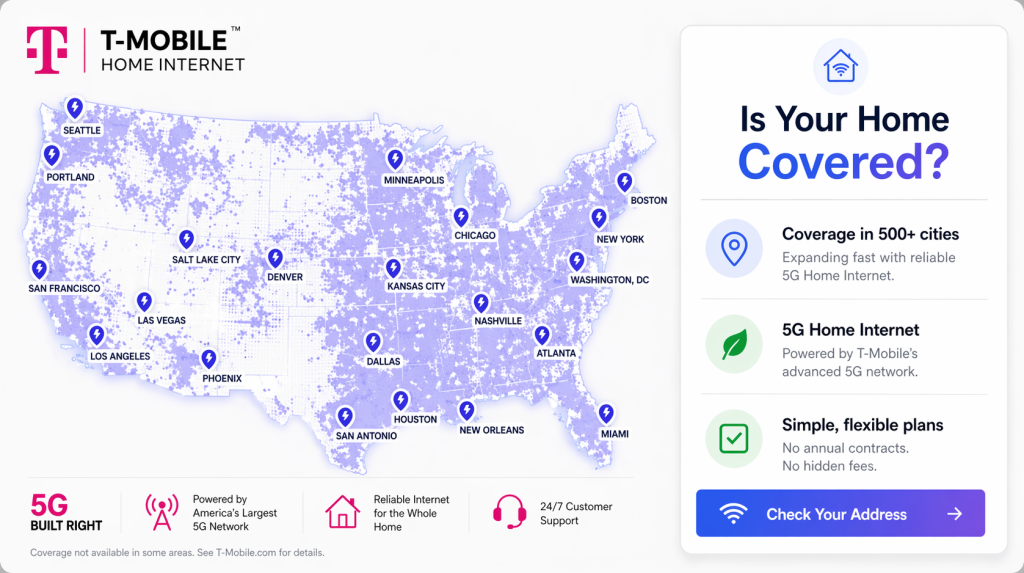
When consulting the T-Mobile home internet coverage map, you will see that their 5G service is available across all 50 states, primarily concentrated in major and mid‑sized cities. Notable metropolitan areas include New York, Los Angeles, Chicago, Houston, Phoenix, Philadelphia, Dallas, Atlanta, Miami, Denver, Seattle, San Francisco, Boston, and Detroit.
Their Fiber rollout is just beginning; currently available to over 500,000 households, with aggressive plans for broad expansion via strategic partnerships. Fiber is live in specific markets such as Rockford, IL; Pueblo & Littleton, CO; Bloomington & Minnetonka, MN; Oceanside, CA; Palm Beach, FL; Farmington, MI; Kenosha, WI; and parts of New York City. While T‑Mobile also has plans to expand deeper into California, additional cities are continuously being added.
The T-Mobile Wi-Fi Gateway and Mobile App
One of the biggest advantages of switching to wireless broadband is completely skipping the dreaded technician appointment. The T-Mobile Wi-Fi Gateway is a sleek, modern device that functions as a combined modem and router. It takes up very little physical footprint and blends easily into your living room decor.
Unlike a traditional cable modem that must connect to a specific coax wall outlet, your T-Mobile 5G gateway needs to capture a cellular signal from the outside world. This means placing it near a window — preferably on an upper floor away from major brick walls, large metal appliances, or dense foliage — is absolutely critical for capturing the best speeds.
To help you find that perfect spot, you will use the T-Life app (formerly known as the T-Mobile Internet app). Gone are the days of deciphering blinking lights on a dusty modem; the mobile app walks you through the entire 15-minute self-installation visually:
- Scan your space: Use the app’s interactive placement assistant to walk around your home. The app will direct you to the window or wall that receives the strongest 5G signal from the nearest tower.
- Plug in the gateway: Connect the provided power cable and place the gateway in your chosen optimal location, ensuring it has a little breathing room to prevent overheating.
- Configure your network: Follow the on-screen prompts to customize your new Wi-Fi network name and password, connect your personal devices, and start browsing immediately.
Once you are up and running, the T-Life app acts as your centralized command center. Through the application, you can manage a variety of powerful network features, including:
- Creating and managing secure guest Wi-Fi networks for visitors.
- Viewing a detailed list of all smart devices and computers currently connected to your network.
- Rebooting the gateway remotely if you experience temporary slowdowns.
- Accessing 24/7 direct customer support chat to quickly troubleshoot any hardware or connection issues.
*Same-day delivery for most Internet-eligible customers, see if it’s an option during checkout.
5G Home Internet Vs. Cable (Spectrum and Xfinity)
If you are actively comparison shopping during your move, capturing the true value of 5G home internet vs cable requires looking at the nuances of pricing and physical infrastructure. While traditional wireline services from massive cable providers typically advertise higher top-end speeds, their pricing structures are notoriously complex.
| Feature | T-Mobile 5G Home Internet | Spectrum Internet | Xfinity Internet |
|---|---|---|---|
| Typical Monthly Price | $50 – $70 / mo. | $50 – $90 / mo. | $20 – $80 / mo. |
| Data Caps | Unlimited (Deprioritized) | Unlimited | 1.2TB (overage fees apply) |
| Equipment Fees | $0 (Included for free) | $0 Modem, $7/mo. Router | $15 / mo. Gateway rental |
| Contract Terms | No Annual Contracts | No Contracts (Promo Pricing) | 12-24 Month Contracts |
When evaluating the stability of the connection itself, physical lines heavily outperform cellular signals. Cable internet relies on underground DOCSIS technology, utilizing insulated coaxial cables that physically deliver data directly to your living room. Because these lines are hardwired, they are largely impervious to environmental factors like heavy rainstorms, dense trees, or thick brick walls in older homes, resulting in highly consistent ping times and raw speed.
Conversely, 5G home internet pulls a signal out of the air from a nearby tower. While modern cellular spectrums are incredibly robust, they are inherently more susceptible to physical interference and local congestion. You should choose T-Mobile over a wired connection if you want a flat, predictable bill and zero equipment rental fees. However, if your daily workflow demands flawless, uninterrupted stability and gigabit speeds, a traditional cable or fiber connection remains the superior technological choice.
Top T-Mobile Home Internet Comparisons
Customer Reputation and Reviews
When finalizing your utility checklist, verifying a provider’s reputation is just as important as comparing price tags. Unsurprisingly, as with nearly all major telecommunications companies, T-Mobile carries an aggregate Better Business Bureau (BBB) rating that skews heavily toward poor customer review scores despite maintaining an A+ accreditation. Common broader industry complaints generally revolve around billing confusion and difficult cancellation processes.
However, when looking closely at community forums dedicated to the service, specifically the popular r/tmobileisp subreddit, a much more nuanced picture emerges. The general consensus among actual daily users is highly divided based on geography. Users in mid-sized cities with recently upgraded 5G towers frequently praise the service for its massive cost savings and reliable performance. Conversely, users in heavily congested urban centers often report frustrating evening slowdowns. Other common themes in customer discussions include the gateway occasionally overheating (prompting some users to add small external cooling fans) and sporadic firmware updates temporarily dropping the connection. Despite these quirks, T-Mobile internet customer service consistently ranks above traditional cable providers in overall satisfaction, with most users finding the mobile app’s built-in chat features highly responsive for basic troubleshooting.
Sustainability and Green Energy Initiatives
As part of our commitment to helping movers make an environmentally mindful choice, we are thrilled to highlight T-Mobile’s substantial corporate strides toward verifiable sustainability. The company proudly became the first major U.S. telecommunications provider to achieve its ambitious goal of sourcing 100% of its total electricity usage from renewable energy. By choosing this provider for your new home, you are passively supporting an infrastructure backed by massive wind and solar power investments, ensuring your digital footprint aligns with a greener future.
Choosing T-Mobile Home Internet for Your New Home
After thorough testing, it is clear that T-Mobile Home Internet is a disruptive, highly practical choice for the modern consumer moving into a new residence. However, it is not a perfect one-size-fits-all solution for every household. To help you make the smartest choice for your connectivity needs, review these specific recommendations before signing up.
Who this provider is best for:
- Cord-cutters: Anyone tired of annual cable price hikes, modem rental fees, and hidden surcharges will love the flat, transparent billing.
- Current T-Mobile customers: Taking advantage of the $35 per month multi-line bundle discount is arguably the best value in home broadband today.
- Rural or suburban residents: If you live within a mile of an upgraded 5G tower but outside the reach of fast fiber-optic lines, this service is a massive upgrade over DSL or satellite internet.
- Budget-conscious streamers: Standard households that primarily use the internet to browse social media and stream Netflix will find the speeds more than sufficient.
Who should avoid this provider:
- Competitive gamers: The inherent latency spikes and strict NAT types associated with fixed-wireless connections make fast-paced multiplayer gaming incredibly frustrating.
- Gigabit speed chasers: If your household demands speeds nearing 1,000 Mbps for massive multi-device downloads, you need a wired fiber or coaxial connection.
- Heavy uploaders and remote workers: Users who routinely upload massive video files to cloud servers or run home servers will likely find the variable upload speeds too restrictive.
Frequently Asked Questions About T-Mobile Home Internet
What is T-Mobile home internet?
How does T-Mobile home internet work?
What speeds can I actually expect with T-Mobile home internet?
Can I use my own router with the T-Mobile 5G gateway?
Does T-Mobile home internet have a data cap?
Does T-Mobile home internet work well for remote work and Zoom calls?
How do I check T-Mobile 5G home internet availability for my address?
Can I travel with my T-Mobile home internet gateway?
How much is the cancellation fee if I don’t return the T-Mobile gateway?
Does T-Mobile home internet offer a free trial?
About the Author

David has been an integral part of some of the biggest utility sites on the internet, including InMyArea.com, HighSpeedInternet.com, BroadbandNow.com, and U.S. News. He brings over 15 years of experience writing about, compiling and analyzing utility data.