

Kinetic Fiber is usually the better pick, but T-Mobile 5G can be a smarter upgrade if your only Kinetic option is DSL.
Key Takeaways
- Stick with Kinetic if you have access to its fiber network, as it usually offers faster speeds and lower latency than 5G home internet.
- T-Mobile 5G may provide faster downloads than older DSL, with no annual contract and no traditional data cap on most home internet plans.
- Some Kinetic offers include equipment for a promotional period, then add a monthly rental fee later. Check the current order summary before you sign up.

- 2 Gbps
- Fiber
- Unlimited
- $24.99/mo

- 498 Mbps
- 5G
- 1.2 TB
- $35.00/mo
*Not all internet providers and speeds available in all areas.
Dealing with endless buffering or spotty Wi-Fi makes navigating daily life incredibly frustrating, especially when you are trying to handle the stress of setting up services in a new residence. Choosing between Kinetic vs. T-Mobile 5G Home Internet can feel overwhelming, but finding the right fit does not have to be a headache. We are breaking down both providers objectively across different real-world scenarios so you can make the smartest, most reliable choice for your household.
Kinetic by Windstream vs T-Mobile 5G at a Glance
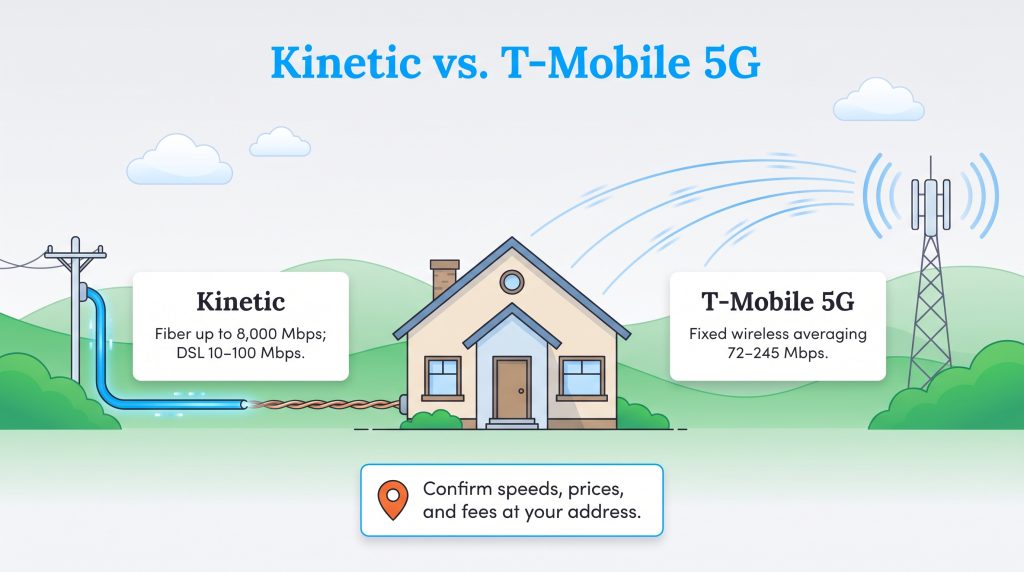
Comparing these two internet service providers requires looking past their basic marketing claims. Kinetic shines when delivering fast fiber connections, but its performance drops significantly in areas only wired for older copper lines. On the flip side, T-Mobile provides a highly flexible wireless experience that relies entirely on how close your home sits to a cellular tower.
Provider-advertised speeds and fees can change by location, so always confirm the offer at your exact address before ordering.
| Feature | Kinetic by Windstream | T-Mobile 5G Home Internet |
|---|---|---|
| Connection Type | Fiber Optic and DSL | Fixed Wireless (5G) |
| Speed Range | Up to 8,000 Mbps (Fiber) or 10–100 Mbps (DSL) | 72–245 Mbps (Average) |
| Price Range | $40–$150+ per month (Promotional rates vary) | $50–$60 per month (Base rate before discounts) |
| Equipment Fees | Often $10.99 or more per month (check current terms) | $0 (Gateway typically included) |
| Data Caps | None | None on most home plans |
A Quick Comparison for Common Situations
If you are short on time, evaluating your specific use case is the fastest way to make a decision. The table below breaks down which service usually performs best based on your household’s daily internet habits.
| Situation | Better Choice | Why |
|---|---|---|
| You can get Kinetic Fiber | Kinetic | Faster speeds, lower latency, and better reliability |
| Your only Kinetic option is DSL | T-Mobile 5G | Usually faster and easier to install |
| You work from home on a VPN | Kinetic Fiber | Wired connections are usually more stable |
| You rent or move often | T-Mobile 5G | Plug-and-play setup is easier to relocate |
| You game competitively | Kinetic Fiber | Lower ping and less jitter |
| You want simple billing | T-Mobile 5G | Equipment is typically included |
The Technology: 5G Home Internet vs Fiber Optic Internet and DSL
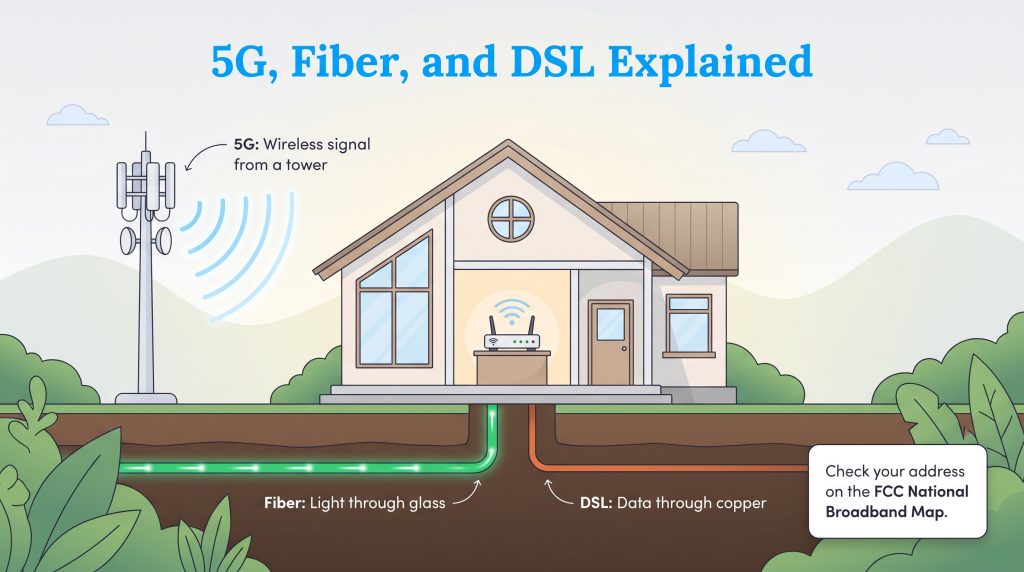
Understanding how these two networks operate is critical before locking in a monthly bill. When you compare 5G home internet vs fiber optic internet, you are looking at entirely different physical infrastructures. Fiber optic networks use thin glass cables to transmit data as pulses of light. This method provides incredibly fast, stable, and weather-resistant connections. If you can get it, fiber is widely considered the gold standard for home networking.
T-Mobile 5G, however, operates on a fixed wireless system. Instead of routing a physical cable into your living room, T-Mobile gives you a gateway device that captures a cellular signal from nearby towers and converts it into Wi-Fi. It is remarkably convenient and bypasses the need for invasive installation, but wireless signals can easily suffer from network congestion when everyone in your neighborhood starts streaming movies at the same time.
This brings us to the famous DSL dilemma. If you match up T-Mobile 5G home internet vs DSL, the wireless option often provides a smoother and faster experience. Kinetic still services many rural and suburban areas using older copper DSL infrastructure, which is usually slower than fiber or 5G. These older lines degrade over distance and rarely deliver enough bandwidth for a modern smart home, making T-Mobile 5G vs Kinetic fiber an entirely different conversation than T-Mobile versus Kinetic DSL.
Quick Fact
You do not have to guess what type of internet cables run beneath your street. You can check your address on the FCC National Broadband Map to see exactly which technologies and speeds are registered at your specific location.
Where Kinetic and T-Mobile 5G Are Available
Availability dictates everything when evaluating Kinetic and T-Mobile 5G coverage. Kinetic focuses primarily on regional footprints across roughly 18 states, continuously expanding its fiber network into areas previously stuck with slower connections. Where Kinetic fiber exists, the service is generally outstanding.
Meanwhile, T-Mobile has aggressively expanded its 5G home internet footprint nationwide. Because it utilizes the same towers that power mobile phones, T-Mobile frequently reaches remote or suburban addresses that traditional fiber providers ignore. Whether you are upgrading your current home or figuring out how to handle setting up new utility services when you move, checking T-Mobile’s coverage map is a quick way to see if you have an immediate alternative to legacy cable and DSL companies.
How Kinetic and T-Mobile Pricing Compare
Monthly costs often dictate which provider you ultimately choose, and comparing their billing structures reveals two very distinct philosophies. As of August 2026, T-Mobile 5G Home Internet typically uses simple monthly pricing, but the exact rate depends on your plan, AutoPay status, and whether you bundle with an eligible T-Mobile phone plan. T-Mobile often promotes price stability, but you should review the current Price Lock or rate guarantee terms before signing up because protections can vary by plan and enrollment date.
Kinetic Plans and Pricing
| Plan Name | Price | Download Speeds | Connection Type | |
|---|---|---|---|---|
| Fiber 100 Mbps | $24.99 /month | Up to 100 Mbps | Fiber | Check Availability |
| 100 Mbps | $44.99 /month | Up to 100 Mbps | DSL | Check Availability |
| 100 Mbps | $24.99 /month | Up to 100 Mbps | Cable | Check Availability |
| Fiber 300 Mbps | $39.99 /month | Up to 300 Mbps | Fiber | Check Availability |
| Fiber 1 GB | $49.99 /month | Up to 1000 Mbps | Fiber | Check Availability |
| Fiber 2 GB | $69.99 /month | Up to 2 Gbps | Fiber | Check Availability |
| Fiber Max 2 GB | $89.99 /month | Up to 2 Gbps | Fiber | Check Availability |
T-Mobile Home Internet Plans and Pricing
| Plan Name | Price | Download Speeds | Connection Type | |
|---|---|---|---|---|
| Home Internet Backup | $20 /month | Up to 318 Mbps | 5G | Check Availability |
| Rely Home Internet | $35 /month | Up to 354 Mbps | 5G | Check Availability |
| Amplified Home Internet | $45 /month | Up to 498 Mbps | 5G | Check Availability |
| All-In Home Internet | $55 /month | Up to 498 Mbps | 5G | Check Availability |
| Fiber 500 | $75 /month | Up to 500 Mbps | Fiber | Check Availability |
| Fiber 1 Gig | $85 /month | Up to 1000 Mbps | Fiber | Check Availability |
| Fiber 2 Gig | $80 /month | Up to 2 Gbps | Fiber | Check Availability |
Comparing this to Kinetic requires a deeper dive into the fine print. Kinetic pricing varies more by address and connection type, especially after promotional periods end. Kinetic frequently lures new customers with attractive introductory rates, but those prices can escalate significantly once your first 12 months conclude.
- T-Mobile 5G Pricing: Straightforward monthly fees, no router rental costs, and frequent discounts if you also carry a T-Mobile cellular plan. You can review T-Mobile’s latest internet plans directly.
- Kinetic Pricing: Low promotional starting rates that usually increase after the first year, alongside potential installation fees. Always verify Kinetic’s official offers for your specific address.
- Kinetic Equipment: Expect to see a monthly gateway rental fee tacked onto your bill, which can quickly add over $130 to your annual expenses.
Money Saver
You may be able to reduce or avoid Kinetic equipment rental fees by using your own compatible router or modem, but check Kinetic’s current equipment policy for your address first. Some connections still require provider-supplied equipment.
Understanding the Two-Year Cost Example
To see how hidden fees impact your budget, consider how expenses compound over 24 months. Here is a simplified example using sample pricing. Your actual bill may vary by address, taxes, fees, discounts, and promotional terms, but learning how to save on your internet bill always starts with understanding the full contract.
- T-Mobile Year 1 & 2: A steady rate (e.g., $50 per month) with the gateway included typically means you pay $600 annually, totaling $1,200 over two years.
- Kinetic Year 1: A promotional rate (e.g., $40 per month) might look cheaper, costing only $480 for the first year if equipment is waived initially.
- Kinetic Year 2: Once the promo ends, your base rate could jump (e.g., $65 per month) plus a new equipment fee (e.g., $10.99 per month). Your second-year cost jumps to roughly $911, bringing your two-year total over $1,390.
Which Provider Works Better for Gaming, Video Calls, and VPNs?
Speed tests only tell half the story. If you work from home using a corporate VPN or spend your evenings playing fast-paced multiplayer games, network stability matters just as much as raw download speed. When evaluating performance for demanding applications, the underlying technology heavily influences your experience.
Because T-Mobile relies on cellular waves bouncing from a tower to your house, it naturally experiences higher latency, also known as ping. During peak evening hours when cell towers get crowded, your 5G connection might suffer from jitter and lag spikes. This makes 5G less than ideal for competitive online gamers or remote workers relying on heavy VPN tunneling. T-Mobile’s download speeds can be impressive, but upload speeds are often lower than fiber. If your household sends large files, backs up photos to the cloud, or uses multiple video calls at once, Kinetic Fiber may feel much smoother.
Conversely, a wired Kinetic fiber line offers remarkably low latency and symmetric upload speeds. Data travels through a dedicated physical line directly to your home, entirely bypassing local cellular congestion. If ping and seamless uploads are a major concern for your household, a physical fiber connection remains the optimal choice for real-time applications.
Switching From Kinetic to T-Mobile Internet: Is It Worth It?
Making the leap from a traditional wired provider to a wireless cellular network feels like a big step. The reality of switching from Kinetic to T-Mobile internet depends entirely on the specific tier of service Kinetic offers at your house. Asking if T-Mobile home internet is better than Kinetic requires looking at the actual wire bolted to the side of your home.
When to Keep Kinetic Fiber
If your home is wired for Kinetic Fiber, stay exactly where you are. A fiber optic connection provides unmatched speed, lower latency, and incredible reliability during bad weather. T-Mobile 5G simply cannot compete with the sheer bandwidth and stability of a dedicated glass cable routed directly into your living room.
When to Switch to T-Mobile 5G
If you are stuck on an older Kinetic DSL plan with maximum speeds hovering around 25 Mbps, switching to T-Mobile 5G is highly recommended. You will instantly notice significant improvements in download speeds, allowing your family to stream 4K video and browse the web simultaneously without grinding the network to a halt.
How to Test T-Mobile Before Canceling Kinetic
Because T-Mobile typically doesn’t require an annual internet contract, you can often test the service with less long-term commitment than a traditional provider contract. Following a few simple steps ensures you do not accidentally disconnect your only working internet line before the new one is fully operational.
- Order T-Mobile and place the gateway near a window: Testing multiple rooms helps you find the strongest cellular signal. Avoid putting the gateway inside a heavy cabinet.
- Run real-world tests: Check your connection during the morning, afternoon, and peak evening hours.
- Test your specific habits: Ensure your work VPNs, video calls, gaming consoles, and streaming services perform well.
- Keep Kinetic active: Do not cancel your wired service until you know T-Mobile works reliably for at least a week.
Heads Up
Don’t cancel Kinetic until you’ve tested T-Mobile during your normal work, streaming, and gaming hours. If you return either provider’s equipment late, you could face non-return fees.
Making the Right Call for Your Home Network
Your ultimate decision hinges on the infrastructure mapped to your address and how your family uses bandwidth daily. For most households, this comparison comes down to the type of Kinetic service available at your address. If Kinetic Fiber is available, it is usually the stronger long-term choice for speed, latency, and reliability. If your only Kinetic option is DSL, T-Mobile 5G Home Internet may give you a faster, simpler, and more flexible setup.
Before switching, test both providers at your address and compare the full monthly cost after equipment fees and promotions. To make your internet setup more environmentally mindful, consider right-sizing your plan so you do not overpay for excess speeds you do not need, and enroll in paperless billing to save resources. Take control of your monthly utility bills and explore more ways to optimize your home internet setup so you always get the performance you deserve.
Frequently Asked Questions About Kinetic vs. T-Mobile 5G Home Internet
Is T-Mobile home internet better than Kinetic?
Can I keep my current router if I switch from Kinetic to T-Mobile?
Is T-Mobile 5G Home Internet good for working from home?
Is Kinetic Fiber better than T-Mobile 5G for gaming?
Can I try T-Mobile before canceling Kinetic?
Does Kinetic by Windstream have data caps?
How difficult is switching from Kinetic to T-Mobile internet?
Why is my Kinetic internet so much slower than T-Mobile 5G?
About the Author

David has been an integral part of some of the biggest utility sites on the internet, including InMyArea.com, HighSpeedInternet.com, BroadbandNow.com, and U.S. News. He brings over 15 years of experience writing about, compiling and analyzing utility data.

Claudio is a sustainability-focused writer with a background in Anthropology and Psychology from NC State University. He has spent over 15 years working in writing, interpretation, and translation, driven by a deep interest in how human culture shapes the environment. Today, he shares his curiosity with readers by writing about sustainable living solutions and the connection between everyday choices and environmental impact.