

Compare Kinetic by Windstream and Starlink by speed, cost, latency, and availability so you can choose the better internet option for your home.

- 2 Gbps
- Fiber
- Unlimited
- $24.99/mo

- 400 Mbps
- Satellite
- Unlimited
- $55.00/mo
*Not all internet providers and speeds available in all areas.
Key Takeaways
- Kinetic Fiber offers superior speeds and lower monthly costs if you live in an upgraded coverage zone, while Kinetic DSL can struggle with slower speeds and aging infrastructure.
- Starlink is often the better fit for deep rural homes when the only wired option is slow or unreliable DSL.
- Switching to Starlink requires a higher upfront investment for the hardware, but the long-term reliability can be a significant improvement for remote workers and families.
If you live outside city limits, you likely already know the struggle of a dropped connection right in the middle of an important video call or family movie night. In the battle of Kinetic vs. Starlink, we are evaluating two completely different technologies to help you figure out which service best fits your rural household’s needs. We want to cut through the marketing jargon and directly compare the real-world speeds, 2026 equipment costs, and long-term reliability of these networks. By the end of this guide, you will know exactly whether a grounded wire or a dish pointing to the sky is the right call to keep your home smoothly connected.
At a Glance: Key Differences
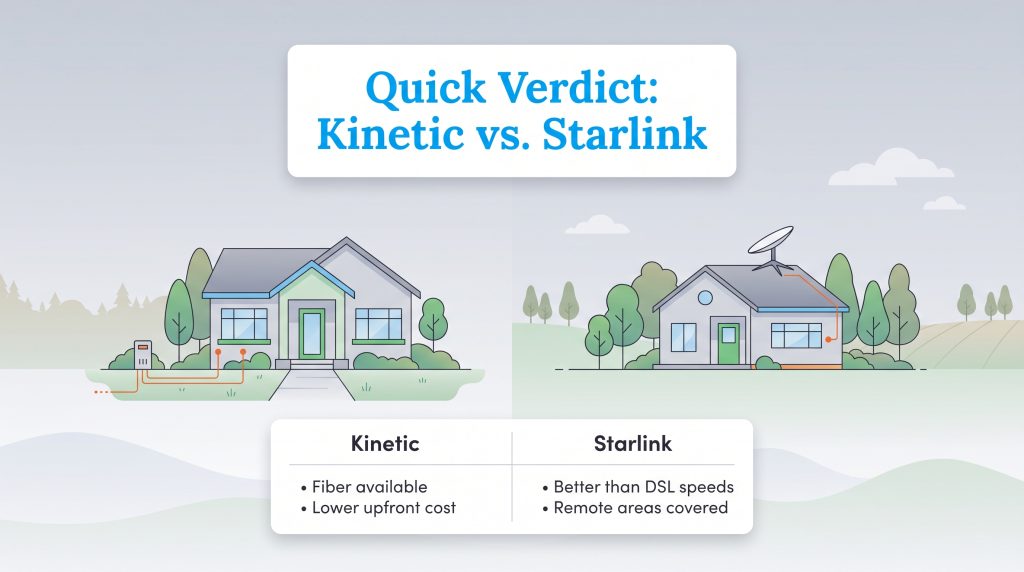
When comparing Kinetic internet vs Starlink, seeing the raw specifications side-by-side helps clarify the differences. Here is a quick look at the technical details for each provider to help you make an informed decision for your home.
| Connection Type | Download Speeds | Upload Speeds | Monthly Price | Upfront Hardware Costs | Data Caps |
|---|---|---|---|---|---|
| Kinetic DSL | 10 – 100 Mbps | 1 – 20 Mbps | ~$40 – $50 | Standard install (often waived) | None |
| Kinetic Fiber | 300 Mbps – 2,000 Mbps | 300 Mbps – 2,000 Mbps | ~$40 – $90 | Standard install (often waived) | None |
| Starlink Standard | 50 – 220 Mbps | 5 – 20 Mbps | ~$120 | $599 (varies by promotion) | None |
Kinetic by Windstream Overview: DSL vs. Fiber
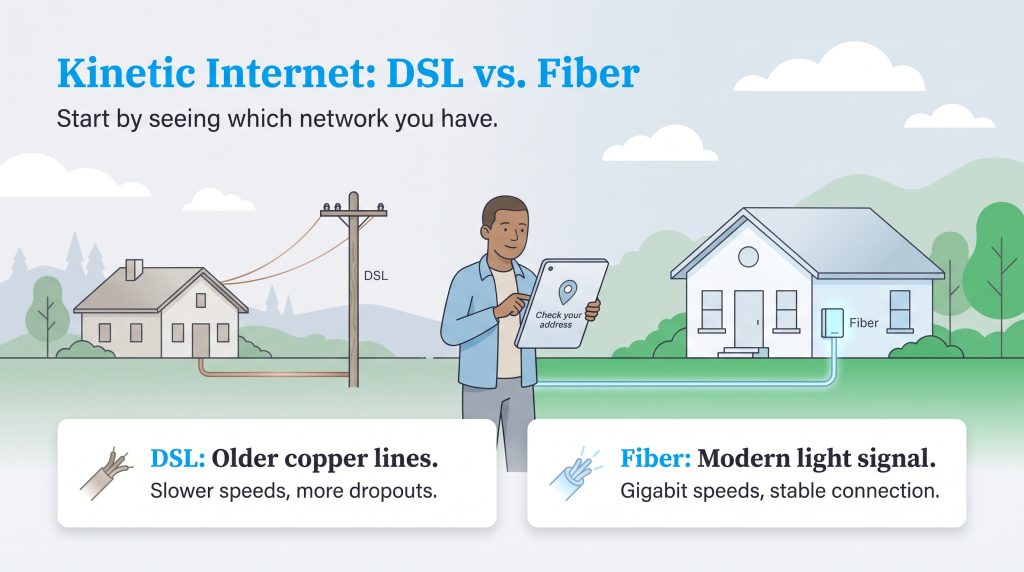
Automated comparison sites often lump all of Windstream’s services together, but you absolutely must separate them to make an informed decision. The debate between Kinetic fiber vs Starlink is vastly different than Kinetic DSL vs Starlink.
Kinetic Fiber is a highly capable, modern service that provides symmetrical gigabit speeds and stellar reliability. If your home is wired for fiber, you can enjoy seamless 4K streaming, competitive gaming, and rapid file uploads. Because it uses physical light pulses rather than electricity, the connection is incredibly stable. Unfortunately, if you live in a deep rural area, you are far more likely to only have access to Kinetic DSL.
Kinetic DSL relies on aging copper phone lines that naturally degrade over time and distance. This older technology leads to the frequent dropouts and frustratingly slow upload speeds that many rural residents experience, especially during peak evening hours when neighbors hop online. When evaluating your options, checking your address on the official provider site to see exactly which Kinetic network reaches your home is the critical first step.
📌 Quick Fact: Fiber-optic cables transmit data using pulses of light, which makes them highly resistant to electromagnetic interference and signal loss over distance. Fiber service can still go down if lines are physically damaged or network equipment loses power.
Starlink Satellite Internet Overview
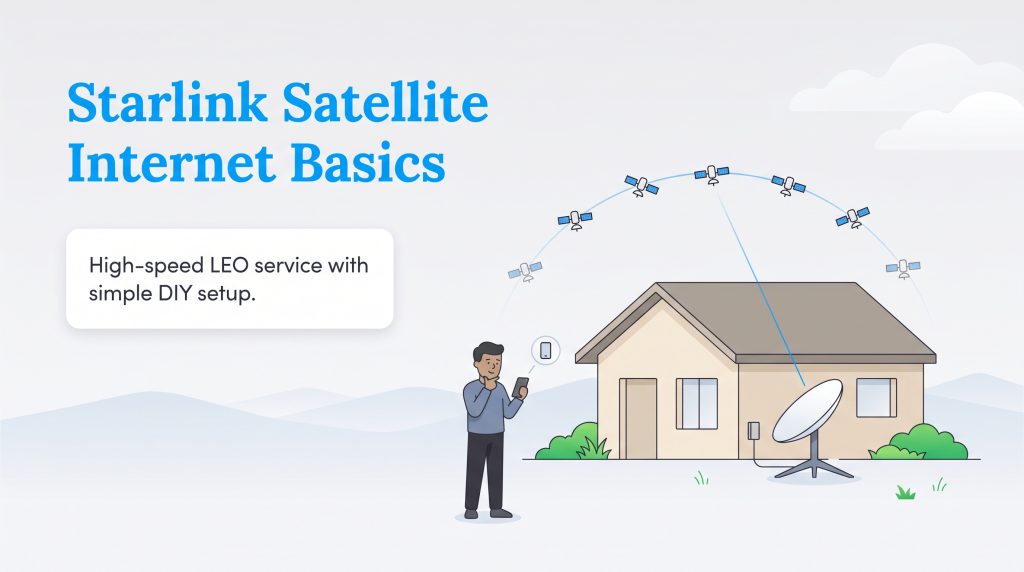
Starlink satellite internet fundamentally changes how remote households get online. Instead of relying on vulnerable copper lines or traditional high-orbit satellites that cause massive communication delays, Starlink uses a constellation of low-Earth orbit (LEO) satellites. This cutting-edge technology allows them to beam high-speed internet to almost any property with a clear view of the sky, serving as one of the most reliable satellite internet alternatives to slow landlines.
As of 2026, standard residential service costs around $120 per month, though pricing and promotional hardware discounts vary significantly by region. A major distinction for Starlink is its DIY installation process. When your kit arrives, you use the smartphone app to scan the sky for tree branches or roof obstructions, plug in the router, and mount the dish yourself. There is no waiting for a technician to trench wires into your yard, granting you total control over your home’s setup.
Speeds and Performance
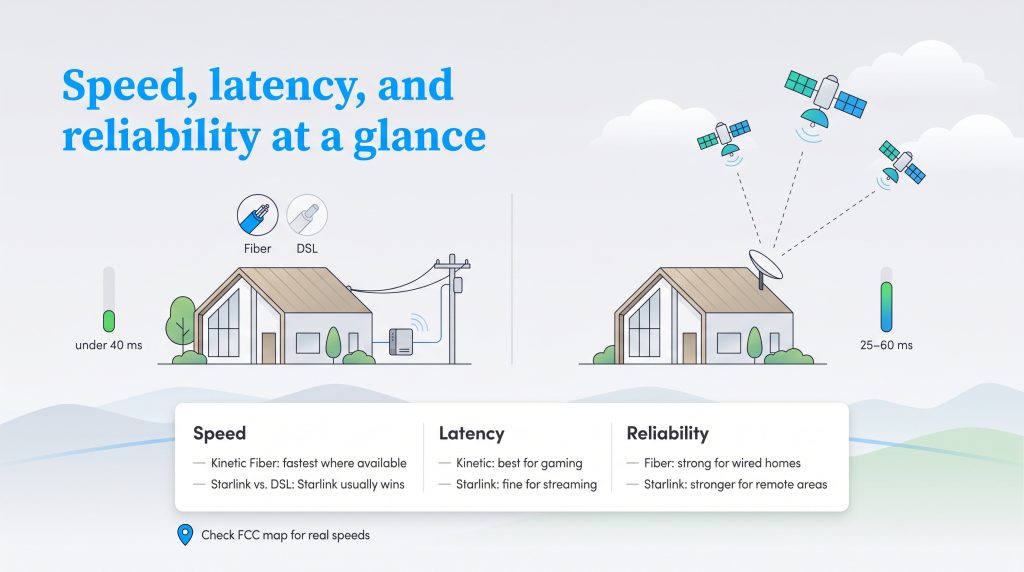
Let’s break down exactly how these two providers stack up against each other in the categories that matter most to your daily digital life, from raw performance to total cost of ownership. Comparing the performance of these providers requires looking beyond advertised marketing numbers. Rural residents constantly battle signal dropouts and buffering screens, so finding a connection that maintains consistent download and upload speeds is essential. A simple Kinetic internet speed comparison reveals massive gaps depending on your exact technology.
Kinetic Fiber is the undisputed speed champion, offering symmetrical speeds ranging from 300 Mbps to a blazing 2,000 Mbps (2 Gig). Starlink follows as a strong middle ground, delivering download speeds between 50 Mbps and 220 Mbps, and uploads between 5 Mbps and 20 Mbps. At the bottom of the pack is Kinetic DSL, which is highly dependent on your distance from the provider’s main equipment node. While a few DSL homes might see up to 100 Mbps, many rural users experience sluggish speeds closer to 10 – 25 Mbps down and a mere 1 – 3 Mbps up.
To get an accurate picture of what you can actually expect at your address, we highly recommend checking the official FCC broadband data. This map will show you exactly what speeds are verified in your neighborhood, helping you avoid signing up for a service that underdelivers.
Pricing and Upfront Costs
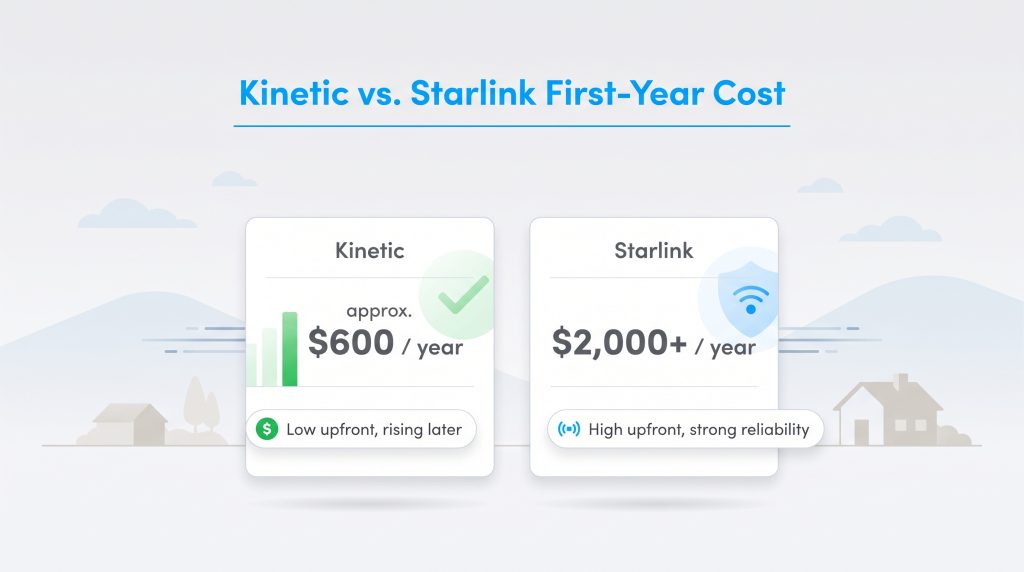
When weighing Kinetic vs. Starlink pricing, you have to look past the monthly sticker price and evaluate the total cost of ownership over your first year. Kinetic often lures customers in with low introductory rates — sometimes around $40 to $50 a month for DSL. However, those prices frequently spike after the first 12 months, and you may encounter equipment rental fees that inflate your bill over time.
To understand your real out-of-pocket expenses, compare these Starlink setup costs vs Kinetic installation fees:
- Kinetic Standard Fees: Kinetic typically charges a minimal upfront installation fee, and they frequently run promotional deals that waive this cost entirely. You essentially just pay your first month’s bill and a minor modem rental fee.
- Starlink Hardware Costs: Starlink requires you to purchase the satellite dish and router outright. In 2026, the standard hardware kit is generally $599, though regional promotions sometimes lower this price.
- Total First-Year Cost: A Kinetic plan at $50 per month costs about $600 for the first year. Starlink, at $120 per month plus a $599 dish, pushes your first-year cost over $2,000 before taxes, shipping, or specialized mounts.
💸 Money-Saver: Before paying full price for new equipment, check the official Starlink website to see if they are offering refurbished hardware in your region, which can significantly cut down on the initial equipment fee.
Equipment and service pricing changes by location, so always confirm the current cost directly on the official Starlink Residential page before you order. While Starlink is undeniably more expensive up front, the long-term value it provides to remote workers and rural families who absolutely need reliable access is often well worth the premium.
Kinetic Plans & Pricing
| Plan Name | Price | Download Speeds | Connection Type | |
|---|---|---|---|---|
| Fiber 100 Mbps | $24.99 /month | Up to 100 Mbps | Fiber | Check Availability |
| 100 Mbps | $44.99 /month | Up to 100 Mbps | DSL | Check Availability |
| 100 Mbps | $24.99 /month | Up to 100 Mbps | Cable | Check Availability |
| Fiber 300 Mbps | $39.99 /month | Up to 300 Mbps | Fiber | Check Availability |
| Fiber 1 GB | $49.99 /month | Up to 1000 Mbps | Fiber | Check Availability |
| Fiber 2 GB | $69.99 /month | Up to 2 Gbps | Fiber | Check Availability |
| Fiber Max 2 GB | $89.99 /month | Up to 2 Gbps | Fiber | Check Availability |
Starlink Plans & Pricing
| Plan Name | Price | Download Speeds | Connection Type | |
|---|---|---|---|---|
| Residential 100 Mbps | $55 /month | Up to 100 Mbps | Satellite | Check Availability |
| Residential 200 Mbps | $85 /month | Up to 200 Mbps | Satellite | Check Availability |
| Roam 100 GB | $55 /month | Up to 300 Mbps | Satellite | Check Availability |
| Roam Unlimiited | $175 /month | Up to 300 Mbps | Satellite | Check Availability |
| Roam 300 GB | $80 /month | Up to 300 Mbps | Satellite | Check Availability |
| Residential Max | $130 /month | Up to 400 Mbps | Satellite | Check Availability |
Latency and Gaming
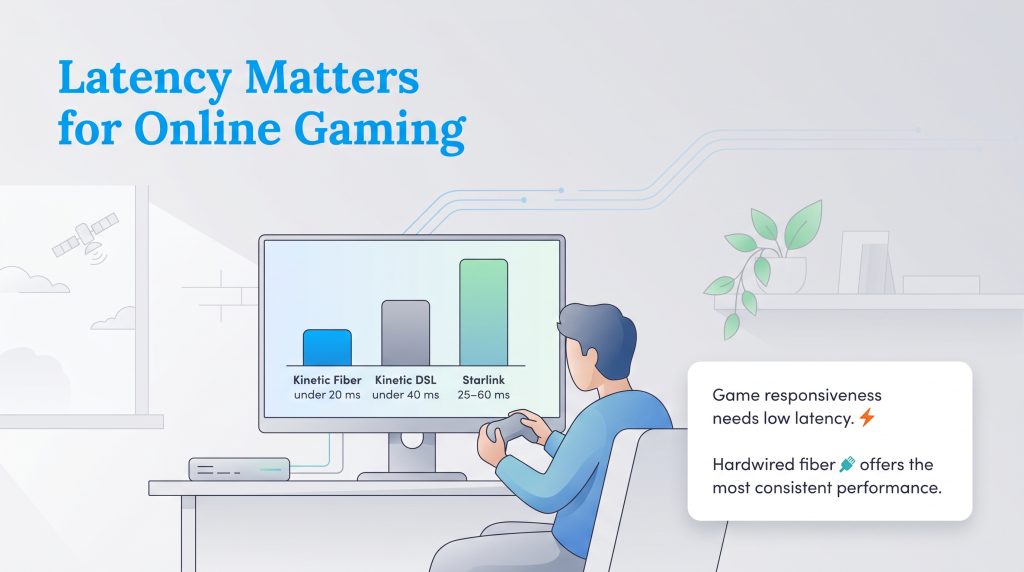
Latency is the time it takes for a packet of data to travel from your device to the network and back. Measured in milliseconds (ms), lower latency is absolutely crucial for real-time video calls, remote desktop software, and competitive online gaming. If you have a household full of heavy internet users, Starlink gaming latency vs DSL is an important metric to understand.
For gamers, Kinetic Fiber is the undisputed champion, consistently delivering ultra-low latency under 20 ms. Kinetic DSL usually stays under 40 ms, which is adequate but can easily spike during evening network congestion. Starlink typically hovers between 25 ms and 60 ms. While this LEO latency is a massive leap forward compared to legacy satellite internet, hardwired connections are generally better for fast-paced multiplayer gaming. However, if your Kinetic DSL connection drops frequently, Starlink provides a much more stable environment for your massive game update downloads and 4K Netflix streaming needs.
Reliability and Weather Impact
Both networks face distinct environmental challenges. Heavy rain or thick snow accumulation can cause temporary signal fade or brief dropouts with your Starlink dish as it struggles to pierce through dense cloud cover. On the other hand, the aging copper lines used for Kinetic DSL are notoriously susceptible to ground moisture, freezing temperatures, and physical weather damage.
Kinetic Fiber is highly weather-resistant because it transmits light through sealed glass cables, making it immune to typical storm interference. However, severe weather can cause local power outages that take any network offline entirely, which is why investing in an uninterrupted power supply (UPS) battery backup is a smart move for whichever service you choose.
Which Provider Is Best for Rural Areas?
Choosing the best internet for rural areas depends entirely on the physical infrastructure currently built out near your property. Because switching providers requires effort, overlapping your services for at least one billing cycle is a smart move when setting up your home internet connection. This safety net ensures you maintain a functional connection while setting up and testing your new network.
Review these conditional recommendations to find your best fit:
- Choose Kinetic Fiber if it is available at your exact address. It provides the fastest symmetrical speeds, the lowest latency for remote work, and bypasses the need to purchase expensive satellite equipment.
- Choose Starlink if your only Kinetic option is DSL. The upfront hardware cost is much higher, but Starlink will vastly outperform aging copper lines, delivering the speed and reliability necessary for modern streaming and smart home connectivity.
🌱 Eco Edge: Keeping your old modems and routers out of landfills is an environmentally mindful choice. Instead of throwing them away, return your unneeded Kinetic equipment to the provider, which may allow for reuse or proper recycling. If you own the hardware, recycle it at a certified e-waste facility to keep harmful heavy metals out of the environment.
The Verdict: Choosing Between Kinetic and Starlink
Making a final decision on your home’s internet provider doesn’t have to be a stressful guessing game. Ultimately, the right choice comes down to the specific technology available at your front door. Kinetic by Windstream rural internet is a phenomenal bargain if you fall within their upgraded fiber zones. However, if you live miles out of town and are stuck with sluggish legacy wires, Starlink is hands down the best investment you can make for your digital lifestyle. As you are managing utilities during a move, verify local availability, weigh the upfront costs, and secure a connection that lets you browse, stream, and work without interruption.
Frequently Asked Questions About Kinetic and Starlink Internet
Is Starlink faster than Kinetic by Windstream?
Do I have to pay an installation fee for Kinetic or Starlink?
Can I game on Starlink better than on Kinetic DSL?
Is Kinetic Fiber better than Starlink?
Can I try Starlink before canceling Kinetic?
Does Kinetic by Windstream offer satellite internet?
How much does Starlink hardware cost upfront?
Can I keep my Kinetic email address if I switch to Starlink?
About the Author

David has been an integral part of some of the biggest utility sites on the internet, including InMyArea.com, HighSpeedInternet.com, BroadbandNow.com, and U.S. News. He brings over 15 years of experience writing about, compiling and analyzing utility data.

LaLeesha has a Masters degree in English and enjoys writing whenever she has the chance. She is passionate about gardening, reducing her carbon footprint, and protecting the environment. She also recently served as President of the Board for City Sprouts (a community garden).