

Students should choose internet based on lease length, roommate count, speed needs, and the real monthly cost after fees
Key Takeaways
- Compare internet speeds based on your major and roommate count rather than just grabbing the cheapest plan available.
- Check for exclusive student discounts and no-contract deals that match a typical nine-month college lease.
- Coordinate with your landlord before installation to avoid lease violations regarding fiber drilling or equipment mounts.
Moving off campus usually brings a new set of responsibilities, and figuring out how to get your apartment online sits right at the top of that to-do list. We know that as a first-time utility buyer, sorting through jargon-heavy broadband plans while trying not to drain your bank account feels completely overwhelming. You might be downloading hefty engineering files or streaming back-to-back virtual lectures. Either way, finding the best internet providers for students requires a solid game plan. We are here to help you bypass the default, overpriced packages, hunt down targeted discounts, and master the logistical setup so you can start the semester with reliable internet already handled.
Best Internet Providers for Students Compared

- 2 Gbps
- Cable & Fiber
- Unlimited
- $30.00/mo

- 7 Gbps
- Cable & Fiber
- Unlimited
- $30.00/mo

- 5 Gbps
- Fiber
- Unlimited
- $35.00/mo

- 5 Gbps
- Fiber
- Unlimited
- $30.00/mo
*Not all internet providers and speeds available in all areas.
Sticking with the standard flyer your apartment complex slips under your door is rarely the most cost-effective move. You must actively hunt for student internet deals to snag waived equipment fees, gift card promotions, and lower monthly rates. Some providers offer student promotions through school-affiliated pages, seasonal move-in deals, or third-party verification platforms, while others focus on low-cost plans for income-qualified households. By putting in a little research upfront, you can lock in a promotional rate that keeps your wallet happy throughout the entire academic year. Beyond just the promotional pricing, evaluating the fine print is equally crucial. Some companies enforce hidden data caps that will severely throttle your speeds right in the middle of finals week if you stream too much video.
When comparing options, we evaluated providers based on their availability in student-heavy markets, no-contract or flexible terms, speed-to-price value, data cap policies, equipment fees, and suitability for roommates. To give you a head start, we reviewed the landscape to find plans that offer the right balance of price, performance, and transparency. For example, exploring Xfinity student internet packages can reveal generous speed boosts designed specifically for university zip codes. Keep an eye out for waived installation fees, which instantly keep more cash in your pocket when managing those stressful upfront moving costs.
Prices shown are examples of starting promotional rates available in some markets as of Aug. 2026. Actual pricing, speeds, equipment fees, and availability vary by address.
| Provider | Best For | Starting Price | Key Student Benefit | Contract / Data Cap Notes |
|---|---|---|---|---|
| Xfinity | Best for Flexible Pricing | $30 per month | Offers a wide variety of speed tiers to fit exceptionally tight budgets. | Term agreements vary, unlimited data include in most areas. |
| Spectrum | Best for No Contracts | $30 per month | Features no data caps and highly flexible terms for off-campus renters. | No annual contract required; unlimited data included. |
| AT&T Fiber | Best for High-Bandwidth | $35 per month | Provides symmetrical upload and download speeds for heavy digital users. | No annual contract; unlimited data on fiber plans. |
| Verizon Fios | Best for Reliability | $49.99 per month | Fiber service is often a strong reliability choice where available. | No annual contracts; unlimited data included. |
Choosing the right option comes down to your specific circumstances:
- Xfinity: Best if you need many speed tiers or live in a cable-heavy apartment market.
- Spectrum: Best if you want no annual contract and simple pricing.
- AT&T Fiber: Best if your household uploads large files or has multiple video calls.
- Verizon Fios: Best where fiber is available and reliability matters.
The best provider for you is the one that services your exact apartment, fits your lease length, and doesn’t bury savings under equipment fees. We’d rather see you choose a reliable 300 Mbps no-contract plan than overpay for a gigabit package you don’t need.
The Roommate Math: Splitting the Internet Bill
Living with several other people definitely changes the financial calculus of your utility bills. Understanding the “roommate math” means recognizing how splitting a higher-tier, high-speed plan among three or four people is often significantly cheaper and more effective than one person buying a low-tier plan on their own. Instead of everyone suffering through a sluggish 50 Mbps connection to save a few bucks, you can upgrade to a robust 500 Mbps fiber plan for a slightly higher total cost. When you split the internet bill with roommates, each person might only pay $15 to $20 a month for reliable connectivity that easily handles simultaneous streaming, gaming, and studying. This collaborative approach prevents the network from crashing when everyone is trying to upload their midterms on Sunday night. Coordinating these shared expenses early on prevents awkward financial conversations later in the semester.
| Monthly Plan Cost | Two Roommates | Three Roommates | Four Roommates |
|---|---|---|---|
| $40 plan | $20 per person | $13.33 per person | $10 per person |
| $60 plan | $30 per person | $20 per person | $15 per person |
| $80 plan | $40 per person | $26.67 per person | $20 per person |
💸 Money-Saver: To avoid awkward conversations about unpaid utility debts, use automated payment apps to seamlessly collect the internet bill from your roommates automatically each month.
Learn more about Splitting Utility Bills
How Much Internet Speed Do College Students Actually Need?
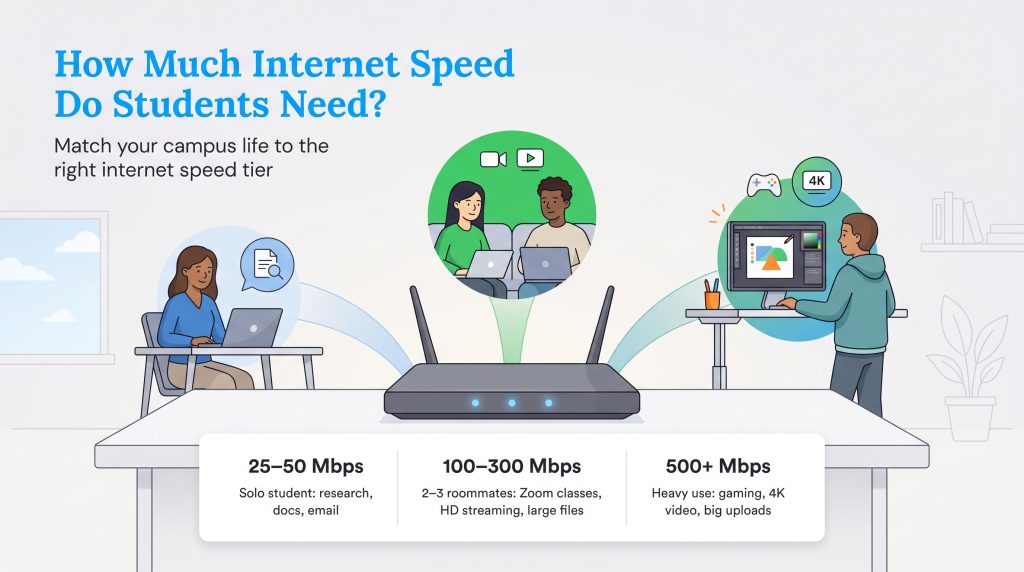
Paying for a massive gigabit connection is not necessary for everyone, especially if you are living solo or just using the web for light research. Internet service providers love to push their most expensive, fastest plans, but translating abstract technical jargon like megabits per second (Mbps) into relatable student tasks makes choosing a tier much simpler. Finding the best internet speed for online classes comes down to evaluating your specific major, your daily digital habits, and the number of devices continuously connected to your router. A graphic design major rendering heavy video files will naturally require vastly different bandwidth than an English major focused entirely on text-based research.
According to the Federal Communications Commission broadband speed guidelines, basic tasks require surprisingly little bandwidth. However, college life rarely involves doing just one thing at a time. To ensure you have enough capacity for those chaotic, multi-device evenings, you will want to compare local internet plans and match them against these realistic usage tiers:
- 25 to 50 Mbps: Perfect for a single user focused on standard research, typing essays in Google Docs, and sending occasional emails.
- 100 to 300 Mbps: The sweet spot for two or three roommates attending simultaneous Zoom lectures, streaming HD video, and downloading large course files.
- 500+ Mbps: Necessary for heavy-duty multi-user households engaged in competitive online gaming, 4K streaming, uploading massive design portfolios, or running smart home devices in the background.
Setup Checklist: Getting Wi-Fi in Your College Apartment
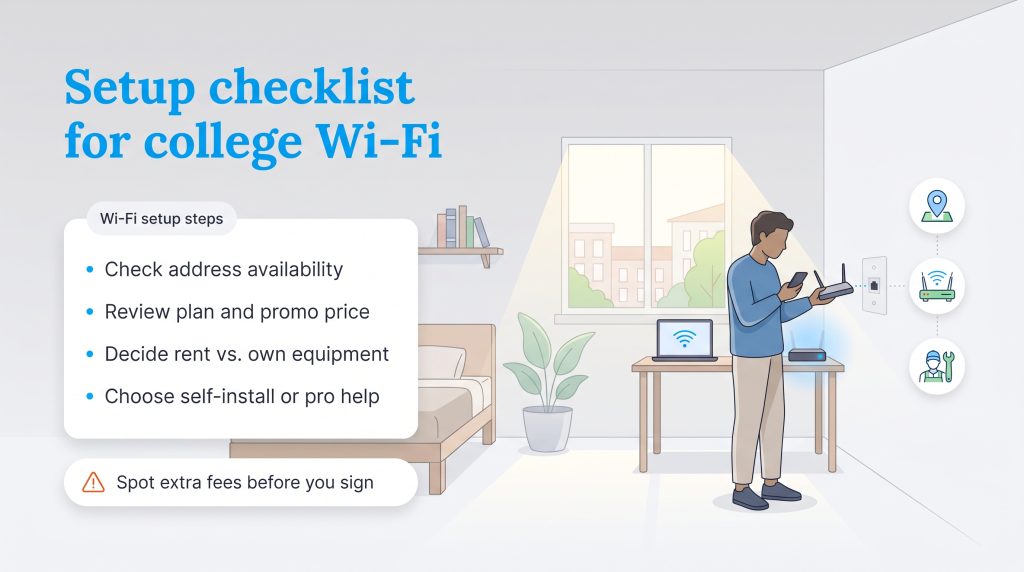
Figuring out how to set up Wi-Fi in college apartment layouts can feel daunting, but a systematic approach makes the entire process manageable. As a first-time utility buyer, you want to tackle this checklist about two weeks before move-in day so your network is active the moment you unpack your laptop. Searching for the best Wi-Fi for college apartments starts with checking local availability, since not every provider services every single address or specific apartment building. You can usually plug your new zip code directly into a provider’s website to see if your exact unit is wired for their network.
Next, you will need to navigate the sign-up process, which typically involves a standard credit check. If you lack a robust credit history, do not panic — many providers offer no-credit-check plans or simply require a small, refundable deposit upfront to get the ball rolling. Once approved, you must choose between renting their equipment or buying your own modem and router. Purchasing your own hardware can save you around $15 every single month, though renting provides the distinct benefit of free technical support if the device ever breaks.
Finally, decide between a self-installation kit and a professional technician visit. Self-installation is usually free and incredibly straightforward; you simply plug the provided modem into an active coaxial or fiber wall outlet. If your apartment has never had internet service before, or if the wiring looks visibly damaged, spending a little extra on a professional when setting up utilities when moving ensures everything is configured correctly from day one.
Fees to Check Before You Sign Up
Students often get surprised by hidden internet fees. Before you finalize your plan, always check the fine print for these common extra costs:
- Equipment rental fee: Monthly charges for using the provider’s modem and router.
- Installation or activation fee: Upfront costs for a technician visit or turning on your service.
- Early termination fee: Penalties for canceling your service before an annual contract ends.
- Data overage fee: Extra charges applied if you exceed your monthly data allowance.
- Autopay or paperless billing discounts: Required account settings to get the lowest advertised price.
- Price increase after promotional period: The standard rate your bill jumps to after your first year.
📌 Quick Fact: Opting for a month-to-month plan is the safest financial bet for renters. Finding no contract internet for students perfectly matches a standard nine-month academic lease and eliminates the risk of costly early termination fees.
Navigating Landlord Restrictions and Bad Dorm Wi-Fi
Moving into an older off-campus house sometimes introduces frustrating physical logistics and unexpected hurdles. Your landlord might enforce strict lease rules that absolutely forbid drilling holes for new fiber optic cables or mounting equipment on the exterior walls. Alternatively, you might be living on campus and dealing with bad dorm Wi-Fi that drops constantly during your virtual lectures, leaving you scrambling to reconnect.
When you cannot install traditional wired broadband, a 5G home internet gateway serves as a convenient plug-and-play solution. You simply plug the device into a standard power outlet, and it pulls a cellular signal to create a robust Wi-Fi network inside your room. Because 5G home internet usually doesn’t require drilling, exterior equipment, or a technician visit, it can be a lower-hassle option for renters who need flexibility. It is incredibly portable, meaning you can pack it up when you go home for winter break, making it an ideal method for securing cheap internet for college students who strongly value flexibility. To keep your network environmentally mindful, choose the right-size plan, recycle or return old equipment, and avoid running duplicate routers if one shared network can handle the household.
If you are unsure which connection type fits your living situation, this quick comparison can help guide your decision:
| Internet Type | Best For | Watch Out For |
|---|---|---|
| Fiber | Heavy uploads, gaming, multiple roommates | Limited availability |
| Cable | Most apartments and shared houses | Possible data caps or slower upload speeds |
| 5G Home Internet | Dorms, short leases, no-drill rentals | Signal strength varies by room |
| DSL | Limited rural or older housing options | Slower speeds |
Making the Smartest Internet Choice for Your Semester
Landing the perfect broadband package doesn’t have to be a stressful chore if you approach it strategically. By assessing your actual speed requirements, embracing the power of roommate math, and actively hunting for those hidden discounts, you can secure a highly reliable connection without overpaying. We know that balancing classes, social lives, and newfound domestic responsibilities is demanding enough without adding network troubleshooting to your plate.
Before you sign up, check your address, compare the total monthly cost after fees, confirm your lease restrictions, and choose a speed tier that fits your roommate count. A little planning now can save you money and keep your semester running smoothly.
Frequently Asked Questions About Student Internet
What Is the Best Internet Provider for Low-Income Students?
Can I Get an Internet Plan Without an Annual Contract?
How Do I Transfer My Internet Service When I Move Apartments Next Year?
Is 100 Mbps Enough for Four Roommates?
Does My Student Status Actually Get Me a Better Internet Rate?
About the Author

David has been an integral part of some of the biggest utility sites on the internet, including InMyArea.com, HighSpeedInternet.com, BroadbandNow.com, and U.S. News. He brings over 15 years of experience writing about, compiling and analyzing utility data.

LaLeesha has a Masters degree in English and enjoys writing whenever she has the chance. She is passionate about gardening, reducing her carbon footprint, and protecting the environment. She also recently served as President of the Board for City Sprouts (a community garden).