Xfinity Internet Review and Coverage Map

Xfinity Delivers Fast, Reliable Speeds And Massive Availability

Key Takeaways
- Speeds and availability are top-tier, with Xfinity covering 40 states and rolling out blazing-fast DOCSIS 4.0 network upgrades to close the gap with pure fiber.
- Hidden fees and strict data caps are common on standard plans, requiring you to actively monitor your 1.2 TB monthly allowance or upgrade to xFi Complete to avoid overage penalties.
- Bundling and price locks bring massive value, especially when you combine your home internet with an Xfinity Mobile plan or lock in a 5-year price guarantee to avoid post-promotional rate hikes.
Welcome to your complete guide to Xfinity internet. If you’re moving into a new home or switching providers to lower your monthly utility bills, you’ve probably noticed that Comcast’s flagship service is one of the most widely available options on the market. With a reputation for fast connection speeds mixed with confusing pricing structures, making a long-term decision can feel overwhelming. We’re here to break down everything you need to know about navigating Xfinity internet plans, from locking in a 5-year price guarantee to understanding hidden equipment fees, strict data limits, and flat-rate prepaid alternatives. Our goal is to help you determine if this telecom giant fits your household’s connectivity needs and budget.
About Xfinity & Network Information
Xfinity is the primary consumer brand of Comcast, a global media and technology company that has been connecting households since 1963. With a massive footprint spanning 40 states and a dense network serving over 31 million homes and businesses, Xfinity leverages Comcast’s extensive infrastructure to deliver reliable internet service. While it built its reputation on traditional cable, Xfinity is now heavily focused on rolling out high-capacity network upgrades across the country.
Hybrid Fiber-Coaxial (HFC) vs. Pure Fiber-Optic
If you’re weighing connection types for your home, it helps to understand the difference between a hybrid fiber-coaxial (HFC) network and a pure fiber-optic network. Pure fiber-optic lines run glass cables directly to your home, resulting in symmetrical upload and download speeds. Conversely, Xfinity’s HFC network uses fiber to connect your neighborhood’s local node, and then relies on traditional coaxial cable to bridge the final gap to your house. Historically, this meant cable internet suffered from much slower upload speeds — often topping out between 20 and 35 Mbps even on high-end download tiers. However, mid-split network upgrades are actively boosting those upload speeds to between 100 and 300+ Mbps in select “Next Generation” markets.
Next-Generation DOCSIS 4.0 and Gigabit X10
To keep pace with dedicated fiber providers, Comcast is upgrading its coaxial lines with next-generation DOCSIS 4.0 technology. This impressive advancement allows Xfinity to push multi-gigabit symmetrical speeds directly over existing cable wiring without digging up your yard. For households demanding the absolute fastest residential connection available, Xfinity also offers an ultra-exclusive pure fiber-to-the-home (FTTH) tier known as Gigabit X10 (formerly Gigabit Pro). Delivering symmetrical 10 Gbps speeds, Gigabit X10 carries a steep $300 monthly price tag (plus hefty activation fees) and requires your property to be located within strict proximity to an existing Comcast fiber node.
Xfinity Internet Plans & Pricing

Xfinity provides a wide range of internet plans to accommodate everything from light web browsing to competitive gaming, remote work, and managing a household full of smart devices. Plans typically range from entry-level 150 to 300 Mbps connections all the way up to 2,000 Mbps (2 Gbps) on standard cable lines, with exact Xfinity pricing and speed tiers varying by regional division. While Xfinity has largely moved away from restrictive annual contracts on its standard offerings, getting the best deal requires comparing their traditional postpaid tiers against their newer prepaid alternatives.
| Plan Name | Price | Download Speeds | Connection Type | |
|---|---|---|---|---|
| NOW Internet | $30 /month | Up to 100 Mbps | Cable | Check Availability |
| 300 Mbps | $40 /month | Up to 300 Mbps | Cable | Check Availability |
| 300 Mbps w/ 5 year price lock | $45 /month | Up to 300 Mbps | Cable | Check Availability |
| 500 Mbps | $50 /month | Up to 500 Mbps | Cable | Check Availability |
| 500 Mbps w/ 5 year price lock | $60 /month | Up to 500 Mbps | Cable | Check Availability |
| 1000 Mbps | $60 /month | Up to 1000 Mbps | Cable | Check Availability |
| 1000 Mbps w/ 5 year price lock | $70 /month | Up to 1000 Mbps | Cable | Check Availability |
| 2000 Mbps | $90 /month | Up to 2 Gbps | Fiber | Check Availability |
| 2000 Mbps w/ 5 year price lock | $100 /month | Up to 2 Gbps | Fiber | Check Availability |
| Plan Tier | Download Speeds | Upload Speeds | Starting Promo Price* | Best For |
|---|---|---|---|---|
| Connect / Connect More | 150–300 Mbps | 20–35 Mbps (Up to 100 Mbps in Next Gen markets) | $30–$40/mo. | Students & Renters |
| Fast | 400–500 Mbps | 20–35 Mbps (Up to 100 Mbps in Next Gen markets) | $45–$55/mo. | Small Families & HD Streaming |
| Superfast | 800 Mbps | 20–35 Mbps (Up to 100–200 Mbps in Next Gen markets) | $60–$65/mo. | Remote Workers & Video Calls |
| Gigabit | 1,000 Mbps | 20–35 Mbps (Up to 100–200 Mbps in Next Gen markets) | $70–$75/mo. | Large Households & 4K Streaming |
| Gigabit X2 | 2,000 Mbps | 100–300+ Mbps (Next Gen markets) | $85–$100/mo. | Smart Homes & Gamers |
| Gigabit X10 | 10,000 Mbps (10 Gbps) | 10,000 Mbps (Symmetrical FTTH) | $300/mo. | Enterprise-Grade Power Users |
*Pricing and speeds may vary by location. All new and existing customers can receive a free line of mobile for 1 year with their internet plan. Note: The 2,000 Mbps (Gigabit X2) plan utilizes upgraded HFC cable rather than pure FTTH fiber in most markets.
Prepaid vs. Postpaid: Understanding Xfinity NOW Internet
If you hate promotional rate games and surprise bill increases, Xfinity NOW Internet is a breath of fresh air. Designed as a prepaid, budget-friendly alternative to standard postpaid plans, NOW Internet simplifies your utility bill into two straightforward speed tiers: $30 per month for 100 Mbps or $45 per month for 200 Mbps. Unlike traditional Xfinity internet plans, these flat monthly rates are completely all-inclusive. Taxes, fees, unlimited monthly data, and a refurbished Wi-Fi gateway are baked right into the sticker price. Because it operates on a prepaid basis, there are zero credit checks, no annual contracts, and no surprise equipment rental charges after 12 months. You simply pay for thirty days of connectivity at a time and can pause or cancel your service in the app whenever you need to, making it an ideal setup for students, apartment renters, and budget-conscious movers.
Top Xfinity Comparisons
Data Caps, Contract Terms & Guarantees

Before signing up for home internet, you need to read the fine print regarding data limits, rate locks, and trial periods. Xfinity gives you plenty of flexibility to avoid long-term contracts, but staying within your budget requires understanding how their usage policies and price guarantees work.
The 1.2 TB Data Cap & xFi Complete
One of the most frequent complaints we uncover when analyzing Xfinity internet reviews revolves around network usage limits. Unless you live in Xfinity’s Northeast service division (where enforcement is suspended), standard postpaid Xfinity internet plans come with a strict 1.2 TB monthly data cap.
While 1.2 TB provides enough bandwidth for a typical household to browse, stream, and work remotely without issue, heavy power users — such as homes running multiple 4K streams simultaneously, gamers downloading massive game updates, or properties utilizing 24/7 cloud security cameras — can burn through this limit fast. Thankfully, Xfinity gives customers one “courtesy month” per 12-month period where you can exceed the 1.2 TB cap without facing a penalty. If you blow past the Xfinity data cap a second time within a year, Comcast automatically applies an overage fee of $10 for every additional 50 GB block of data you use, up to a maximum penalty of $100 per month.
If your household consumes a massive amount of bandwidth, the most cost-effective workaround is to add the xFi Complete package to your plan during checkout. For an additional flat monthly fee (usually around $25, though often discounted during promotions), xFi Complete includes your Gateway modem rental, advanced cybersecurity protections, and truly unlimited data so you can bypass overage penalties entirely.
The 5-Year Price Guarantee & 30-Day Money-Back Guarantee
To combat the frustration of short-term promotions, Xfinity offers a nationwide 5-Year Price Guarantee. For an extra $5 to $10 more per month than standard introductory rates, new customers can lock in their base monthly price for a full five years with no term contract required. Typically, standard plans spike considerably after the first 12 or 24 months. For example, a 400 Mbps plan starting at $40 per month routinely jumps to $69 per month once the promotion expires — an average price hike of $29 per month. By opting for the Xfinity 5-year price guarantee up front (paying $45 per month for that same tier), you avoid that sudden rate cliff. Even better, many 5-year guarantee offers bundle in unlimited data and your modem rental, making it a smart play for power users.
If you’re still nervous about how the network will perform at your new address, Xfinity backs its service with a 30-day money-back guarantee. If you aren’t satisfied with your connection speed or reliability, cancelling within the first 30 days of activation refunds all monthly recurring charges, standard installation fees, and equipment charges. You simply return your gateway to an Xfinity store or via prepaid UPS label to walk away with zero out-of-pocket costs.
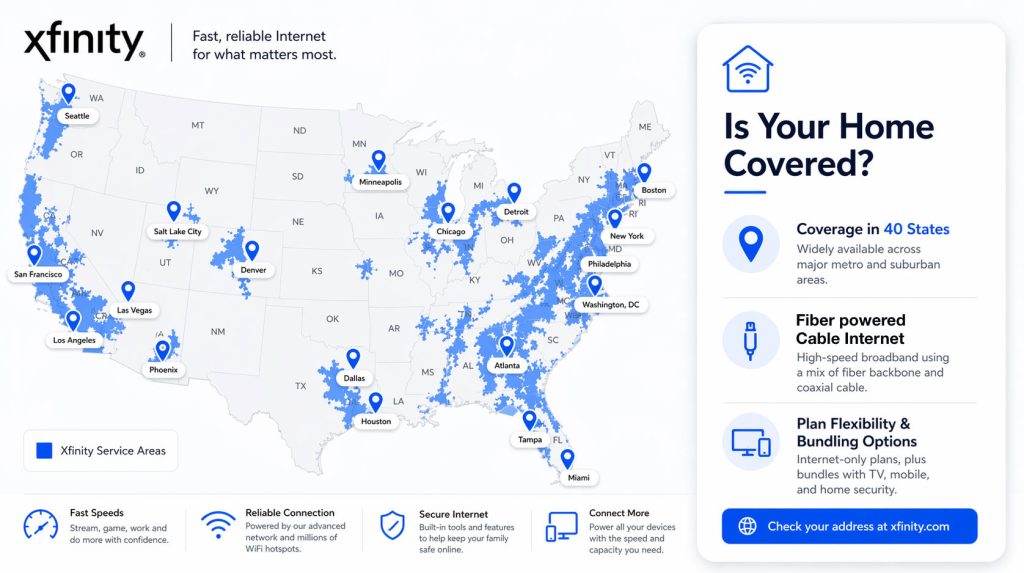
Xfinity’s Service Area & Coverage Map

Xfinity’s network spans 40 states and Washington, D.C., making it one of the most widely available utility providers in the country. Its services are particularly strong in suburban and urban areas, offering dense coverage in major metropolitan hubs, though deeply rural markets may still lack physical coaxial access. However, Xfinity does not operate in 10 states: Alaska, Hawaii, Idaho, Iowa, Montana, Nebraska, Nevada, North Dakota, Oklahoma, and Wyoming.
Before reviewing the Xfinity coverage map, it is worth noting that the network is especially dominant in these five key states:
- California
- Florida
- Illinois
- Pennsylvania
- Michigan
Major cities with robust service include:
- West: San Francisco, Seattle, Denver, Portland, Salt Lake City, Los Angeles, San Diego, Sacramento
- Midwest: Chicago, Detroit, Indianapolis, Minneapolis
- South: Atlanta, Miami, Houston, Nashville, Jacksonville
- Northeast: Boston, Philadelphia, Pittsburgh, Washington, D.C.
Customers can easily check exact service availability and upgraded upload speeds at their specific street address through Xfinity’s online availability tool.
Xfinity Mobile, TV & StreamSaver Bundles

Xfinity excels at bundling, offering aggressive combinations of internet, TV, and mobile services to simplify your billing and lower your overall household costs. If you are a heavy media consumer or looking to cut your cell phone bill in half, exploring Xfinity bundles is the easiest way to extract maximum value from Comcast.
Xfinity Mobile Plans (Select vs. Plus)
Available exclusively to Xfinity internet subscribers, Xfinity Mobile operates on Verizon’s nationwide 5G network blended with millions of secure Xfinity Wi-Fi hotspots. Pairing your home broadband with mobile service often unlocks $10 to $20 in monthly internet bill credits, and new internet customers frequently qualify for a free unlimited mobile line for an entire year. Here is how the two primary unlimited Xfinity mobile plans compare:
- Xfinity Mobile Select (Unlimited): Priced at $30 per month for a single line when paired with home internet (with multi-line discounts dropping the per-line cost even further), this tier includes 30 GB of premium high-speed cellular data, 15 GB of mobile hotspot data at 3G/4G speeds, and standard-definition (720p) video streaming.
- Xfinity Mobile Plus (Unlimited Plus): Priced between $40 and $45 per month for a single line, this upgraded tier boosts your premium cellular allowance, includes 30 GB of high-speed 5G mobile hotspot data, and unlocks crisp 4K UHD video streaming while on the go.
💸 Money-Saver: Always make sure your current smartphone is fully paid off and carrier-unlocked before you attempt to switch it over to Xfinity Mobile. This ensures a seamless transition without unexpected charges from your old cellular provider.
Xfinity StreamSaver & Traditional TV Surcharges
If you want entertainment without the bloat of traditional cable boxes, Xfinity StreamSaver is a standout option. It bundles Netflix Standard with ads, Peacock Premium, and Apple TV+ for just $15 per month. Available to both internet and mobile subscribers, this package saves you roughly $95 a year compared to paying for those three streaming subscriptions separately.
On the flip side, you should tread carefully if you’re considering traditional Xfinity TV cable packages (like Popular TV or Ultimate TV). While the advertised bundle price looks tempting at checkout, traditional live TV tiers carry hefty, mandatory hidden fees that aren’t included in the base rate. Specifically, you will be hit with a monthly Broadcast TV Fee (which can reach $35+ per month depending on your market) and a Regional Sports Network Fee (adding up to $12+ per month). Those two surcharges alone can easily inflate your monthly cable bill by nearly $50 before taxes.
Equipment & Hidden Fees

While Xfinity delivers strong technical performance, budgeting accurately for your new home requires looking past the flashy introductory rate. Between hardware leases and regional surcharges, knowing how to spot extra costs upfront will save you major headaches down the road.
The xFi Gateway & Rental Fees
For most plans, Xfinity offers its proprietary xFi Gateway — a combination cable modem and Wi-Fi router unit. Many promotional offers and 5-year price lock bundles include this equipment at no extra cost during your initial term. However, once a standard promotion ends (or if you opt for a basic tier without an equipment promo), you’ll pay an Xfinity modem rental fee of $14 to $15 per month. Over a two- or three-year stretch, you end up paying over $350 to lease hardware you never own. You can easily cut this cost by purchasing your own Comcast-compatible DOCSIS 3.1 modem and Wi-Fi router, bypassing the monthly rental charge completely.
Reading Xfinity’s FCC Broadband Consumer Labels
To prevent surprise billing, the Federal Communications Commission (FCC) requires all internet providers to display standardized “Broadband Facts” labels — designed to look just like the nutrition labels on food packaging. When you enter your street address on Xfinity’s plan selection or checkout page, click the “Broadband Facts” link directly beneath each speed tier before adding it to your cart. This label forces Xfinity to disclose critical numbers in plain sight: the exact standard monthly rate you’ll pay once your introductory promotion ends, itemized equipment rental fees, local tax estimates, and typical network performance metrics for your neighborhood, including real-world upload speeds and typical latency (ping). Checking this label takes 30 seconds and guarantees you won’t be blindsided on your first utility statement.
The Xfinity App & Installation Options
Getting your new internet service up and running is generally a straightforward process, largely thanks to Comcast’s heavy investment in digital tools and streamlined setup options. When you check out, you will simply choose how you want your network activated.
Professional vs. Self-Installation
For a one-time fee generally ranging from $89.99 to $100, you can schedule a professional installation. This route is required for Gigabit X10 fiber setups and is highly recommended if your home lacks existing coaxial outlets or needs new exterior wiring run from the street pole. However, if your home or apartment was previously wired for Comcast within the last few years, the Getting Started Self-Install Kit is the way to go. It is free (with optional expedited shipping or free same-day pickup at a local Xfinity store) and lets you get online in about 15 minutes.
Network Management & App Features
If you choose the self-install route, using the Xfinity App on your smartphone is mandatory to activate your gateway. Beyond getting you online, the app acts as your central command center for daily network management. Through this intuitive platform, you can:
- Pause devices and manage screen time: Easily disconnect specific tablets or gaming consoles during family dinner or homework hours.
- Test your network speeds: Run real-time diagnostics right to your gateway to ensure you are getting the bandwidth you pay for.
- View and pay your bill: Set up automatic payments or track your monthly data usage against the 1.2 TB cap to avoid overage fees.
💡 Pro Tip: We highly recommend downloading the Xfinity App and creating your account login prior to moving day. Having it ready on your smartphone makes activating your self-install kit much faster when you are surrounded by unboxed electronics.
Deals, Discounts & Ways to Save
Xfinity frequently runs limited-time promotions to entice new movers. However, there are also several ongoing assistance programs, targeted discounts, and simple billing strategies to make your utility services more affordable year-round:
- Internet Essentials: Priced at $14.95 per month for speeds up to 75 Mbps (or $29.95 per month for Internet Essentials Plus at 100 Mbps), this program provides affordable home internet with no credit check and free equipment for qualifying low-income households participating in programs like SNAP, Medicaid, SSI, or the National School Lunch Program.
- Military & Veterans: Xfinity honors active-duty service members and veterans with dedicated promotional credits, mobile line discounts, and an automatic upgrade to the Diamond tier in Xfinity Rewards, which unlocks special perks and bill credits.
- Students & Teachers: Periodic back-to-school promotions offer Visa prepaid gift cards, waived equipment fees, or exclusive rate reductions for verified college students and educators.
- Paperless Billing & Autopay: Enrolling in automatic payments and paperless statements using a linked bank account (ACH) typically earns you a $10 monthly discount on your internet bill (or $2 per month when using a credit or debit card in select markets).
- Seasonal Holds: Snowbirds or part-time residents can place their internet service on a seasonal hold at heavily reduced rates during long absences, avoiding the hassle of cancelling and returning hardware.
- Negotiation: Xfinity often provides retention offers if you reach out to support when your promo expires and politely mention that you are considering switching to a local fiber or 5G home internet competitor.
Comcast’s Sustainability & Green Initiatives
If you’re looking for an environmentally mindful choice when setting up home utilities, Comcast has made measurable strides in reducing its corporate carbon footprint. Comcast has pledged to become carbon neutral across its global operations by 2035 and has already reduced the electricity required to deliver each byte of data across its network by 55% since 2019. To fund this transition, the company allocated $995 million from its $1 billion Green Bond toward renewable energy procurement, energy efficiency upgrades, and transitioning its technician fleet to electric vehicles. Inside your home, the latest generation of Xfinity Wi-Fi gateways acts as an energy-saving option, featuring outer casings made from 85% post-consumer recycled materials and shipping in 100% domestic, sustainably sourced packaging.
🌱 Eco Edge: When upgrading your speed tier or moving out, never toss old modems or coaxial cables into the trash. Drop them off at any Xfinity retail store or request a free prepaid return label so Comcast can refurbish the hardware or responsibly recycle the internal electronics.
What Real Customers Are Saying

To give you an honest picture of what to expect as a subscriber, we analyzed customer sentiment across community forums like Reddit (specifically the official r/Comcast_Xfinity subreddit), state utility commission records, and major consumer rating platforms. Overall feedback is sharply divided between network quality and billing practices. Customers consistently praise the sheer technical performance, uptime reliability, and speed consistency of the physical network. Gamers and remote workers rarely complain about dropped connections or slow downloads.
However, when looking at Xfinity customer service feedback and informal complaints filed with the FCC and state utility boards, a clear pattern of billing friction emerges. The vast majority of consumer complaints center on sudden billing disputes after 12- or 24-month promotional periods expire, unannounced Broadcast TV fee increases, and confusion over 1.2 TB data overage charges. Furthermore, Reddit users frequently note that calling the primary phone support line involves navigating frustrating automated voice menus before reaching a live agent. For the fastest results, longtime customers strongly recommend using the Xfinity App or messaging the official support team directly on Reddit rather than calling on the phone.
Ratings Breakdown (BBB, Reddit, ACSI)
| Review Platform | Average Rating / Sentiment | Key Takeaways |
|---|---|---|
| Reddit (r/Comcast_Xfinity) | Mixed | High praise for technical reliability and speed; frequent frustration over phone support wait times, post-promo price hikes, and strict data caps. |
| ACSI (American Customer Satisfaction Index) | 68 / 100 | Scores generally inline with the industry average for large ISPs, reflecting solid physical performance but poor billing transparency. |
| Better Business Bureau (BBB) | 1.2 / 5 Stars (A+ Accredited) | Like most major telecom companies, written reviews trend negative due to customer service friction, despite strong corporate accreditation and responses. |
Our Verdict: Is Xfinity Right for Your Home?
Xfinity offers one of the most capable, widely available internet networks in the United States. Whether you’re a student looking for a $30 flat-rate prepaid connection or a remote worker powering a smart home on a multi-gigabit tier, Comcast has a plan built for your household — provided you keep a close eye on your promotional end dates and data usage.
| Pros | Cons |
|---|---|
| Nationwide availability across 40 states and major metro areas | Upload speeds lag behind pure fiber on non-upgraded cable nodes |
| Wide range of fast, reliable speed tiers (100 Mbps to 2+ Gbps) | Phone-based customer service experiences can be frustrating |
| No annual contracts required on most modern plans and 5-year price locks | Steep price hikes occur after 12- or 24-month promotions expire |
| Massive monthly savings when bundling with Xfinity Mobile or StreamSaver | 1.2 TB data cap and $15/mo. equipment fees apply to standard postpaid plans |
| Excellent Xfinity App for self-installation and network management | Traditional TV bundles carry heavy Broadcast and Regional Sports surcharges |
| All-inclusive NOW Internet and low-income Internet Essentials options | Not available in 10 states or deeply rural off-grid areas |
Who Should Choose Xfinity?
You should choose Xfinity if you value widespread availability, fast setup via self-installation kits, and the financial perks of combining your home internet, streaming subscriptions, and mobile phone lines under one roof. If you take advantage of the 5-Year Price Guarantee or the flat-rate Xfinity NOW Internet plans, you can enjoy rock-solid cable speeds while bypassing the rate hikes that historically plagued Comcast customers.
Who Should Look Elsewhere?
You may want to look elsewhere if your street is wired for a dedicated fiber-optic competitor offering symmetrical upload speeds and unlimited data by default, or if you don’t want to monitor a 1.2 TB monthly data cap. Still, with DOCSIS 4.0 upgrades expanding rapidly and contract-free options now standard, Xfinity remains a dependable utility powerhouse for millions of American households.
Frequently Asked Questions About Xfinity
What internet speeds does Xfinity offer?
– Basic (150–300 Mbps): Great for light browsing and small households.
– Mid-Tier (400–800 Mbps): Ideal for HD streaming, remote work, and multiple connected devices.
– Gigabit+ (1–2 Gbps, and up to 10 Gbps in select fiber zones): Perfect for power users, 4K streaming, and fully integrated smart homes.
What is Xfinity NOW Internet?
Does Xfinity internet have a data cap?
How much does my Xfinity internet bill go up after the first year?
Does Xfinity have hidden fees?
Can I use my own modem and router with Xfinity?
Can I bundle internet with TV or mobile?
– Internet + Mobile: Save monthly on your internet bill and choose between Xfinity Mobile Select ($30/mo.) or Plus ($40–$45/mo.), often with a free unlimited line for your first year.
– Internet + Streaming: Save roughly $95 a year on major streaming platforms with the $15/mo. StreamSaver package (including Netflix, Peacock, and Apple TV+).
Why are my upload speeds slower than download speeds?
How do I check for or report an Xfinity internet outage?
Does Xfinity require a credit check for new internet service?
How do I transfer my Xfinity service when moving to a new home?
What is Xfinity’s 30-day money-back guarantee?
About the Author

David has been an integral part of some of the biggest utility sites on the internet, including InMyArea.com, HighSpeedInternet.com, BroadbandNow.com, and U.S. News. He brings over 15 years of experience writing about, compiling and analyzing utility data.