

Understanding the new broadband nutrition labels empowers you to compare internet speeds, spot hidden fees, and choose the best internet provider for your home.
Key Takeaways
- The FCC now requires internet service providers to display a standardized label so you can easily compare internet speeds and prices before signing a contract.
- Paying close attention to the introductory rate versus the regular rate prevents unexpected monthly bill hikes and helps you budget effectively.
- Checking typical network performance metrics like latency ensures your plan supports energy-saving smart home devices without frustrating drop-offs.
Moving into a new home means setting up fresh utilities, and thanks to recent FCC updates, picking the right internet provider just got a lot more transparent. If you have ever felt misled by promotional pricing or confused by mysterious line items on your monthly bill, you are not alone. Most providers are now required to display FCC broadband labels at the point of sale. Large providers had to comply beginning April 10, 2024, while smaller providers received until Oct. 10, 2024. These standardized labels make it easier to compare internet provider prices, fees, speeds, and contract terms side by side. In this guide, we will break down exactly how to read a broadband consumer label so you can lock in a fair price, avoid hidden fees, and ensure your home network can efficiently run everything from your remote workspace to your eco-conscious smart home system.
The Anatomy of a Broadband Facts Label
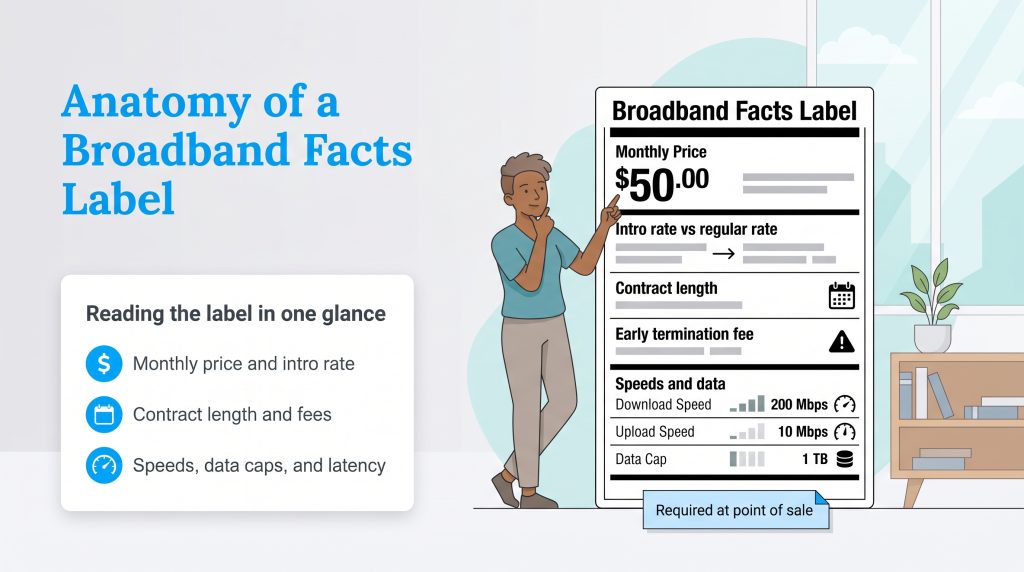
When you start browsing internet plans for your new residence, you might notice something familiar. The required broadband nutrition label intentionally mimics the black-and-white FDA food nutrition labels we see at the grocery store. This simple design isn’t an accident. The FCC designed these labels to make internet pricing and performance easier to compare across providers. Having FCC broadband labels explained simply comes down to giving you the power to know exactly what you are buying.
Instead of digging through dense legal jargon or squinting at the fine print, you now get a straightforward breakdown of pricing, speeds, and fees in one standard format. The label lists the plan’s monthly price, typical performance metrics, and any data allowance or overage charges attached to the plan. This standardized format takes the guesswork out of choosing an internet service provider, making it easier to evaluate what plan actually fits your lifestyle.
When scanning a new label, follow this quick reading process to gather all the necessary facts:
- Start with the monthly price.
- Check when the introductory rate ends.
- Add recurring provider fees and equipment costs.
- Review one-time fees.
- Compare download speed, upload speed, latency, and data caps.
- Confirm contract length and early termination fees.
💡 Pro Tip: Federal regulations require providers to display these labels prominently right at the point of sale, ensuring you can review the details before making any financial commitment.
Breaking Down the Monthly Price and Contract Terms
The very top of the label displays the base monthly price, but this number rarely tells the whole story. Many providers use eye-catching promotional discounts to get you in the door. Understanding the difference between an introductory rate vs regular rate internet pricing prevents painful bill shock once that initial honeymoon period ends. Knowing exactly what you will pay in year two is critical for household budgeting.
- Introductory Rates: This is the discounted promotional price you pay for the first few months or the first year of service. The label clearly states when this rate expires and what the regular, long-term price will be afterward.
- Length of Contract: This line item tells you exactly how long you are locked into the agreement. Some plans operate month-to-month, while others require a strict one- or two-year commitment.
- Early Termination Fees: If you need to move or want to switch providers before your contract ends, this tells you the exact penalty fee you will owe.
How to Calculate the Real Monthly Internet Cost
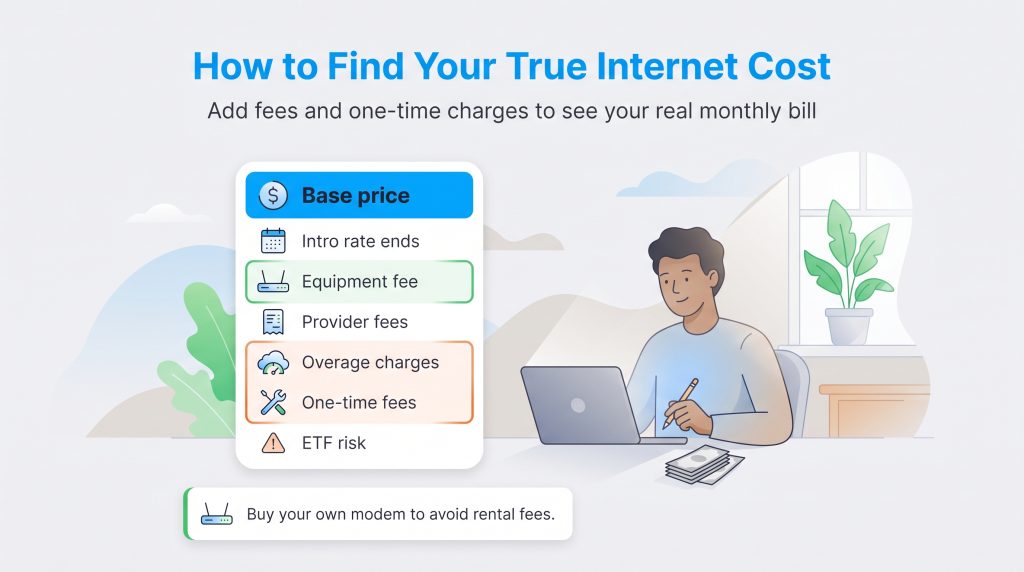
The advertised monthly price is only the starting point for your budget. To figure out what you will actually pay, you need to look at the full picture provided by the label.
- Base Monthly Price: The core cost of the service.
- Introductory Rate Expiration: How much the regular monthly price increases after any promotion ends.
- Required Equipment Fee: The monthly cost if you rent a router or modem from the provider.
- Provider Monthly Fees: Any recurring administrative or network charges.
- Estimated Overage Charges: Potential costs if the plan has a data cap and you exceed it.
- Installation or Activation Fees: One-time charges that you can spread across your first year’s budget.
- Early Termination Fee Risk: The penalty you might owe if you plan to move again soon.
Spotting Additional Charges and Hidden Fees
This middle section of the label is where you can catch the easy-to-miss costs that often inflate your monthly statement. If you are trying to budget carefully — much like figuring out how to save on your electric bill — spotting internet provider hidden fees is essential. Providers must explicitly list their one-time installation charges alongside any recurring equipment rental costs.
You will also find information on data overage charges. If your plan includes a strict data cap, the label indicates exactly how much extra you will owe per gigabyte once you cross that threshold. Reviewing this section carefully ensures that a seemingly cheap internet plan doesn’t become your most expensive utility once the extra fees pile up.
💸 Money-Saver: If your provider allows customer-owned equipment, buying a compatible modem or router can help you avoid rental fees. Compare power usage and compatibility before you buy.
How to Evaluate Internet Speeds and Network Performance
Beyond the price tag, your internet connection needs to actually keep up with your daily routine. The performance section of the label displays typical download and upload speeds. Download speed dictates how fast you can stream movies, load web pages, and pull data from the internet. Upload speed measures how quickly you can send data out, which is vital for crisp video calls, cloud backups, uploading work files, security camera cloud storage, and multiple remote workers sharing the same network.
A single person who casually checks email requires significantly less bandwidth than a family of four streaming 4K video and gaming simultaneously. Knowing your household’s digital habits prevents you from overpaying for speeds you don’t need or under-subscribing and dealing with constant buffering. For more comprehensive guidelines on these mandated metrics, you can always check the official FCC broadband consumer labels hub or review the FCC broadband speed guidance.
To help you decode the numbers on the label, here is a quick breakdown of what speeds and performance metrics typically fit different living situations:
| Household Size & Usage | Recommended Download Speed | Recommended Latency |
|---|---|---|
| 1-2 people (Casual browsing, occasional streaming) | 50–100 Mbps | Under 100 ms |
| 3-4 people (Multiple devices, frequent 4K streaming, remote work) | 200–500 Mbps | Under 50 ms |
| 5+ people (Heavy gaming, smart home automation, large file transfers) | 500 Mbps–1 Gbps or higher | Under 30 ms |
Why Latency Matters for a Smart Home
While high speeds often grab all the attention, the label’s typical latency number is just as important, especially if you run a connected home. Latency, measured in milliseconds (ms), is the delay between sending a command and receiving a response. If you have ever experienced a frustrating lag while talking on a video call, high latency was the culprit.
For sustainable living setups, this metric is crucial. Smart meters, security cameras, and smart thermostats need to communicate instantly without a hitch to optimize your energy consumption efficiently. A reliable, low-latency connection can help cloud-connected devices respond faster, but your thermostat settings, HVAC system, and home insulation usually have a much bigger impact on energy savings.
🌱 Eco Edge: A reliable connection helps smart thermostats, sensors, and energy-monitoring tools stay connected, but the biggest savings still come from efficient settings, smart schedules, and energy-conscious equipment choices.
What the Broadband Label Doesn’t Tell You
While the label provides a fantastic baseline, it does not cover every possible detail about your internet experience. The label describes the provider’s typical network performance, not a guarantee that every room in your home will get that speed over Wi-Fi. Router placement, walls, device age, and mesh network setup can all affect your actual experience.
Additionally, customer service quality, local reliability, and historical outage data are not shown. Taxes vary by location, and promotional bundles with phone or television service may complicate the final bill. Always do a bit of extra research on equipment compatibility and provider reputation before signing a contract.
How to Compare Internet Provider Labels Side-by-Side
When you sit down to compare internet provider labels, the side-by-side format makes spotting the true value of a plan much simpler. A simple sample comparison shows why the lowest advertised price is not always the best deal. Imagine you are choosing between two competing services for your new home.
| Label Item | Provider A | Provider B |
|---|---|---|
| Introductory Monthly Price | $45 | $60 |
| Regular Monthly Price | $90 after 12 months | $60 |
| Equipment Fee | $15/month | Included |
| Data Cap | 1.2 TB | Unlimited |
| Typical Download Speed | 500 Mbps | 500 Mbps |
| Typical Latency | 45 ms | 22 ms |
| Better Long-Term Fit? | Maybe short term only | Better for predictable billing |
Provider A reels you in with a low advertised introductory rate, but their price doubles after 12 months and they enforce data caps. Provider B has a higher upfront cost, but offers a flat rate, unlimited data, and low latency. If you work from home or run an eco-conscious smart home, Provider B ends up being the far superior long-term choice. The label cuts through the marketing fluff, saving you from a year of disruptions and surprise charges.
Using Broadband Labels to Shop Smarter for Your New Home
Navigating utility setups during a move can feel overwhelming, but reading the broadband nutrition label firmly puts the purchasing power back in your hands. By carefully evaluating the real costs rather than just the flashy promotional pricing, you can make an informed, budget-friendly decision that perfectly suits your household’s daily needs.
Taking a few extra minutes to review contract terms, identify hidden fees, and verify performance metrics ensures your new home network is reliable, fast, and capable of supporting sustainable living at home. As you finalize your moving utility setup checklist, explore our other internet setup guides to ensure your transition into your new space is as seamless as possible.
Frequently Asked Questions About Broadband Consumer Labels
These quick answers cover the most common questions people have when comparing broadband consumer labels during an internet search. Reviewing these details ensures you understand your contract before you sign.
What Is a Broadband Consumer Label?
Are Internet Providers Required to Show a Broadband Nutrition Label?
Where Can I Find the Broadband Facts Label on My Provider’s Website?
What Is the Difference Between an Introductory Rate and a Regular Rate?
How Do Internet Provider Data Caps Work?
Can I Use the Broadband Label to Spot Hidden Fees?
About the Author

LaLeesha has a Masters degree in English and enjoys writing whenever she has the chance. She is passionate about gardening, reducing her carbon footprint, and protecting the environment. She also recently served as President of the Board for City Sprouts (a community garden).

David has been an integral part of some of the biggest utility sites on the internet, including InMyArea.com, HighSpeedInternet.com, BroadbandNow.com, and U.S. News. He brings over 15 years of experience writing about, compiling and analyzing utility data.