

Comparing Starlink to Verizon’s 5G, Fios, and DSL networks can help you find the most reliable, cost-effective, and energy-efficient connection for your home.


- 400 Mbps
- Satellite
- Unlimited
- $55.00/mo
*Not all internet providers and speeds available in all areas.
Key Takeaways
- Verizon Fios and 5G Home Internet generally cost less and offer lower latency for gaming and streaming compared to satellite connections.
- Starlink is often the most viable option for rural homes, providing high-speed access where traditional cellular and fiber networks cannot reliably reach.
- Verizon’s 5G gateway consumes significantly less electricity than a Starlink dish, saving you money on your monthly energy bill and reducing your home’s carbon footprint.
Setting up utilities when moving into a new home means making crucial decisions about your connectivity, and choosing between a low-Earth orbit satellite network and a massive cellular or fiber grid requires understanding exactly what your household needs. While both Starlink and Verizon offer highly capable home internet solutions, they utilize completely different technologies that dramatically impact your download speeds, upfront equipment costs, and even your monthly electric bill. By exploring how these two telecom giants stack up against each other, you can easily determine which service will keep your family streaming, working, and gaming without frustrating interruptions.
The Quick Verdict: Which Internet Provider is Right for You?
When weighing Starlink vs. Verizon Home Internet, your decision ultimately boils down to where you live and what infrastructure surrounds your property. Instead of digging through endless technical specifications, we have simplified the research process. Here is how the two providers best serve different households:
- Best for rural homes: Starlink provides high-speed access in many remote areas, offering a solid alternative where traditional service maps end. However, it does require a clear line of sight to the sky.
- Best for budget-conscious renters: Verizon 5G Home Internet eliminates installation headaches and offers flat monthly rates without massive upfront equipment fees.
- Best for gamers and remote workers: Verizon Fios delivers unbeatable symmetrical speeds and ultra-low latency.
📌 Quick Fact: Verizon actually offers three separate types of internet connections — 5G cellular, Fios fiber-optic, and traditional DSL. This variety fundamentally changes how the provider compares to Starlink’s satellite network depending on your exact address.
Breaking Down Starlink vs. Verizon’s Three Network Types
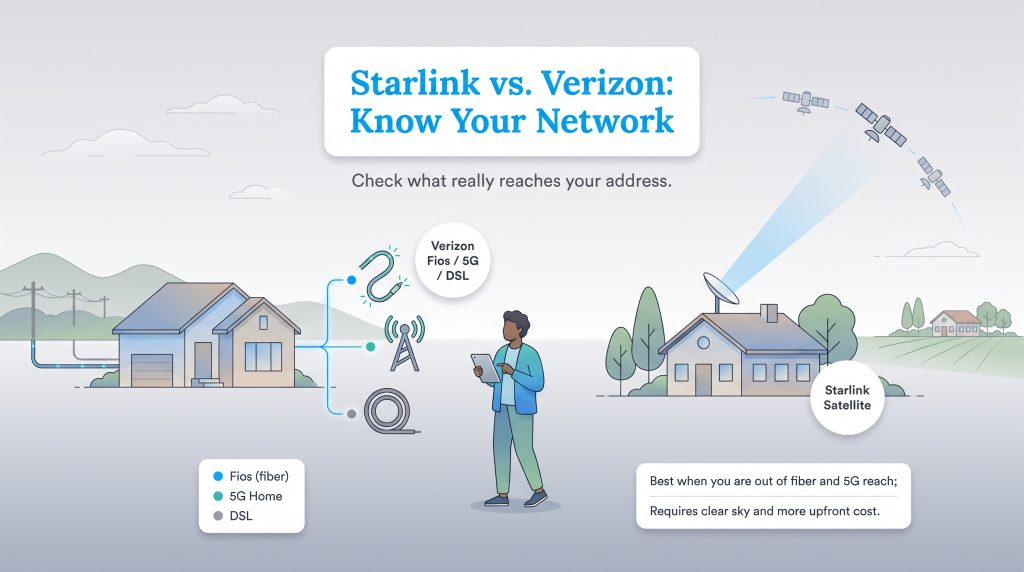
To make a fair comparison, you must look beyond the brand names and understand the technology powering your connection. Evaluating home internet options through our internet hub requires checking exactly what wires or signals reach your address. Because Verizon operates three vastly different network architectures across the country, comparing Starlink to the provider broadly is nearly impossible. Starlink beams data down from a massive constellation of low-Earth orbit satellites, while Verizon relies on a ground-based infrastructure of cell towers, fiber-optic cables, and older copper phone lines. Understanding these differences is key to making the best choice for your household.
| If you have this option… | Choose this if… | Watch out for… |
|---|---|---|
| Verizon Fios | You want the fastest, most reliable connection for gaming, working from home, and streaming. | Limited availability; it is only offered in select metropolitan areas. |
| Verizon 5G Home Internet | You want an affordable, plug-and-play solution without installation headaches. | Signal strength can vary depending on your exact proximity to the nearest cell tower. |
| Starlink | You live in a rural area where fiber or strong 5G cellular signals do not reach. | Higher upfront costs, increased energy consumption, and the need for an unobstructed view of the sky. |
Checking Availability for Your New Address
Before falling in love with a specific plan, verify what actually reaches your property. We recommend running your new address through the FCC’s National Broadband Map to see a broad overview of your options. Then, use the official address lookup tools on both the Verizon and Starlink websites to confirm current availability, pricing, and promotional equipment discounts.
Starlink vs. Verizon 5G Home Internet
Comparing Starlink vs. Verizon 5G Home Internet pits space-age satellite technology against modern cellular towers. Verizon 5G utilizes the same wireless towers that power your smartphone, beaming a signal directly to an indoor gateway in your home. It typically delivers average download speeds ranging between 85 and 300 Mbps. Meanwhile, Starlink relies on a dish positioned outside your house that communicates with satellites zooming overhead, generally providing download speeds of 50 to 150 Mbps. If you live within range of a strong 5G tower, Verizon usually offers a more consistent experience.
Is Starlink Better Than Verizon Fios?
Verizon Fios uses physical fiber-optic cables buried underground or strung across utility poles to deliver data via light signals. If you are wondering, “Is Starlink better than Verizon Fios,” the short answer is almost always no. When you have access to a pure fiber connection like Fios, it remains the superior choice for any household. Fiber networks deliver blistering gigabit speeds, and they are typically more consistent and offer lower latency than satellite connections during severe weather. They also boast symmetrical upload speeds that satellites simply cannot match.
Starlink vs. Verizon DSL Speeds
Many older or deeply rural homes sit completely outside the footprint of Verizon’s 5G and Fios networks, leaving them stuck with legacy DSL service. DSL runs over standard copper telephone wires and often ranges from single digits to tens of Mbps, depending on your distance from the provider’s hub. When evaluating Starlink vs. Verizon DSL speeds, the satellite service represents a significant upgrade. Upgrading to Starlink instantly transforms a struggling household connection into one capable of handling multiple 4K video streams and large file downloads simultaneously.
Monthly Costs and Upfront Equipment Fees
Moving into a new home involves balancing plenty of expenses, and your monthly internet bill shouldn’t harbor nasty surprises. When analyzing the Starlink monthly cost vs. Verizon, you will quickly notice drastically different pricing models. Starlink requires a substantial upfront investment for the satellite dish and mounting hardware, though the company frequently runs regional pricing promos and hardware discounts. As of April 2026, you might find hardware costs ranging anywhere from completely free up to $599, with monthly plans also varying. On the flip side, Verizon 5G Home Internet eliminates the barrier to entry by typically including the gateway rental at no extra cost — especially if you already have a qualifying Verizon cellular plan. Neither provider enforces strict data caps on their standard residential plans, saving you from overage fees. However, both companies reserve the right to temporarily slow your speeds during periods of heavy local network congestion.
| Feature | Starlink | Verizon 5G Home Internet |
|---|---|---|
| Monthly Price | $35 to $120 (promos vary) | $35 to $80 (depends on mobile plan) |
| Upfront Equipment Cost | $0 to $599 (depends on promos) | $0 (equipment included) |
| Data Caps | Unlimited (Standard data) | Unlimited |
*Note: Pricing and equipment fees are accurate as of April 2026 but frequently fluctuate based on seasonal promotions and regional availability. Always check your exact address for the most current rates.
Verizon Plans and Pricing
| Plan Name | Price | Download Speeds | Connection Type | |
|---|---|---|---|---|
| High Speed Internet | $40 /month | Up to 15 Mbps | DSL | Check Availability |
| Verizon Home Internet Lite | $35 /month | Up to 25 Mbps | 5G | Check Availability |
| Verizon Home Internet Lite Extra | $55 /month | Up to 25 Mbps | 5G | Check Availability |
| 5G Home | $50 /month | Up to 100 Mbps | 5G | Check Availability |
| 5G Home Plus | $60 /month | Up to 150 Mbps | 5G | Check Availability |
| Fios 300 Mbps | $30 /month | Up to 300 Mbps | Fiber | Check Availability |
| 5G Home Ultimate | $75 /month | Up to 300 Mbps | 5G | Check Availability |
| Fios 500 Mbps | $65 /month | Up to 500 Mbps | Fiber | Check Availability |
| Fios 1 Gig | $80 /month | Up to 1000 Mbps | Fiber | Check Availability |
| Fios 2 Gig | $90 /month | Up to 2.3 Gbps | Fiber | Check Availability |
| Fios 5 Gig | $104.99 /month | Up to 5 Gbps | Fiber | Check Availability |
Starlink Plans and Pricing
| Plan Name | Price | Download Speeds | Connection Type | |
|---|---|---|---|---|
| Residential 100 Mbps | $55 /month | Up to 100 Mbps | Satellite | Check Availability |
| Residential 200 Mbps | $85 /month | Up to 200 Mbps | Satellite | Check Availability |
| Roam 100 GB | $55 /month | Up to 300 Mbps | Satellite | Check Availability |
| Roam Unlimiited | $175 /month | Up to 300 Mbps | Satellite | Check Availability |
| Roam 300 GB | $80 /month | Up to 300 Mbps | Satellite | Check Availability |
| Residential Max | $130 /month | Up to 400 Mbps | Satellite | Check Availability |
The Hidden Utility Cost: Energy Consumption and Sustainability
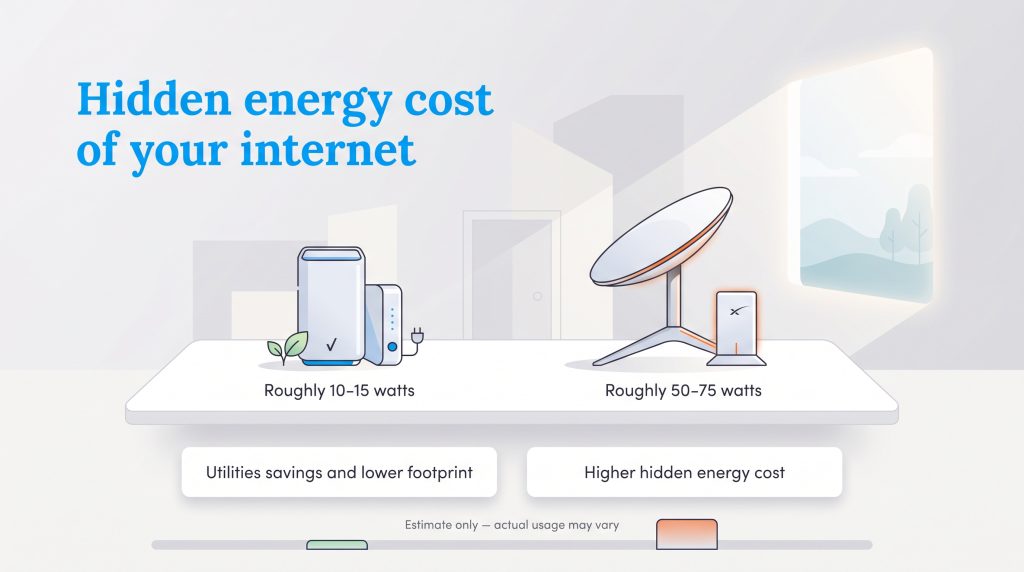
When evaluating the actual cost of your internet, most homeowners completely overlook the equipment silently drawing power 24 hours a day. Your router and modem represent a constant baseline drain on your electricity. A standard Verizon 5G gateway operates incredibly efficiently, typically drawing only 10 to 15 watts of continuous power. In contrast, a Starlink dish actively tracks satellites across the sky and utilizes a built-in heating element to melt snow and ice during winter storms. This means a Starlink setup continuously uses roughly 50 to 75 watts of electricity.
This seemingly small discrepancy adds up quickly. For example, if your dish averages 75 watts over 24 hours, it uses about 54 kilowatt-hours (kWh) per month (75W × 24h × 30 days = 54,000 watt-hours). At an average rate of $0.15 per kWh, that adds around $8 to your monthly utility bill compared to a traditional router. Keep in mind that using the dish’s built-in heater mode during snowy or freezing weather can easily increase this power draw and push your costs higher. According to the ENERGY STAR network equipment guidelines, standard home routers are engineered for minimal power consumption. If you want an environmentally mindful choice that keeps your carbon footprint low while reducing your monthly electricity costs, Verizon 5G serves as the clear energy-saving option.
🌱 Eco Edge: If you plan to power an off-grid cabin or a remote homestead using a solar array, you must calculate Starlink’s higher continuous wattage into your inverter limits to avoid draining your battery bank overnight.
Installation Differences: Roof Mounts vs. Plug-and-Play Gateways
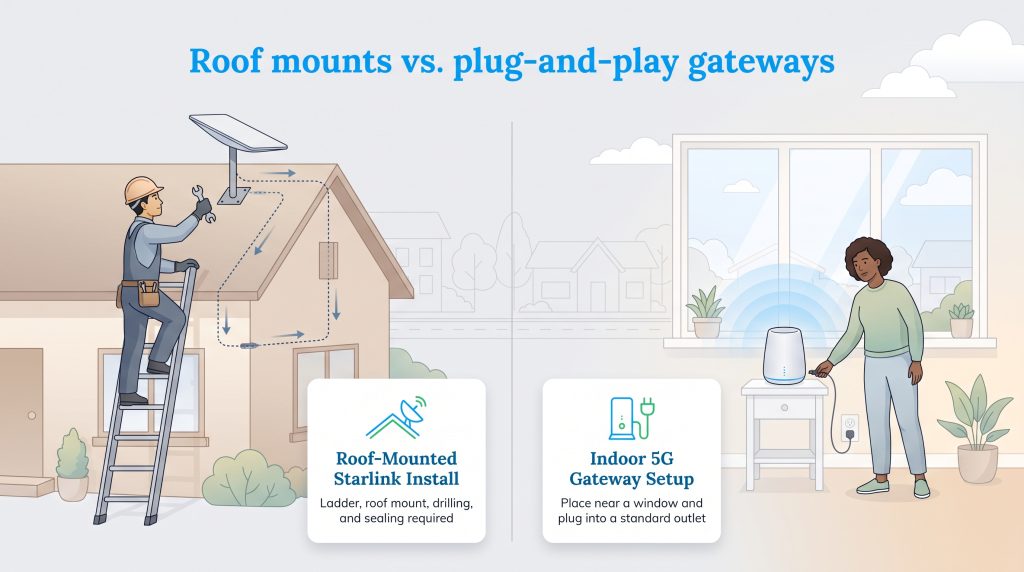
Getting your network up and running sets the tone for your entire experience in a new house. Verizon 5G Home Internet champions simplicity with an indoor, plug-and-play design. You simply take the gateway out of the box, place it near a window facing the nearest cell tower, and plug it into a standard wall outlet.
Starlink demands significantly more effort and DIY capability. Because the dish requires a completely unobstructed view of the sky to maintain a connection, placing it on the ground or in a heavily wooded yard rarely works. A permanent, reliable Starlink installation usually involves:
- Climbing a ladder to safely access your roof or an elevated fascia board.
- Securing an aftermarket mounting bracket designed for your specific roof type.
- Drilling a hole through your exterior wall to route the proprietary cable indoors.
- Applying waterproof silicone sealant to prevent structural moisture damage.
Performance Showdown: Gaming, Streaming, and Latency
Raw download speeds only tell half the story when it comes to keeping your household entertained. Whether you prioritize Starlink vs. Verizon home internet gaming or binge-watching shows, latency plays a massive role in your daily experience. Latency, often called “ping,” measures how quickly data travels from your device to a server and back.
Because Starlink beams data thousands of miles into space, its latency typically hovers around 30 to 50 milliseconds. While perfectly fine for streaming 4K movies or browsing the web, this slight delay can frustrate competitive gamers who rely on split-second reactions. Verizon 5G and Fios easily win the gaming showdown, as their ground-based networks drastically reduce ping times, ensuring a smoother, more responsive multiplayer experience without noticeable lag.
If you host private game servers, use a strict VPN for remote work, or need port forwarding, you should also consider how each service handles IP addresses. Both providers generally use Carrier-Grade NAT (CGNAT) on their standard wireless and satellite residential plans, which can complicate advanced networking. However, Verizon Fios offers much more flexibility with public IP addresses if you need those capabilities for your home office or gaming setup.
💡 Pro Tip: Regardless of which provider you choose, hardwiring your gaming console or primary work computer directly to the router using an Ethernet cable will always provide a faster, more stable connection than relying on Wi-Fi.
Making the Final Call for Your Home Network
Choosing the best internet provider requires aligning your physical location with your household’s daily digital habits. If you live in an area blanketed by Verizon’s cellular or fiber infrastructure, Fios and 5G Home Internet easily stand out as the smartest overall picks. They offer fantastic speeds, lower upfront costs, and superior energy efficiency to keep your monthly utility bills in check. However, Starlink remains an absolute technological marvel that frequently connects remote properties trapped in frustrating internet dead zones. If traditional wires and cell towers fail to reach your property, investing in Starlink hardware ensures you never have to compromise on modern connectivity, no matter how far off the beaten path you choose to live.
Frequently Asked Questions About Starlink vs. Verizon Home Internet
Moving into a new home often sparks plenty of questions about setting up your essential utilities. We have gathered the most common inquiries about choosing between these two major internet providers to help you make an informed decision.
Is Verizon 5G or Starlink better for rural areas?
What is the process for switching from Verizon to Starlink?
Does Starlink use a lot of electricity compared to regular routers?
Can I travel with Verizon 5G Home Internet like I can with Starlink?
Are there data caps on either service?
About the Author

David has been an integral part of some of the biggest utility sites on the internet, including InMyArea.com, HighSpeedInternet.com, BroadbandNow.com, and U.S. News. He brings over 15 years of experience writing about, compiling and analyzing utility data.

LaLeesha has a Masters degree in English and enjoys writing whenever she has the chance. She is passionate about gardening, reducing her carbon footprint, and protecting the environment. She also recently served as President of the Board for City Sprouts (a community garden).