

Comparing Cox’s primarily wired connection to Starlink’s satellite network helps you choose the most reliable and cost-effective internet for your lifestyle.

- 7 Gbps
- Cable & Fiber
- Unlimited
- $30.00/mo

- 400 Mbps
- Satellite
- Unlimited
- $55.00/mo
*Not all internet providers and speeds available in all areas.
Key Takeaways
- Cox offers faster top download speeds (up to 2 Gbps) and lower latency starting at $50 per month, making it the premier choice for competitive gaming and busy smart homes in areas with wired infrastructure.
- Starlink provides unmatched rural availability with standard residential speeds of 100 to 220 Mbps for $120 per month, serving as an ideal solution for households outside traditional cable service zones.
- Factoring in data caps and power draw reveals hidden long-term costs, as Cox charges extra for unlimited data while Starlink’s outdoor satellite dish consumes up to five times more electricity than a standard cable modem.
If you’re moving to a new property or simply weighing your options for better home connectivity, choosing the right internet service provider is a major household decision. Pitting Cox vs. Starlink head-to-head is a smart way to compare two vastly different approaches to getting online: grounded hybrid fiber-coaxial lines versus Low Earth Orbit (LEO) satellites. We understand the need to find a connection that fits your daily habits without breaking your utility budget. Our goal is to provide a straightforward, real-world comparison of speeds, two-year ownership costs, and energy usage so you can confidently select the best provider for your address.
Quick Verdict: Which Internet Provider Wins?
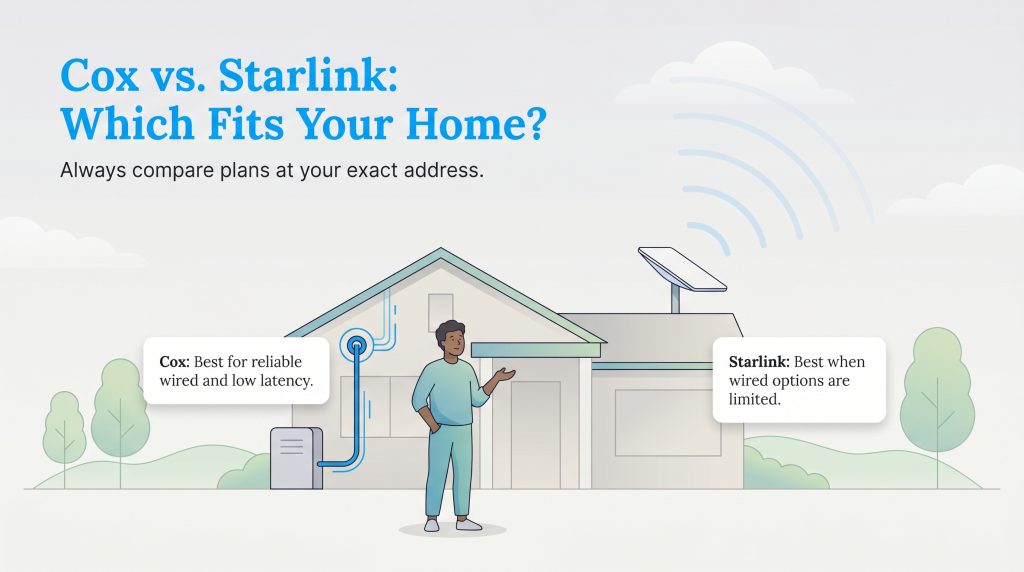
Cox is the clear winner if your home is wired for cable or fiber, you want low latency for gaming or video calls, and you prefer minimal upfront startup costs. Starlink takes the crown if your wired options are nonexistent, sluggish, or geographically restrictive. Because the right choice depends heavily on your household setup and location, we’ve broken down exactly which buyer personas benefit most from each network.
When Cox Wins
- Suburban Families and Heavy Streamers: With download speeds scaling from 100 Mbps up to 2 Gbps (2,000 Mbps), Cox easily supports multiple 4K TV streams, smart home security systems, and tablets running all at once.
- Competitive Gamers: Wired cable and fiber lines keep ping low (20 to 30 ms) and packet loss near zero, giving fast-paced multiplayer gamers a massive edge over satellite connections.
- Budget-Conscious Movers: With plans starting at $50 per month and $0 upfront equipment purchases if you rent a gateway or bring your own compatible modem, Cox keeps move-in costs low.
- Apartment and Condo Dwellers: Multi-family buildings are almost always pre-wired for Cox inside service footprints, whereas installing an outdoor satellite dish on a shared roof or tree-shaded balcony is often impossible.
When Starlink Wins
- Rural Homeowners and Acreage Properties: If you live beyond the reach of municipal cable lines and refuse to settle for slow DSL or legacy geostationary satellite, Starlink delivers true broadband speeds (100 to 220 Mbps) anywhere with a clear view of the sky.
- High-Volume Data Users: Every Starlink Standard Residential plan includes truly unlimited high-speed data without hard caps or overage penalties, while Cox enforces a 1.25 TB monthly cap on standard plans unless you pay $50 extra per month.
- RV Travelers and Digital Nomads: Starlink’s Roam plans allow you to pause and resume service on a month-to-month basis and take your hardware on the road across the country.
- No-Contract Purists: Starlink charges a flat $120 per month for residential service with no annual contracts and no surprise second-year promotional rate hikes.
Cox vs. Starlink: Side-by-Side Spec Comparison
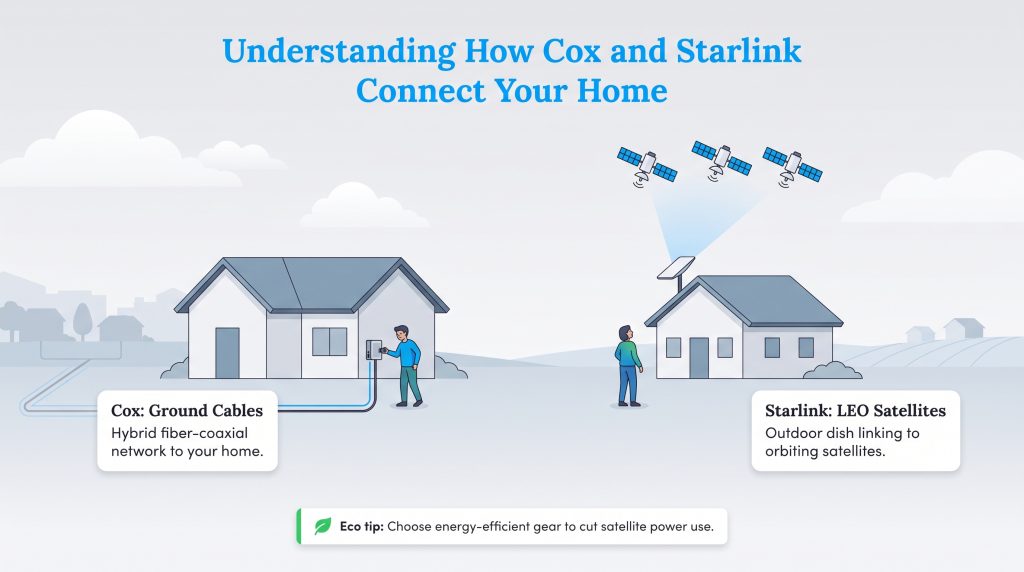
When comparing Starlink internet vs Cox cable, looking at the raw specifications side-by-side is the quickest way to see which provider aligns with your daily digital routine. Cox delivers its connection through a Hybrid fiber-coaxial network — bringing fiber-optic lines into neighborhoods and finishing the run to your home with coaxial cables — alongside full fiber-to-the-home in select markets. Starlink bypasses ground wires entirely, bouncing signals between an outdoor dish on your property and a constellation of Low Earth Orbit (LEO) satellites orbiting roughly 340 miles above Earth.
The table below highlights the most significant technical and financial differences you’ll encounter when shopping for either service in 2026.
| Specification | Cox Internet | Starlink Residential |
|---|---|---|
| Connection Type | Hybrid Fiber-Coaxial (HFC) & Fiber | Low Earth Orbit (LEO) Satellite |
| Standard Download Speeds | 100 Mbps – 2,000 Mbps (2 Gbps) | 100 Mbps – 220 Mbps |
| Standard Upload Speeds | 10 Mbps – 100 Mbps (Coax) / Up to 2 Gbps (Fiber) | 10 Mbps – 25 Mbps |
| Starting Monthly Price | $50/month (12-month promo rate) | $120/month (Standard Residential) |
| Average Latency (Ping) | 20 – 30 ms | 40 – 70 ms |
| Average Jitter | 4 – 8 ms | 10 – 25+ ms (spikes during handoffs) |
| Data Allowance | 1.25 TB/month (Unlimited costs +$50/mo) | Unlimited standard data |
| Contract Requirements | No annual contract on most plans (12–24 mo promo locks) | No contracts; cancel anytime |
| Upfront Hardware Cost | $0 (~$15/month Panoramic Wi-Fi rental or BYO modem) | $349 – $599 upfront kit purchase |
🌱 Eco Edge: While modern internet infrastructure is highly efficient, satellite dishes require continuous power to communicate with orbit. When prioritizing sustainable living in your home, looking for energy-efficient electronics can help keep your electricity usage in check.
Real-World Performance: Streaming, Gaming, and Remote Work
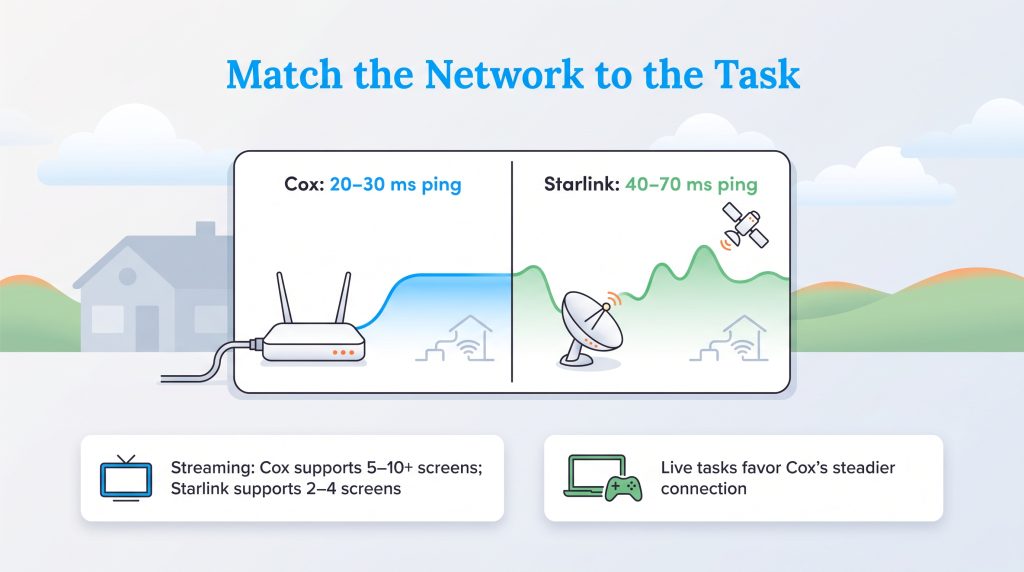
Running a speed test quickly reveals how differently these two networks behave under household stress. Because Cox relies on physical lines, its download speeds consistently match advertised tiers, scaling from 100 Mbps on the entry-level plan up to 1 Gbps and 2 Gbps on top tiers. When comparing Cox gigabit vs Starlink, Cox is far superior for bandwidth-heavy tasks like downloading 100 GB console updates or transferring massive video files in minutes.
Starlink still holds its own for daily family use, delivering typical residential download speeds between 100 Mbps and 220 Mbps. Since a single 4K video stream only requires about 25 Mbps, Starlink easily handles three or four televisions streaming Netflix simultaneously. However, raw download speed only tells half the story when evaluating Cox vs Starlink gaming and remote work stability.
| Scenario | Cox Internet | Starlink Residential |
|---|---|---|
| 4K Video Streaming | Seamless across 5–10+ screens simultaneously on mid-to-high tiers | Smooth on 2–4 screens simultaneously; occasional brief buffering during peak hours |
| Zoom/Teams HD Video Calls | Rock-solid audio and video sync with minimal freeze-ups | Good for 1-on-1 calls; brief 1–2 second freezes can occur during satellite handoffs |
| Competitive Online Gaming | Excellent (20–30 ms ping); smooth hit registration in fast-paced titles | Playable for casual games, but 40–70 ms ping and jitter cause lag spikes in shooters |
| Peak-Hour Speed Consistency | High; minor slowdowns possible in congested coaxial neighborhoods (7–11 p.m.) | Moderate; speeds can dip toward 50–100 Mbps in oversubscribed rural cells |
| Heavy Rain or Snow Impact | Minimal; underground and aerial lines only fail during physical line damage or power outages | Moderate to High; heavy downpours (“rain fade”) or thick snow accumulation can drop signal |
Upload Speeds and Jitter: The Hidden Bottlenecks
Most internet shoppers focus entirely on download speeds, but upload speeds and jitter determine how smooth your connection feels during live, two-way interactions. If you’re researching how your connection handles remote work or multiplayer lobbies, you need to understand how ping works alongside jitter. While ping (latency) measures the round-trip travel time of a data packet, jitter measures the consistency of that timing.
On a wired Cox connection, jitter stays remarkably low at 4 to 8 ms. Data packets arrive in a steady, predictable stream. On Starlink, your dish must switch its beam from one fast-moving satellite to another every few minutes. During these orbital handoffs, latency can briefly spike and jitter jumps to 15 ms or higher, resulting in “rubber-banding” in video games or a frozen screen during a presentation.
Upload bandwidth is another critical bottleneck. Unless you live in a select neighborhood with symmetrical Cox Fiber (which offers up to 2 Gbps uploads), Cox’s traditional coaxial cable plans limit upload speeds to between 10 Mbps and 100 Mbps depending on your tier. Even so, Cox’s coaxial uploads remain much steadier than Starlink’s, which average 10 to 25 Mbps and fluctuate based on cloud cover and overhead satellite traffic. If you back up large databases to the cloud, host live streams, or have multiple family members on camera for school and work at the same time, Cox’s steadier upstream channel and low jitter provide a noticeably smoother workday.
📌 Quick Fact: Cable internet speeds can slow down slightly during neighborhood peak usage hours (typically 7:00 p.m. to 11:00 p.m.), whereas satellite speeds depend on both local user congestion and the physical density of satellites passing above your latitude.
Pricing, Data Caps, and True 2-Year Cost
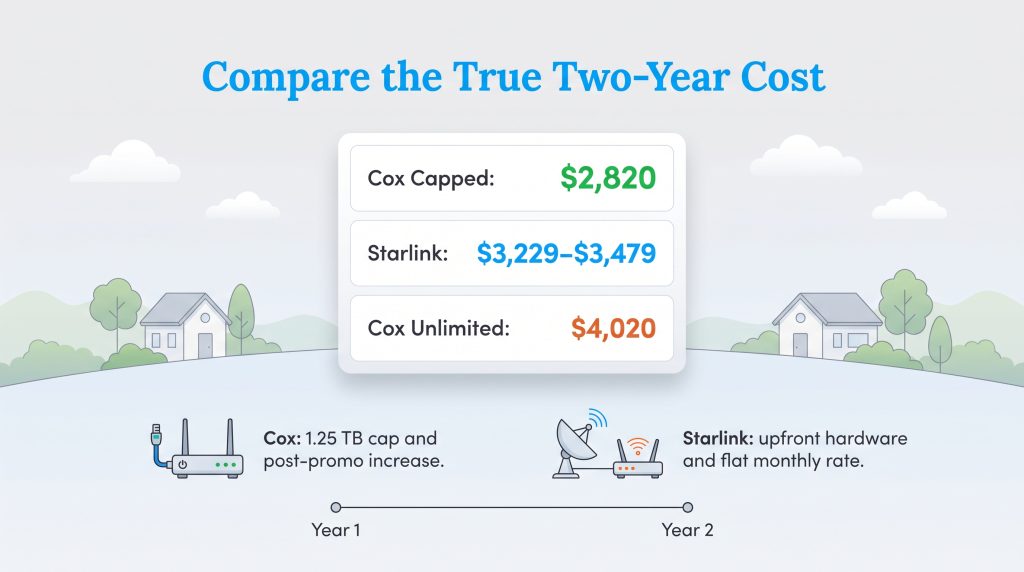
When we talk to homeowners, the biggest point of frustration is almost always the long-term bill. Understanding Starlink vs Cox pricing requires looking far beyond the flashy number on a mailer. While Cox lures new customers in with low introductory rates, Starlink charges a high upfront ticket price for hardware followed by flat, predictable monthly billing.
Cox Plans and Promotional Rate Hikes
Cox structures its residential lineup around five core speed tiers, starting at $50 per month for 100 Mbps and scaling up to $150 per month for 2 Gbps. While these introductory prices look budget-friendly, you have to watch out for Cox promotional rate hikes once your initial 12-month or 24-month promotional period ends. Standard rates typically jump by $20 to $35 per month in your second year.
Comparing the Cox data cap vs Starlink also exposes a major hidden expense for heavy internet users. All standard Cox plans include a 1.25 TB (1,280 GB) monthly data cap in most markets. If your household crosses that threshold, Cox automatically charges $10 for every additional 50 GB block of data (up to $100 per month), unless you pay an extra $50 per month for an Unlimited Data add-on.
| Cox Plan Tier | Download / Upload Speeds (Coax) | Promotional Monthly Rate | Est. Post-Promo Rate (Year 2+) | Data Allowance |
|---|---|---|---|---|
| Go Fast | 100 Mbps / 10 Mbps | $50/month | ~$70/month | 1.25 TB |
| Go Faster | 250 Mbps / 25 Mbps | $70/month | ~$90/month | 1.25 TB |
| Go Super Fast | 500 Mbps / 50 Mbps | $90/month | ~$115/month | 1.25 TB |
| Go Even Faster | 1 Gbps / 100 Mbps | $110/month | ~$135/month | 1.25 TB |
| Go Beyond Fast | 2 Gbps / 100 Mbps (Up to 2 Gbps on Fiber) | $150/month | ~$175/month | 1.25 TB |
| Plan Name | Price | Download Speeds | Connection Type | |
|---|---|---|---|---|
| Spectrum Internet 100 | $30 /month | Up to 100 Mbps | Cable | Check Availability |
| Spectrum Internet 500 | $40 /month | Up to 500 Mbps | Cable | Check Availability |
| Spectrum Internet 1 Gig | $60 /month | Up to 1000 Mbps | Cable | Check Availability |
| Spectrum Internet 2 Gig | $80 /month | Up to 2 Gbps | Cable | Check Availability |
| Spectrum Internet 7 Gig fiber internet | $140 /month | Up to 7 Gbps | Fiber | Check Availability |
Starlink Plans and Upfront Hardware Costs
Starlink skips promotional gimmicks and annual contracts altogether. The Standard Residential plan costs $120 per month and includes unlimited standard data with no overage fees. The catch is the upfront equipment purchase: you must buy the Starlink receiver dish and router kit outright for $349 to $599 (depending on regional pricing and hardware generation) before getting online.
If you travel frequently in a camper or need prioritized bandwidth for a home business, Starlink also offers specialized tiers that let you customize how and where you connect.
| Starlink Plan Tier | Typical Download Speeds | Monthly Price | Upfront Hardware Cost | Data Allowance & Best Use Case |
|---|---|---|---|---|
| Standard Residential | 100 – 220 Mbps | $120/month | $349 – $599 | Unlimited Standard data; fixed rural and suburban homes |
| Roam 50GB | 50 – 200 Mbps | $50/month | $349 – $599 (Standard or Mini kit) | 50 GB mobile data (opt-in per-GB top-ups); weekend campers |
| Roam Unlimited | 50 – 200 Mbps | $165/month | $349 – $599 (Standard or Mini kit) | Unlimited mobile data across the continent; full-time RVers |
| Priority (40GB – 1TB+) | 135 – 250 Mbps | $140 – $250+/month | $349 – $2,500 (Standard or High Performance) | Allotted Priority data + Unlimited Standard data; remote businesses |
| Plan Name | Price | Download Speeds | Connection Type | |
|---|---|---|---|---|
| Residential 100 Mbps | $55 /month | Up to 100 Mbps | Satellite | Check Availability |
| Residential 200 Mbps | $85 /month | Up to 200 Mbps | Satellite | Check Availability |
| Roam 100 GB | $55 /month | Up to 300 Mbps | Satellite | Check Availability |
| Roam Unlimiited | $175 /month | Up to 300 Mbps | Satellite | Check Availability |
| Roam 300 GB | $80 /month | Up to 300 Mbps | Satellite | Check Availability |
| Residential Max | $130 /month | Up to 400 Mbps | Satellite | Check Availability |
2-Year Total Cost of Ownership Breakdown
To see how Starlink’s steep upfront equipment fee stacks up against Cox’s second-year price increases, Panoramic Wi-Fi rental fees, and unlimited data add-ons, you have to run the numbers over a full 24-month period. Below is a side-by-side breakdown comparing Cox’s popular mid-tier Go Super Fast (500 Mbps) plan — both with and without the unlimited data upgrade — against Starlink Standard Residential.
| Cost Category | Cox Go Super Fast (500 Mbps) – Standard 1.25 TB Cap | Cox Go Super Fast (500 Mbps) – With Unlimited Data | Starlink Standard Residential (100–220 Mbps) |
|---|---|---|---|
| Year 1 Base Internet Cost (12 Mos) | $1,080 ($90/mo promo) | $1,080 ($90/mo promo) | $1,440 ($120/mo flat rate) |
| Year 2 Base Internet Cost (12 Mos) | $1,380 (~$115/mo post-promo) | $1,380 (~$115/mo post-promo) | $1,440 ($120/mo flat rate) |
| Upfront Hardware Purchase | $0 | $0 | $349 – $599 (One-time kit fee) |
| Equipment Rental Fees (24 Mos) | $360 ($15/mo Panoramic Wi-Fi) | $360 ($15/mo Panoramic Wi-Fi) | $0 (Customer owns hardware) |
| Unlimited Data Add-On (24 Mos) | $0 (Capped at 1.25 TB/mo) | $1,200 ($50/mo add-on) | $0 (Included in base plan) |
| 2-Year Total Cost | $2,820 | $4,020 | $3,229 – $3,479 |
As the math shows, a household that stays under Cox’s 1.25 TB monthly data cap will save roughly $400 to $650 over two years with Cox, while enjoying more than double the download speed. However, if your family blows past 1.25 TB every month and has to pay Cox’s $50 monthly unlimited data fee (plus the $15 router rental), Cox actually ends up costing $540 to $790 more than Starlink over two years.
💸 Money-Saver: You can shave $360 off your two-year Cox bill by skipping the $15/month Panoramic Wi-Fi rental and purchasing your own DOCSIS 3.1 cable modem and Wi-Fi 6 router for around $180 upfront.
Equipment and Installation: Panoramic Wi-Fi vs. Starlink Gen 3
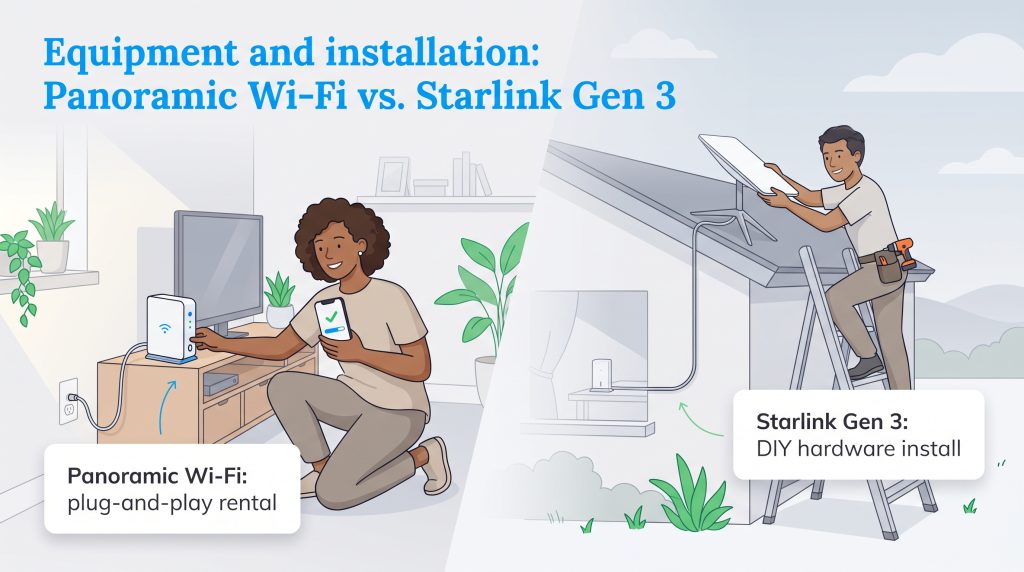
Getting your home network up and running depends heavily on the hardware you install. When evaluating Starlink Gen 3 vs Cox Panoramic Wifi, you’re looking at two completely different approaches to equipment ownership and physical setup.
Cox encourages customers to rent its Panoramic Wi-Fi gateway for $15 per month. This all-in-one device combines a DOCSIS 3.1 modem and a Wi-Fi 6 router, managed through the Cox Panoramic Wifi app. The perk of renting is hassle-free maintenance: if the gateway dies or becomes outdated, Cox swaps it out for free. Installation takes about 15 minutes inside your living room. If your home has an active coaxial wall outlet, you simply screw in the coax cable, plug in the power cord, and activate the network on your smartphone.
Starlink requires you to purchase its Gen 3 hardware kit upfront for $349 to $599. The kit includes a weather-resistant phased-array dish with a manual kickstand, a dual-band Wi-Fi 6 router with two built-in Ethernet ports, a heavy-duty power supply, and 49 feet of shielding cable. Because Starlink does not send company technicians to your house, self-installation is the default path unless you hire a local handyman or third-party installer. While you can set the dish in your yard temporarily, a permanent home setup requires mounting the dish to your roof, eave, or fascia board, drilling an entry hole through an exterior wall, and routing the cable indoors to the router.
Availability, Weather Resilience, and Rural Coverage
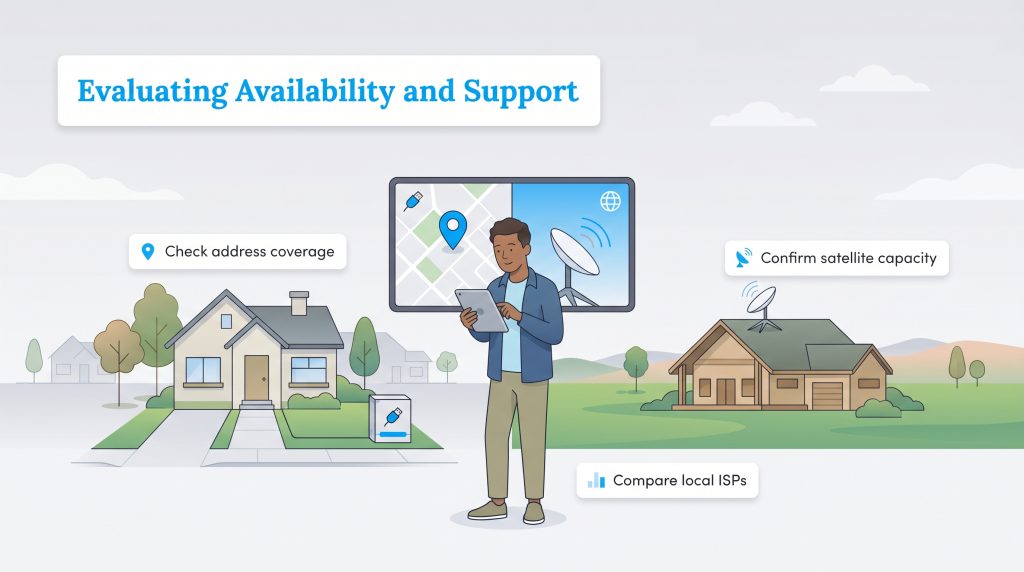
Even the fastest internet plan is useless if it doesn’t reach your street. Cox operates its wired infrastructure across 18 states, concentrating heavily in urban and suburban hubs like Phoenix, Las Vegas, San Diego, Omaha, Oklahoma City, New Orleans, and Hampton Roads, Virginia. If you live a few miles outside city limits or move to a rural acreage lot, Cox simply won’t be an option.
That geographic boundary is why satellite has become a lifeline for families exploring viable rural internet options. Starlink covers virtually the entire continental United States, provided your local coverage cell has open capacity. However, physical terrain matters: Starlink’s dish requires a wide, 100-degree unobstructed field of view of the sky. Even a few overhanging pine branches, a steep canyon wall, or a neighboring roofline clipping that 100-degree cone will cause frequent micro-dropouts every time a satellite passes behind the obstacle.
Weather resilience also separates the two networks. Because Cox runs underground or along utility poles, regular rainstorms, heavy cloud cover, and snow flurries won’t slow down your speeds. Outages typically only happen during neighborhood power failures or when a fallen tree limb snaps an aerial line. Starlink signals, on the other hand, must travel through the atmosphere. Intense rainstorms, hail, or heavy wet snow can cause “rain fade,” temporarily degrading speeds or dropping your connection until the storm cell passes.
We recommend verifying wired broadband availability at your exact address using the FCC National Broadband Map before making any commitments. You can also try checking satellite capacity directly on Starlink’s coverage map, or spend a few minutes comparing all internet service providers in your area to see every wired and wireless option on your street.
Eco-Conscious Internet: Power Consumption and Impact
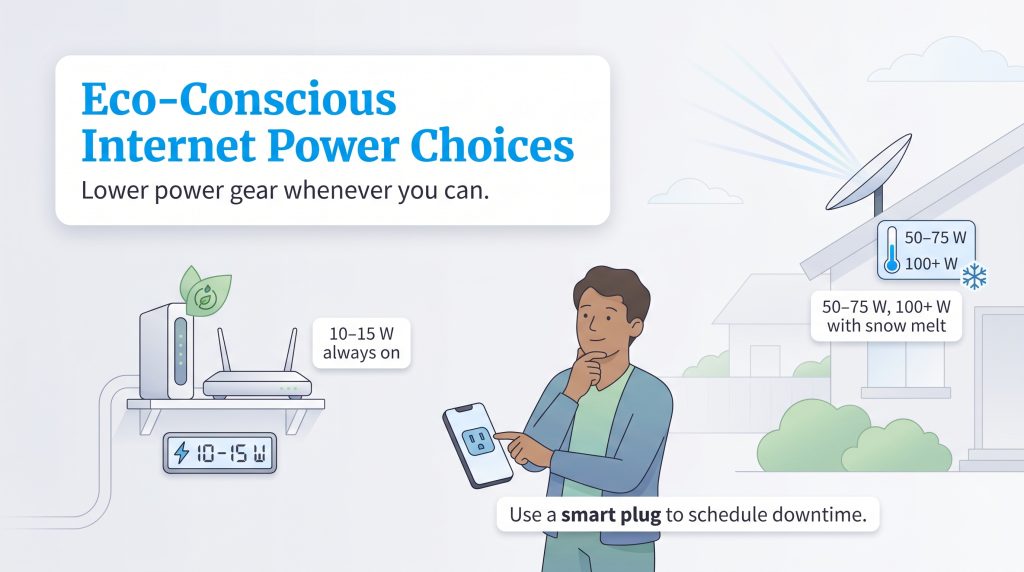
When setting up utilities for a new home, many people overlook the 24/7 electrical draw of their networking gear. If making an environmentally mindful choice is a priority for your household — or if you track your wattage carefully on an off-grid solar system — you should pay close attention to Starlink power consumption compared to a standard cable modem.
A Cox cable modem and router combination pulls a modest 10 to 15 watts of continuous power. In contrast, the Starlink Gen 3 dish is an active high-powered radio transceiver that draws roughly 50 to 75 watts during normal daily operation, and spikes above 100 to 150 watts when its built-in “Snow Melt Mode” activates in freezing weather. Running 24/7 over a full year at the U.S. average electricity rate of $0.16 per kWh, a Cox gateway uses roughly 88 to 131 kWh ($14 to $21 per year), whereas a Starlink system consumes between 438 and 657+ kWh ($70 to $105+ per year) — adding an extra 350 to 525 kWh and up to $84 annually to your electric bill.
💡 Pro Tip: To offset the higher energy use of your Starlink system, use the “Sleep Schedule” feature inside the Starlink app or connect the router to a smart plug so it powers down overnight while everyone is asleep. Putting the dish to sleep for seven hours a night cuts its annual electricity draw by nearly 30%.
Customer Support and Bundling Options
Beyond raw speeds and monthly bills, your day-to-day experience as a customer comes down to how each company handles technical headaches and household utility bundling. Cox operates as a full-service traditional telecommunications provider. You can bundle your home internet with Contour TV cable packages, landline home phone service, and Cox Mobile cell phone plans (which often unlocks $10 to $20 in monthly multi-service discounts). If your connection drops or your hardware malfunctions, Cox offers 24/7 live phone support, online live chat, local brick-and-mortar retail stores where you can swap out faulty equipment in person, and fleet technicians who can visit your home to troubleshoot wiring issues.
Starlink takes a lean, hands-off approach to both bundling and customer care. It is strictly a standalone internet provider with zero television, streaming, or mobile phone bundles. More importantly, Starlink does not have a customer service phone number, retail storefronts, or in-home service technicians. If your dish goes offline or your billing hits a snag, your only avenue for help is submitting an asynchronous support ticket through the Starlink smartphone app and waiting for a digital response — which can take anywhere from a few hours to several days during peak outage events.
Preparing Your Home for the Switch
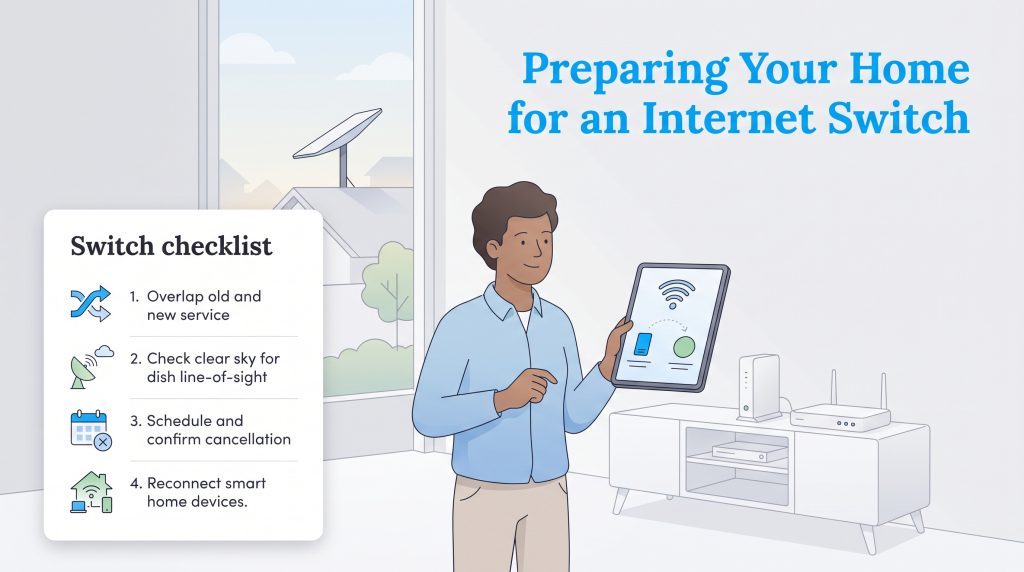
Healthy competition in the broadband space gives homeowners real leverage. Whether you’re ditching cable rate hikes for satellite or moving into a suburban neighborhood where fiber and cable are finally available, switching internet providers takes a little logistical planning to avoid work-from-home downtime.
Follow this four-step checklist to keep your household connected during the transition:
- Overlap your services by a few days: Never cancel your existing internet plan until your new Cox gateway or Starlink dish is physically installed and passing speed tests. A three-to-five-day overlap prevents unexpected work interruptions if shipping is delayed.
- Run an obstruction scan before ordering Starlink: Download the free Starlink app on your phone and use its camera-based obstruction tool from your yard or porch. Confirm you have a clear 100-degree view of the sky free of tree canopies or roof peaks before spending $349+ on hardware.
- Return rented gear promptly: Once your new connection is live, call Cox to cancel or pause your Starlink account in the app. If you rented a Cox Panoramic Wi-Fi gateway, return it to a local Cox store or UPS drop-off within 10 days and keep the receipt to avoid unreturned equipment fees.
- Keep your old Wi-Fi name and password: When configuring your new router, set the network name (SSID) and password to match your old router’s exact credentials. Your smart thermostats, security cameras, printers, and TVs will reconnect automatically without needing manual setup.
Choosing the Right Connection for Your Address
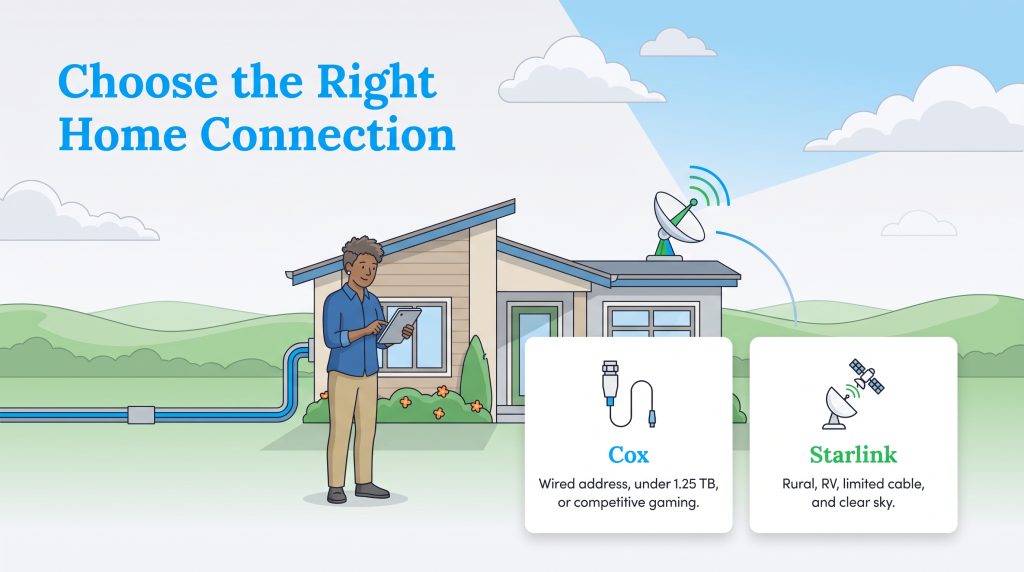
Choosing between Cox vs. Starlink ultimately comes down to a simple three-part check of your address, your gaming and remote work demands, and your monthly data consumption. If Cox is wired to your home and your household uses less than 1.25 TB of data per month (or plays competitive online games), choose Cox — you’ll get faster speeds (up to 2 Gbps), lower latency, lower electricity draw, and a lower two-year cost, especially if you buy your own modem. However, if you live in a rural area outside Cox’s 18-state footprint, travel in an RV, or live in an area where Cox is limited to lower speeds while forcing you to pay $50 extra per month for unlimited data, choose Starlink (as long as your roof has a tree-free view of the sky).
Frequently Asked Questions About Cox and Starlink
Does Starlink slow down during peak evening hours like Cox?
Can I use my own router with Cox and Starlink to save money?
Is Starlink cheaper than Cox in the long run if you need unlimited data?
What happens to Starlink if I live in an apartment or condo with trees?
Is Starlink better than Cox for online gaming?
How does Cox gigabit vs Starlink compare for working from home?
Does weather affect Starlink more than Cox?
About the Author

David has been an integral part of some of the biggest utility sites on the internet, including InMyArea.com, HighSpeedInternet.com, BroadbandNow.com, and U.S. News. He brings over 15 years of experience writing about, compiling and analyzing utility data.

LaLeesha has a Masters degree in English and enjoys writing whenever she has the chance. She is passionate about gardening, reducing her carbon footprint, and protecting the environment. She also recently served as President of the Board for City Sprouts (a community garden).