
Reviewing Hughesnet Plans, Coverage, and Real User Experiences to Help You Decide If It Is the Right Choice for Your Home
Key Takeaways
- Hughesnet provides essential satellite internet to rural and remote areas where traditional cable and fiber providers cannot reach.
- Speeds can reach up to 100 Mbps, but you will experience significantly throttled speeds once your monthly priority data cap is exceeded.
- The Hughesnet Fusion plan offers lower latency by combining satellite and wireless networks, making it a better option for seamless video calls and working from home.
Finding reliable internet in rural or underserved areas can feel like an endless search, but Hughesnet satellite internet often steps in where traditional cable and fiber providers fall short. Whether you are moving to a new home far from city limits or simply tired of spotty local service, understanding Hughesnet satellite internet plans, current pricing, and real customer reviews is essential to making a smart utility choice. We have evaluated their nationwide coverage area, explored the everyday functionality of the myHughesnet mobile app, and analyzed how they stack up against competitors to help you make an informed, confident decision for your household connectivity.
About Hughesnet Satellite Internet
Hughes Network Systems (Hughesnet) is an American satellite internet provider operating under its parent company, EchoStar. It remains one of the most accessible and widely available internet service providers in the United States, engineered specifically for rural and remote locations lacking established cable or fiber infrastructure. If you have ever felt left out by the major telecommunications companies, Hughesnet serves as a vital digital lifeline.
While they officially launched their initial 25 Mbps broadband satellite service back in 2017, recent technological upgrades — particularly the successful launch and deployment of their massive Jupiter 3 satellite — have allowed them to push download speeds up to an impressive 100 Mbps. While they are not the absolute speediest option on the market today, they promise consistent reliability and vast coverage.
Here is a quick overview of what Hughesnet brings to the table for its subscribers:
- Widespread Availability: Service relies on a clear view of the southern sky rather than local underground wires, making it available almost everywhere.
- Consistent Speeds: With the Jupiter 3 satellite actively in orbit, baseline speeds have improved significantly for everyday web browsing and media consumption.
- Built-In Wi-Fi: Every standard installation includes a modern Wi-Fi 6 modem and router combo, ensuring a robust wireless signal reaches throughout your home.
Hughesnet Plans and Pricing Details
Hughesnet keeps its offerings relatively simple with four main residential service tiers. All of their plans technically include “unlimited” data, come with a built-in Wi-Fi 6 modem, and require a standard 24-month contract. However, assessing Hughesnet internet prices requires looking past the introductory offer. Prices start reasonably low thanks to new-customer promotions, but they will jump significantly after your first 12 months of service. You will want to budget carefully for those standard, long-term costs.
| Plan Name | Price | Download Speeds | Connection Type | |
|---|---|---|---|---|
| Lite | $39.99 /month | Up to 25 Mbps | Satellite | Check Availability |
| Select | $49.99 /month | Up to 50 Mbps | Satellite | Check Availability |
| Elite | $64.99 /month | Up to 100 Mbps | Satellite | Check Availability |
| Fusion | $94.99 /month | Up to 100 Mbps | Satellite | Check Availability |
Post-Promotional Pricing Comparison
To pick the right tier, you need to evaluate the priority data caps and the eventual price hikes. These plans are grouped into standard satellite-only options (Lite, Select, Elite) and their premium hybrid option (Fusion). Here is what you can expect your bill to look like before and after the promotional period ends:
| Plan Name | Priority Data | Intro Price (Months 1-12) | Standard Price (Months 13-24) |
|---|---|---|---|
| Hughesnet Lite | 100 GB | $49.99 / mo. | $74.99 / mo. |
| Hughesnet Select | 200 GB | $64.99 / mo. | $89.99 / mo. |
| Hughesnet Elite | 200 GB | $89.99 / mo. | $114.99 / mo. |
| Hughesnet Fusion | 200 GB | $94.99 / mo. | $119.99 / mo. |
Popular Add-On Services: Voice and Security
Beyond standard internet, many rural households require a reliable landline and cybersecurity software. Hughesnet offers two primary add-ons to enhance your home network:
- Hughesnet Voice: This Voice over Internet Protocol (VoIP) service routes your home phone calls through your satellite connection rather than traditional copper phone lines. It typically costs $29.95 per month, though new users can often snag a promotional rate of $9.95 per month for the first six months. It includes premium features like caller ID, call waiting, and voicemail.
- Norton 360 Premium: For about $5.99 per month, you can bundle Norton 360 to protect up to 10 household devices from malware, phishing scams, and viruses.
Hughesnet Coverage Area and Availability

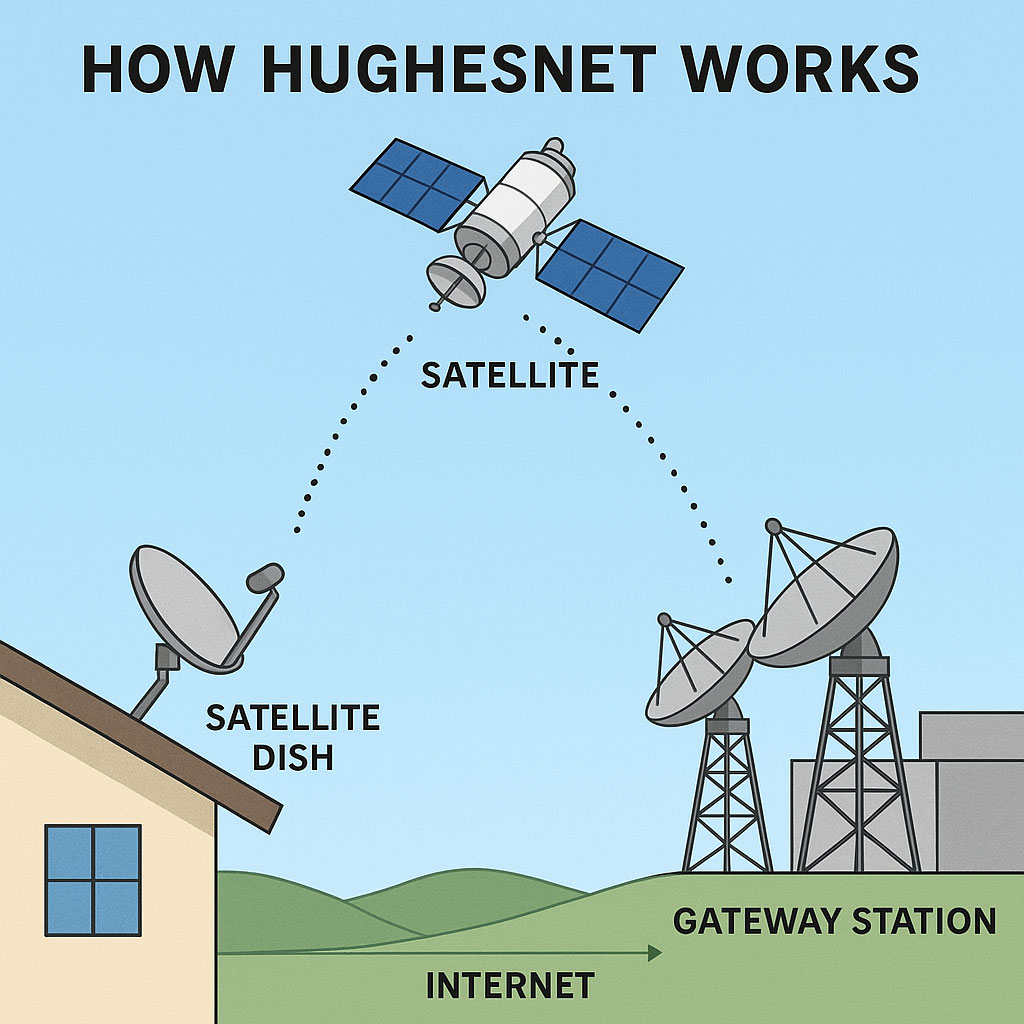
When looking at the Hughesnet coverage map rural areas are the undisputed priority. Hughesnet covers the entire contiguous United States, plus Alaska and Puerto Rico. They boast near-nationwide availability, making them a powerhouse in regions where wired broadband simply cannot reach. Unlike traditional wired internet service providers that have to lay miles of expensive cable to connect your neighborhood, satellite internet beams the service directly from orbit to your roof.
You do not need to live completely off the grid to benefit from this reach. Hughesnet actively serves the sprawling, outlying suburbs of major metropolitan hubs. If you live 40 miles outside of Dallas, deep in the mountains outside of Seattle, or in the heavily wooded areas surrounding Atlanta and Chicago, standard providers may refuse to run lines to your property. Hughesnet bridges that infrastructure gap.
The only strict requirement for guaranteed service is a clear, unobstructed view of the southern sky. Thick tree canopies, tall neighboring buildings, or steep mountainsides can easily block the satellite signal. If you have an open view from your roof or yard, you are likely eligible for immediate installation.
Network Information: Speeds, Latency, and Data Caps
While Hughesnet advertises up to 100 Mbps download speeds and 5 Mbps upload speeds, your actual day-to-day experience will heavily depend on your specific data usage and the physical limitations of space travel. Traditional Geostationary Earth Orbit (GEO) satellites sit roughly 22,000 miles above the equator. Data must travel from your home, up to space, back down to a network hub, and then return the same way. This massive journey naturally introduces latency (often between 600 and 700 milliseconds).
Unless you upgrade to the Fusion plan, real-time online gaming and live video calls will likely struggle with a noticeable, frustrating delay. However, Hughesnet Fusion plan latency is a completely different story. By utilizing advanced multipath technology, the Fusion plan actively routes latency-sensitive traffic (like your Zoom video or VoIP voice data) through local wireless cellular towers while sending heavy data (like a movie download) up to the satellite. This hybrid approach drastically reduces latency, making it the superior option for remote workers.
Understanding Hughesnet Data Caps and Throttling
The most crucial aspect to monitor is the strict Hughesnet data caps and throttling policy. Once you use your allotted priority data for the month (usually 100 GB or 200 GB depending on your plan tier), you are not cut off from the internet entirely. However, your speeds are severely throttled, often dropping down to just 1 to 3 Mbps until your next billing cycle begins.
Here is what you can realistically expect when operating on throttled 1 to 3 Mbps speeds:
- What you CAN do: Check and send standard emails, read text-heavy news articles, listen to streaming music, and slowly scroll through basic social media feeds.
- What you CANNOT do: Stream 4K or HD video without constant buffering, participate in live video conferencing, play online multiplayer games, or download large software updates in a timely manner.
Hughesnet Deals, Discounts, and Bundles
Hughesnet actively promotes a variety of deals, making the initial sign-up process much more affordable for new households. Standard promotions for new customers often include $25 off your monthly bill for the first 12 months, a prepaid Mastercard rebate, or free standard installation.
If you secure a deal that includes a prepaid Mastercard rebate, you must follow specific steps to claim it. The money does not arrive automatically:
- Order Qualifying Service: Ensure your chosen plan explicitly states it includes the rebate offer during checkout.
- Maintain Active Service: Keep your Hughesnet account in good standing for at least 31 continuous days following your installation.
- Submit the Form: Visit the official Hughesnet rebate center online, enter your new account number, and submit the digital rebate form within 90 days of activation. Your prepaid card will typically arrive in the mail within four to eight weeks.
Installation, Equipment Fees, and Guarantees
Getting Hughesnet set up at your home is strictly not a DIY project. It requires a professional installer to mount the exterior satellite dish and configure your indoor gateway. Real-life customer experiences often cite a surprisingly fast five-day turnaround from the moment you place your order to the day the technician arrives.
The installation process typically takes about four to six hours. The technician will mount the dish securely, drill the necessary holes to run coaxial cables inside, and ensure your home Wi-Fi network is active. Safety and precise satellite alignment are paramount, which is exactly why self-installation is prohibited.
Hughesnet Equipment Lease Versus Purchase
When you sign up, you face an immediate financial decision regarding your hardware. Because all Hughesnet plans require a mandatory 24-month commitment, understanding the Hughesnet equipment lease vs purchase costs can save you significant money in the long run.
| Option | Upfront Costs | Monthly Fees | Total Cost Over 24 Months |
|---|---|---|---|
| Lease Equipment | $99 setup fee | $14.99 to $19.99 / mo. | $458.76 to $578.76 |
| Purchase Equipment | $299 to $449 + $199 setup | $0 / mo. | $498.00 to $648.00 |
If you choose to purchase your equipment outright, Hughesnet includes a comprehensive 90-day warranty. If any hardware fails within those first three months, they will replace it free of charge. Be mindful of the Early Termination Fee (ETF) as well. If you break your contract early, you will be hit with a hefty fee of up to $400, which decreases by about $15 for every month you remain an active customer after the first 90 days.
MyHughesnet Mobile App Features
Managing a capped satellite internet connection requires a bit more active participation than standard unlimited cable. The myHughesnet mobile app is arguably the most valuable tool in your arsenal to prevent unexpected speed drops. Available as a free download on both the iOS App Store and Android Google Play, the app provides real-time oversight of your utility.
Instead of logging into a clunky desktop portal, the myHughesnet mobile app puts complete account management directly in your pocket. Here are its core functionalities:
- Data Tracking: View a highly visual gauge showing exactly how many gigabytes of priority data you have consumed in the current billing cycle.
- Buy Data Tokens: Instantly purchase additional high-speed data tokens if you run out of priority data before the month ends.
- Bill Pay: Securely view your monthly statements, submit one-time payments, or configure automatic ACH payments.
- Run Speed Tests: Perform a built-in Hughesnet internet speed test to diagnose latency or check current download performance.
- Wi-Fi Signal Strength: Use the app while walking around your home to identify frustrating network dead zones and reposition your router accordingly.
Sustainability and Green Energy Initiatives
As we transition toward more sustainable living standards, evaluating the environmental impact of your chosen utility providers is increasingly important. EchoStar and Hughes Network Systems have begun to publicly emphasize corporate sustainability and environmental responsibility, which is a welcome shift in the resource-heavy aerospace telecommunications industry.
A major focus for the company is mitigating space debris. When designing and launching massive satellites like Jupiter 3, EchoStar adheres to strict end-of-life disposal protocols to ensure their hardware does not clutter low-Earth or geostationary orbits indefinitely. Additionally, on the ground level, their manufacturing facilities have implemented robust closed-loop recycling programs to reduce industrial waste.
If you eventually upgrade your hardware or cancel your service, it is highly recommended that you return your equipment directly to Hughesnet or dispose of it through an EPA-certified electronics recycling facility to prevent toxic e-waste from entering local landfills.
What People Are Saying: Reviews and Ratings
To truly gauge the value of a rural internet provider, you have to look beyond the slick marketing materials and listen to what actual paying customers are experiencing. Aggregating sentiment across multiple online platforms paints a vivid picture of the Hughesnet user experience — and it is undeniably a mixed bag.
Reddit and Local Rural Forums:
When reading through niche rural subreddits and community forums, users are often vocal about the strict data throttling. Many users sign up seeing the word “unlimited” and are unpleasantly surprised when their 100 Mbps connection drops to a crawl mid-month simply because they streamed too many HD movies. However, off-grid users frequently praise the service’s reliable uptime, noting that Hughesnet stays connected during local cellular outages.
Better Business Bureau (BBB) and State Complaints:
When evaluating Hughesnet customer service reviews on the BBB, recurring themes emerge regarding billing and cancellations. A large volume of formal complaints revolves around the Early Termination Fees (ETF) and unreturned equipment fees. Customers who attempt to cancel their 24-month contract early express deep frustration over the sheer cost of the exit penalties. On a positive note, the BBB shows that the company actively responds to and attempts to resolve many of these formal grievances.
Why Choose or Avoid Hughesnet
Every single internet provider has its specific trade-offs, especially when dealing with the physical realities of satellite technology. Here is a clear breakdown of where Hughesnet shines and where it objectively falls short for the modern consumer.
| Pros of Hughesnet | Cons of Hughesnet |
|---|---|
| Nearly nationwide coverage guarantees access in deeply rural areas. | Speeds drop dramatically after you exhaust your monthly priority data cap. |
| Available without the need for local underground wires or fiber cables. | High latency on standard plans will hinder live video calls and gaming. |
| Fusion plan successfully utilizes multipath tech to improve latency. | Requires a strict 24-month contract with early termination fees up to $400. |
| Generous 50 GB Bonus Zone data is awarded freely during off-peak hours. | Prices rise significantly after the 12-month promotional period ends. |
| Consistent promotional discounts and prepaid Mastercard rebates. | High upfront equipment purchase costs if you decide not to lease. |
Hughesnet Versus Competitors Starlink and Viasat
When shopping for rural connectivity, your primary satellite options usually boil down to a three-way race: Hughesnet vs Viasat internet, or Hughesnet vs Starlink. The right choice depends heavily on your budget, data needs, and whether you are willing to sign a long-term contract.
| Feature | Hughesnet | Starlink | Viasat |
|---|---|---|---|
| Network Type | GEO Satellite & Hybrid | Low Earth Orbit (LEO) | GEO Satellite |
| Max Speeds | Up to 100 Mbps | 50–250+ Mbps | Up to 150 Mbps |
| Data Caps | Strict priority caps (100-200 GB) | No hard caps | High caps (up to 500 GB) |
| Contract Length | 24 months | No contract | 24 months |
| Installation | Professional required | DIY kit shipped to you | Professional required |
Hughesnet vs. Viasat:
Viasat generally offers higher priority data caps (sometimes up to 500 GB) and slightly faster advertised speeds depending on your exact region. However, Viasat’s monthly pricing is traditionally much more expensive than Hughesnet, making Hughesnet the better choice for budget-conscious families who do not need massive amounts of data.
Hughesnet vs. Starlink:
Starlink’s Low Earth Orbit (LEO) constellation provides incredibly low latency (20 to 50 ms) and zero data caps, making it vastly superior for competitive gaming and heavy 4K streaming. However, Starlink requires an enormous upfront equipment purchase (often $599) and charges a premium monthly rate with no introductory promotions. Hughesnet remains much more accessible for those looking to minimize initial out-of-pocket expenses.
Deciding If Hughesnet Is the Right Choice for Your Home
Making an internet purchasing decision ultimately comes down to matching a provider’s strengths with your daily household habits. While Hughesnet is not the lightning-fast, limitless fiber connection you might find in a dense urban center, it serves an incredibly specific and necessary role in the national infrastructure network.
You should absolutely consider subscribing to Hughesnet if you fit into any of the following user profiles:
- Off-Grid and Deep Rural Residents: If you live in an area where traditional cable companies refuse to lay lines and cellular hotspots cannot hold a signal, Hughesnet will reliably keep you connected to the modern world.
- Budget-Conscious Starters: If you simply cannot afford the massive $599 upfront equipment fee required by competitors like Starlink, Hughesnet’s promotional pricing and leasing options offer a much softer financial landing.
- Light to Moderate Web Surfers: If your primary internet activities involve sending emails, managing online banking, and reading the news — rather than streaming hours of 4K Netflix — the 100 GB or 200 GB priority data caps will serve you perfectly.
- Remote Workers Lacking Options: If you work from home in the countryside, paying extra for the Hughesnet Fusion plan is a brilliant workaround to solve the agonizing latency issues that plague standard satellite video calls.
Conversely, if you are a heavy data consumer craving ultra-fast, unlimited gigabit speeds, or you frequently engage in fast-paced online multiplayer gaming, this service will likely frustrate you. We recommend taking your time to compare their actual promotional rates, thoroughly review the Hughesnet equipment lease vs purchase math, and ensure your home has a clear line of sight to the southern sky before signing that two-year agreement.
Frequently Asked Questions About Hughesnet
How much is Hughesnet internet per month?
Hughesnet plans typically start between $49.99 and $94.99 per month during their introductory promotional period, which usually lasts for the first 12 months. You should also factor in mandatory equipment leasing fees, which run about $14.99 to $19.99 per month, along with standard state taxes and fees.
How much is Hughesnet internet after the promotional period ends?
Once your initial 12-month promotional window closes, your monthly rate will automatically increase to standard pricing. Depending on your specific tier, your bill will generally jump by $25 to $30 per month. For example, a base Lite plan that starts at $49.99 will typically increase to $74.99 for months 13 through 24 of your contract.
What is Hughesnet, and how does it work?
Hughesnet is a prominent satellite internet provider that beams an internet connection directly to a specialized dish securely installed on the exterior of your home. Unlike traditional cable or fiber optic providers, it does not rely on buried ground lines, making it widely available across the U.S. as long as you have a clear, unobstructed view of the southern sky.
Is Hughesnet fast enough for Netflix?
Yes, Hughesnet is absolutely fast enough to stream Netflix in standard and high definition (HD) while you still have priority data available. However, streaming dense 4K video is not recommended. Once you exceed your priority data limit for the month, your speeds will drop to 1 to 3 Mbps, causing video platforms to buffer heavily or automatically downgrade to a very low resolution.
What happens if I go over my Hughesnet priority data limit?
If you consume all 100 GB or 200 GB of your allotted priority data, Hughesnet will not disconnect you or charge you hidden overage fees. Instead, your account enters a throttled state. Your download speeds will be dramatically reduced to between 1 and 3 Mbps until your next billing cycle begins. You can optionally purchase data tokens via the myHughesnet app to restore high speeds immediately.
Does weather affect my Hughesnet satellite internet connection?
Yes, extreme weather can temporarily disrupt your service. Heavy cloud cover, severe thunderstorms, or thick snow accumulating directly on your satellite dish can interfere with the signal traveling to and from orbit. This phenomenon is commonly referred to as “rain fade.” However, normal rain or light snow rarely causes prolonged outages, and the connection typically restores itself once the severe weather passes.
Does Hughesnet require a contract?
Yes, every residential plan comes with a mandatory 24-month contract. If you decide to cancel your service before that initial two-year period is over, you will be financially responsible for an Early Termination Fee.
How do I cancel my Hughesnet service without paying the early termination fee?
Avoiding the Early Termination Fee (ETF) is notoriously difficult, as you legally agreed to a 24-month contract upon sign-up. However, you can sometimes have the fee waived if you are moving to a location where Hughesnet cannot physically provide service (such as an apartment building with no clear line-of-sight to the southern sky). You will need to speak directly with their customer retention department to negotiate this rare exception.
Can I install Hughesnet myself?
No, professional installation is strictly required. A certified technician must securely mount the exterior dish, align it perfectly with the satellite in orbit for optimal signal strength, and safely run the necessary wiring into your home.
About the Author

David has been an integral part of some of the biggest utility sites on the internet, including InMyArea.com, HighSpeedInternet.com, BroadbandNow.com, and U.S. News. He brings over 15 years of experience writing about, compiling and analyzing utility data.