

Balancing your upfront budget with your household’s need for speed is the key to choosing the right satellite provider.
Key Takeaways
- Starlink offers incredibly fast speeds and low latency, making it the top choice for remote workers and robust smart homes.
- Viasat provides a lower upfront equipment cost and professional installation, which is ideal for homeowners who want a hands-off, budget-friendly setup.
- Switching providers depends heavily on your location, so mapping out your property’s clear view of the sky is essential before making a long-term commitment.

- 400 Mbps
- Satellite
- Unlimited
- $55.00/mo

- 150 Mbps
- Satellite
- 150-850 GB
- $39.99/mo
*Not all internet providers and speeds available in all areas.
Setting up a rural homestead usually means leaving traditional fiber broadband miles behind you. If you are upgrading your current home network, you face a distinct choice: the cutting-edge, low-latency technology of Starlink or the established, professionally installed convenience of Viasat. Navigating the Viasat vs. Starlink debate ultimately comes down to balancing your initial budget against your daily digital demands. We will help you weigh the equipment expenses and performance specs so you can confidently stream, work, and manage your property without frustrating interruptions.
At a Glance: Viasat and Starlink Head-to-Head
Comparing these two satellite giants requires looking well beyond just peak download speeds. You need to examine how each provider impacts your monthly wallet and supports your broader home utility ecosystem. From upfront gear expenses to installation headaches, these details dictate your overall satisfaction with your new connection.
| Feature | Viasat | Starlink |
|---|---|---|
| Starting Price | Varies by plan and location | Varies by plan and location |
| Equipment Cost | Lease commonly available | Purchase typically required |
| Top Speeds | Varies by region (typically slower than LEO) | Varies by region (typically faster than GEO) |
| Latency | ~600ms typical (Geostationary) | ~40ms typical (Low-Earth Orbit) |
| Installation | Professional | DIY |
Speeds, Latency, and the Smart Home Experience
Your internet performance strictly dictates how well modern home utilities actually function. From adjusting smart thermostats remotely to monitoring security cameras and energy monitors in real-time, a reliable signal acts as the central nervous system for your house.
How Viasat Unleashed Handles Daily Streaming
With the introduction of the newer “Viasat Unleashed” plan, the company shifted away from its traditional long-term commitments. Analyzing Viasat Unleashed vs. Starlink shows that Viasat’s advertised speed ranges are often plenty for standard web browsing, evening movie streaming, and managing basic smart home appliances. While some plans advertise no hard data caps, they may still be subject to network management or reduced speeds after heavy use. However, because Viasat relies on geostationary satellites parked roughly 22,000 miles above Earth, you will experience high latency of around 600ms. This delay won’t ruin a Netflix binge, but it can absolutely cause frustrating lag when you try to pull up a real-time security camera feed.
Why Starlink’s Low Latency Wins for Gamers and Remote Workers
Starlink flips the script by operating a massive constellation of Low-Earth Orbit (LEO) satellites sitting roughly 340 miles above the atmosphere. When you compare Viasat vs. Starlink latency, this physical closeness translates to a rapid 40ms response time that feels remarkably similar to traditional cable broadband. The Federal Communications Commission (FCC) notes that physical distance directly impacts delay, which explains why Starlink’s lower orbit makes it the best fit for many households that rely on daily Zoom calls, competitive online gaming, and instantaneous smart home automation.
Eco Edge
Integrating your internet with an ENERGY STAR-certified smart home energy management system requires a highly stable connection. Once synced up, this smart ecosystem can automatically optimize your heating and cooling schedules to actively reduce your monthly utility footprint.
Matching Your Household Habits to the Right Network
Understanding exactly how your family consumes data is essential before locking yourself into a new provider. Rather than guessing based on abstract megabits, it helps to match your daily routine to a realistic household profile.
The Remote Working Household
If your daily schedule includes back-to-back video conferences while your partner streams HD movies and your security cameras upload footage to the cloud, low latency is non-negotiable. Starlink typically handles this heavy, simultaneous load smoothly without constant buffering.
The Light Surfing Retiree
For a household that primarily checks email, reads the news, and streams a single evening television show, paying a premium for maximum speeds might not make financial sense. Viasat comfortably manages these lighter demands while sparing you the steep initial equipment fee.
The Expanding Rural Homestead
If you are running long Wi-Fi extensions to outbuildings, barns, or detached garages, placement and stability matter immensely. Managing a large-scale property often points toward Starlink due to the DIY flexibility it offers for mounting the dish at the optimal transmission point.
Breaking Down the Costs: Equipment Fees vs. Monthly Plans
Setting up utilities at a new property involves a delicate balancing act between short-term moving expenses and long-term monthly bills. Satellite internet forces you to decide exactly where you prefer to spend your cash.
Starlink Equipment Cost vs. Viasat
Looking at the Starlink equipment cost vs. Viasat reveals two completely different business models. Starlink typically requires a significant upfront capital investment for its hardware before you even pay your first monthly bill, though this cost varies by current promotions. Viasat, by contrast, offers minimal setup fees and generally leases the dish to you. Choosing Viasat offers immediate cash-flow convenience when moving to a new home. Yet, while Starlink is often more expensive on day one, avoiding endless equipment leasing fees often balances the scale after a couple of years.
Starlink Plans & Pricing
| Plan Name | Price | Download Speeds | Connection Type | |
|---|---|---|---|---|
| Residential 100 Mbps | $55 /month | Up to 100 Mbps | Satellite | Check Availability |
| Residential 200 Mbps | $85 /month | Up to 200 Mbps | Satellite | Check Availability |
| Roam 100 GB | $55 /month | Up to 300 Mbps | Satellite | Check Availability |
| Roam Unlimiited | $175 /month | Up to 300 Mbps | Satellite | Check Availability |
| Roam 300 GB | $80 /month | Up to 300 Mbps | Satellite | Check Availability |
| Residential Max | $130 /month | Up to 400 Mbps | Satellite | Check Availability |
Viasat Plans & Pricing
| Plan Name | Price | Download Speeds | Connection Type | |
|---|---|---|---|---|
| 12 Mbps / 65 GB Internet | $49.99 /month | Up to 12 Mbps | Satellite | Check Availability |
| Viasat Essentials | $39.99 /month | Up to 50 Mbps | Satellite | Check Availability |
| Viasat Unleashed | $69.99 /month | Up to 150 Mbps | Satellite | Check Availability |
Navigating Obstructions, Mounting, and Power Needs
Securing a strong satellite signal goes beyond choosing a plan and paying your bill. The physical landscape of your property dictates exactly how and where your new equipment will live.
Clearing Trees and Rooflines
Both providers demand a clear, unobstructed view of the sky. Tall pine trees, neighboring rooflines, and steep ridges can easily block satellite signals. Taking the time to survey your property for potential dead zones is a critical first step before a technician arrives or you start drilling holes.
Mounting and Grounding the Dish
Finding the right spot often means exploring various mounting options, such as roof mounts, pole mounts in the yard, or securing the dish to the side of your home. It is also essential to ensure your setup is properly grounded to protect your network from lightning strikes, a step that professional Viasat installers handle automatically but DIY Starlink users must manage themselves.
Installation and Weather Resilience
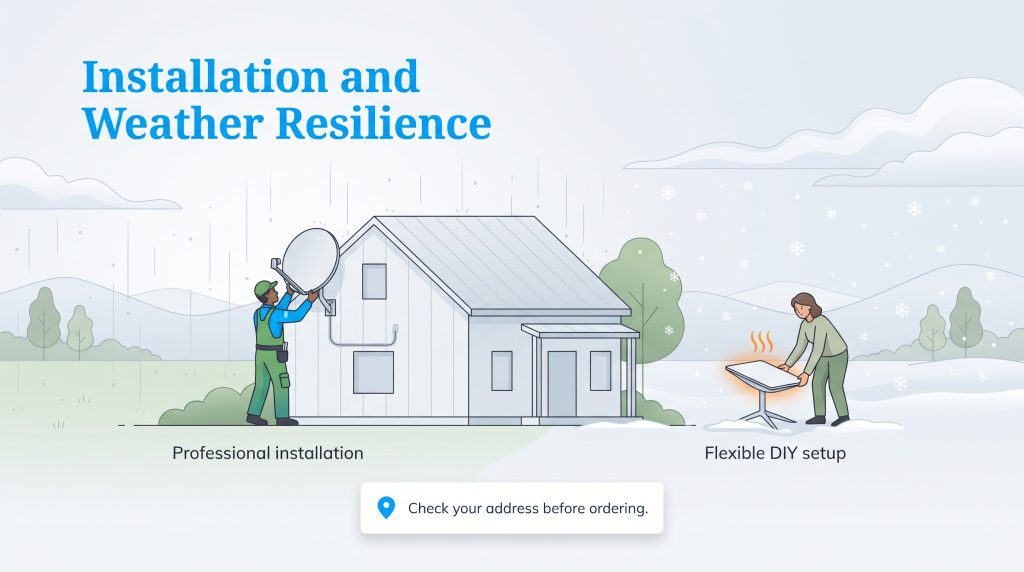
The physical realities of living outside city limits mean your home’s geography and local climate play a massive role in choosing a provider. A dish that works perfectly in the arid Southwest might struggle through harsh Midwestern winters.
Professional Setup vs. DIY Mounting
Viasat sends an experienced technician directly to your property to securely mount the dish and professionally route the cables through your walls. For non-technical homeowners, this hands-off approach is a massive relief. In contrast, Starlink forces you to handle the installation yourself. You will be up on your roof finding the perfect angle or mapping out a clear spot in your yard, which requires genuine physical effort but grants you total flexibility over the dish’s placement.
Tackling Starlink Rain Fade vs. Viasat Outages
Weather disruptions are an unavoidable part of owning a dish, making the debate of Starlink rain fade vs. Viasat incredibly relevant for rural customers. Heavy rain or dense snowstorms can temporarily drop the signal for both services. Starlink counters winter weather nicely with a built-in heating element that automatically melts snow off the dish, which can help maintain a connection during lighter storms. Viasat utilizes a larger, stationary dish that occasionally requires manual clearing with a broom, though its sheer size may perform differently against certain wind conditions. Ultimately, heavy precipitation can disrupt both providers regardless of dish design.
Pro Tip
Before ordering any hardware, plug your exact rural address into the FCC’s National Broadband Map. This tool verifies precise network availability and shows reported connectivity speeds reported by your actual neighbors.
Choosing the Right Satellite Provider for Your Property
Deciding between these two dominant networks comes down to how you balance your budget against your daily digital needs. Use these quick guidelines to steer your final choice.
Choose Starlink if you:
- Work from home and require seamless video conferencing without lag.
- Enjoy fast-paced online gaming that relies on low-latency connections.
- Have a robust smart home ecosystem with real-time security cameras.
- Are comfortable physically installing and mounting equipment yourself.
Choose Viasat if you:
- Want to avoid a large, upfront expense when moving into a new property.
- Prefer a hands-off, professional installation process with guaranteed grounding.
- Primarily use the internet for casual browsing, email, and moderate streaming.
- Live in an area where Starlink is currently waitlisted or heavily congested.
Making the Switch: Is Starlink Better Than Viasat?
If you currently have a functioning connection but feel frustrated by sluggish speeds, you are likely wondering if it makes financial sense to switch from Viasat to Starlink. Taking on a higher upfront hardware fee to break away from an older, slower setup is usually worth it if your career or home security system relies heavily on instant data transfer.
Best Satellite Internet for Rural Areas: Our Final Verdict
If you are actively comparing rural internet providers, identifying your household’s primary need is the fastest way to make a decision. Here is how we rank the landscape for our satellite internet comparison 2026 update:
- Best for Speed and Smart Homes: Starlink
- Best for Budget Setup and Convenience: Viasat
- Best Alternative Backup: HughesNet
While HughesNet acts as a fair, budget-tier third option in the larger Starlink vs. Viasat vs. HughesNet debate, the main event remains between the top two contenders. Investing in Starlink hardware might sting initially. However, properly leveraging your fast new connection to manage an automated, energy-efficient smart house is a brilliant strategy for saving on your monthly utility bills over time.
Wrapping Up Your Satellite Internet Decision
Choosing the ideal connectivity solution ultimately revolves around your personal priorities and technical comfort zone. Prioritizing cutting-edge speed for seamless zoom calls points you firmly toward Starlink, while valuing a hands-off, budget-friendly installation highlights Viasat as the sensible choice. Whichever route you take, the modern landscape of rural connectivity continues to improve rapidly, ensuring you won’t be left in the digital dark.
Frequently Asked Questions About Viasat vs. Starlink
Is Starlink better than Viasat?
How much faster is Starlink compared to Viasat?
Can I play online games on Viasat?
Does Viasat still require a long-term contract?
What is the best satellite internet for rural areas right now?
Will trees block my Starlink or Viasat signal?
About the Author

David has been an integral part of some of the biggest utility sites on the internet, including InMyArea.com, HighSpeedInternet.com, BroadbandNow.com, and U.S. News. He brings over 15 years of experience writing about, compiling and analyzing utility data.

LaLeesha has a Masters degree in English and enjoys writing whenever she has the chance. She is passionate about gardening, reducing her carbon footprint, and protecting the environment. She also recently served as President of the Board for City Sprouts (a community garden).