


Understanding your smart meter’s digital display codes helps you track your daily energy consumption and take control of your monthly electricity bill.
Key Takeaways
- Smart meters provide frequent digital data on your energy consumption, usually reducing or entirely eliminating the need for manual monthly readings from your utility company.
- Understanding common smart meter display codes like CLS and OPN can help you easily troubleshoot your home’s power connection status without calling a technician.
- Homes with solar panels use bidirectional smart meters to track both the electricity pulled from the local grid and the excess renewable energy exported back to it.
Staring at the digital screen on the side of your house can feel intimidating, but learning how to read a smart meter is actually a straightforward process that instantly upgrades your household energy management. Rather than viewing that gray utility box as a confusing mystery, you can treat it as an empowering tool that helps you save time, money, and natural resources. We know understanding your electric bill can be frustrating, but taking just a few minutes to understand your meter’s basic codes puts you in the driver’s seat of your home’s daily power consumption. You don’t need to be a certified electrician or an energy expert to grasp these core concepts — just a curious homeowner ready to decode the data and take proactive control of your monthly utility bill.
What Is a Digital Smart Meter?
Not that long ago, homes relied on traditional analog meters equipped with slowly spinning dials to track electricity and natural gas usage. A meter reader from your utility provider had to physically walk into your yard every month to manually record those numbers. Today, modern digital smart meters have completely revolutionized this process by utilizing advanced two-way communication technology. These upgraded devices send accurate, frequent interval data directly to your utility company over secure radio frequency networks, which effectively reduces the need for routine manual readings and frustratingly estimated bills.
While many homeowners associate this smart technology strictly with electricity, utility companies have also rolled out digital smart meters for natural gas and water services across the country. If you want a deeper dive into how this technology is actively upgrading the nation’s infrastructure, you can explore the Department of Energy’s smart grid overview. We love smart meters because they grant you unprecedented visibility into your daily energy habits, making it much easier to spot expensive waste, shift your usage to cheaper hours, and adjust your routines for a significantly more energy-saving household.
🌱 Eco Edge: Millions of homes now use smart meters, which actively reduces the carbon footprint of utility fleets because meter readers no longer have to drive gas-powered trucks from neighborhood to neighborhood every single month.
How to Read an Electric Smart Meter
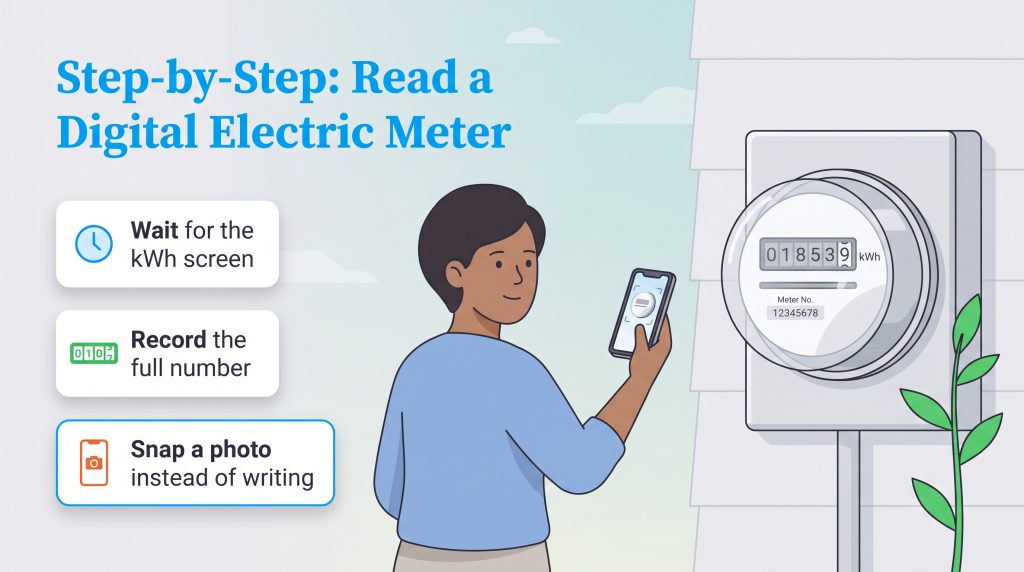
Figuring out exactly how to read an electric smart meter is surprisingly easy once you know what to look for on that flashing digital display. Unlike older analog dials that required reading from left to right and carefully rounding numbers up or down based on pointer position, your new meter simply displays exactly what you have consumed. If your utility bill shows a different register number than the one you see outside, just use your bill’s meter number or register label to confirm you are comparing the correct reading. Just follow these simple steps to pull an accurate reading from your electric meter:
- Locate your meter outside: Find the digital electric meter, which is typically mounted on the side or back of your house near your main breaker panel.
- Wait for the correct screen (Single-Rate): Stand patiently in front of the meter and allow the digital screen to automatically cycle until you see the “kWh” or “404” screen.
- Watch for alternating registers (Multi-Rate): If your household operates on a multi-rate or time-of-use plan, keep watching the screen as it cycles between multiple kWh readings for different times of day.
- Record the display numbers: Write down the 5- to 7-digit number displayed on the screen from left to right, completely ignoring any smaller fractions or decimal points if they happen to appear.
- Log the date and time: Note the exact date and time of your reading so you can accurately track your cumulative usage over a specific weekly or monthly timeframe.
💡 Pro Tip: Instead of fumbling for a pen and paper outside in the weather, simply snap a quick, clear photo of the meter screen with your smartphone so you never accidentally write down the wrong number.
How to Read a Gas Smart Meter
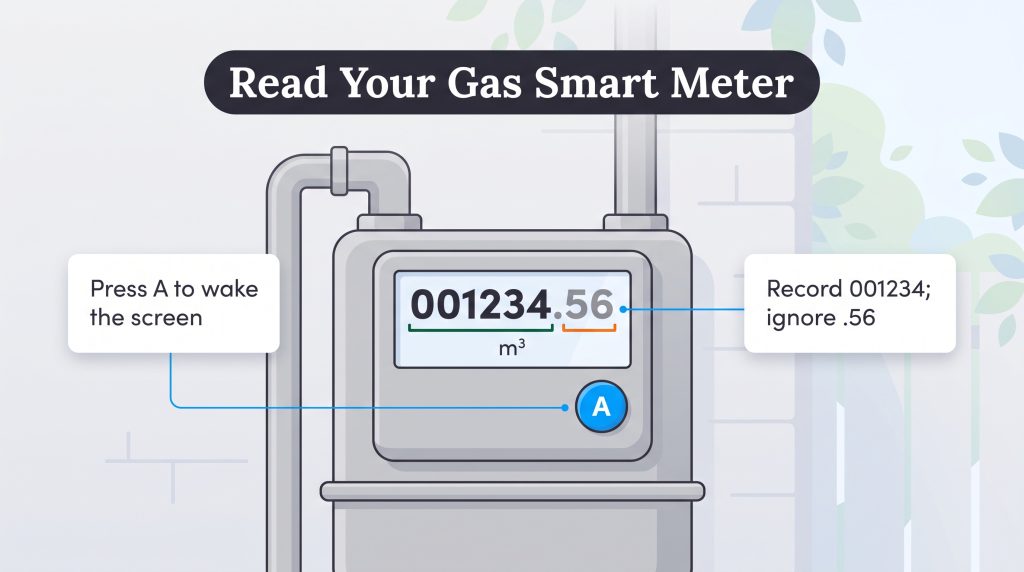
If your home relies on natural gas for heating, hot water, or cooking, learning how to read a gas smart meter helps you track that specific fuel consumption just as easily as your electricity. Natural gas meters function a bit differently than electric meters because they measure the physical volume of gas flowing through the pipes rather than electrical current. Because many modern gas smart meters are battery-operated, their digital screens often go to sleep to conserve power, meaning they won’t automatically flash information at you while you stand there.
Checking your household natural gas usage requires waking up the device and grabbing the right numbers. Follow these four quick steps to get a successful reading:
- Wake up the digital screen: Press the primary button (often red, blue, or labeled “A”) located on the front of the gas meter. You might need to press it briefly or hold it for a few seconds until the digital display illuminates.
- Toggle to the volume display: If the screen does not immediately show your usage, press the button a few more times to cycle through the menu until you see “Volume,” “Cubic Feet,” “CCF,” or “Cubic Meters.”
- Read the numbers from left to right: Note the main sequence of numbers displayed across the screen.
- Ignore the decimal points: Just like with electric meters, completely ignore any numbers following a decimal point. Your utility provider only bills you for full units of gas consumed.
🚩 Heads Up: Never attempt to open the physical housing of your gas meter or force buttons that are stuck. If your gas meter screen refuses to turn on after pressing the main button, contact your utility provider to request a battery check or replacement.
Smart Meter Button Functions Explained
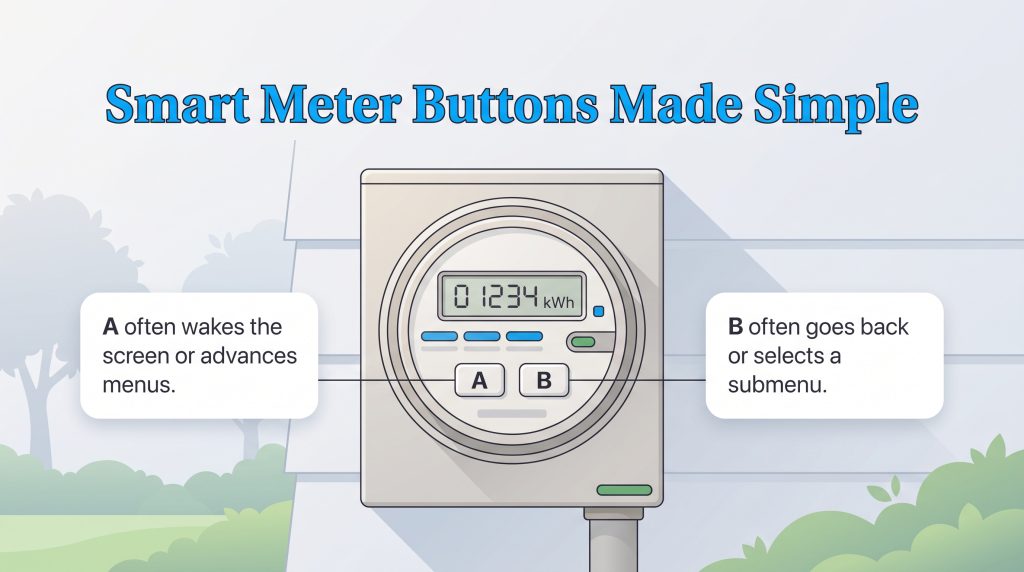
While many digital meters are programmed to scroll through their data screens automatically, some models require a little manual interaction to reveal the specific information you need. Getting your smart meter button functions explained is incredibly helpful if your meter’s screen is currently asleep or locked on a diagnostic display. Different manufacturers use slightly different button layouts, but they generally follow similar operational logic.
Here are the most common physical button configurations you will encounter on your home’s smart meter:
- A and B Buttons: This is one of the most common layouts. Pressing the “A” button typically wakes the screen up and allows you to toggle forward through the menu. Pressing the “B” button often allows you to scroll backward or select a specific sub-menu, such as your time-of-use registers or current voltage.
- Blue and Red Buttons: Similar to the A/B setup, the colored buttons allow you to cycle through the displays. A quick press on the Blue button usually advances the screen to the next code, while holding the Red button down for a few seconds can reset the display cycle or reconnect a temporarily open internal switch (only if instructed by your utility).
- Scroll Arrows: Some advanced meters feature intuitive directional arrows. You can simply press the right or left arrows to navigate directly to your total kWh usage, the current date, or connection status codes.
If you press a button and accidentally navigate into a deeply confusing diagnostic menu full of complex engineering codes, don’t panic. Simply stop pressing the buttons for about 60 seconds, and the meter will automatically time out and revert to its standard scrolling display.
Time of Use Tariff Smart Meter Reading
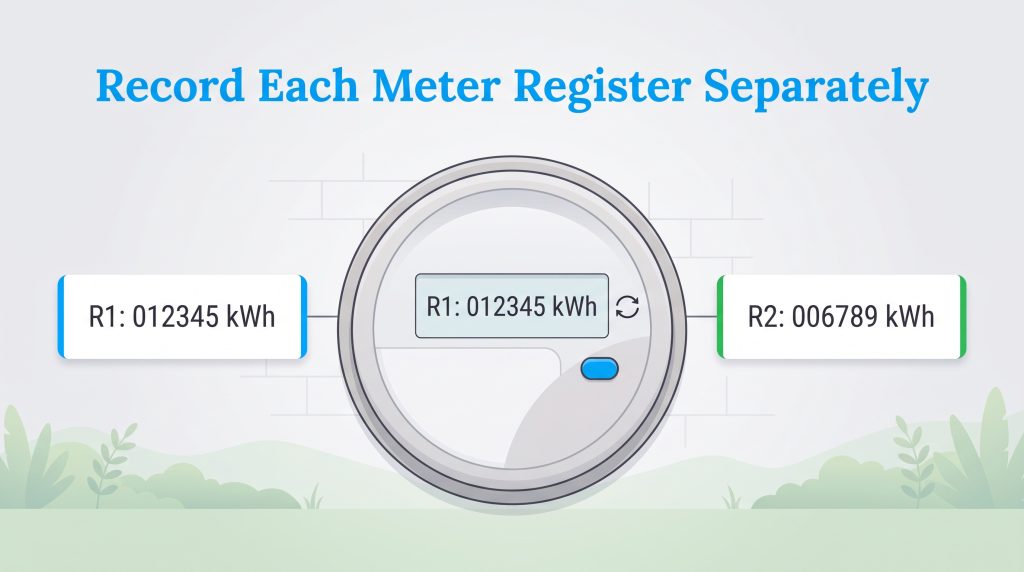
Taking a time of use tariff smart meter reading requires a little more attention than pulling data from a standard flat-rate meter. If you enrolled in a dual-rate or multi-rate energy plan, your utility provider charges you different prices for electricity depending on the time of day. This means your smart meter must track exactly when you use power, separating your consumption into distinct buckets — typically categorized as peak and off-peak hours.
When you observe your meter’s digital screen, you will notice that it does not show just one grand total for your kWh. Instead, it will cycle between at least two separate usage registers. You will typically see a screen labeled “Rate 1” or “R1,” which often represents your peak-hour usage when electricity is most expensive. A few seconds later, the screen will switch to “Rate 2” or “R2,” which tracks your cheaper, off-peak usage. In some complex utility regions, you might even see a third register for “shoulder” or “mid-peak” hours.
To accurately track your household data, you must write down both numbers separately and label them according to the register. Monitoring these individual rates is a brilliant energy-saving strategy, as it clearly reveals whether you are successfully shifting your heavy appliance usage (like running the dishwasher or doing laundry) into the cheaper off-peak windows.
Smart Meter Display Codes Explained
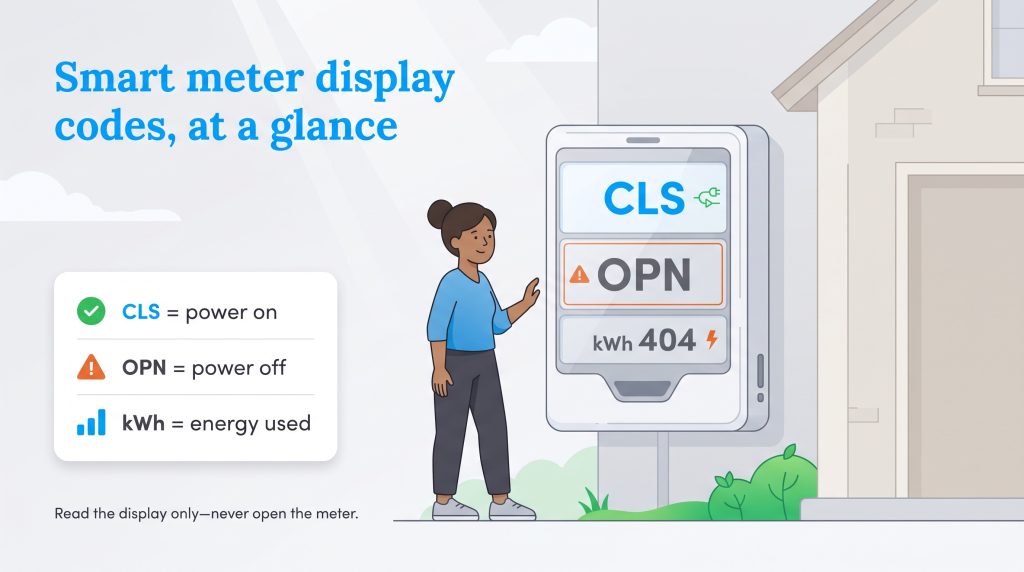
When you first walk up to your digital meter, you will probably notice the screen flashing an unfamiliar variety of letters and numbers. Getting your smart meter display codes explained is the first major step toward demystifying your household power usage. You generally don’t need to press any buttons to see this basic information, as the digital screen is programmed to cycle through these various codes automatically, usually pausing on each display for a few seconds.
If you have ever found yourself asking what do smart meter numbers mean, we have outlined the most common abbreviations you will encounter. Keep in mind that smart meter codes vary slightly by utility provider and manufacturer model, so treat these as helpful common examples rather than a universal, strict codebook. If your display shows an error code not listed here, always check your utility’s online meter guide or contact their customer service line before assuming there is a major hardware problem.
| Code | Meaning | What You Should Know |
|---|---|---|
| CLS | Closed | This means the internal switch is closed and power is successfully flowing to your home. |
| OPN | Open | This may indicate the service switch is open or your home’s power is disconnected from the local grid. |
| 404 or kWh | Kilowatt-hours | This displays your total electricity consumption, which is the primary number used for your monthly billing. |
| PH | Phase | Indicates the electrical phase connection status; most standard residential homes will display a single-phase status. |
| V / A | Voltage / Amps | Displays real-time electrical voltage or amperage being drawn, useful for utility diagnostic purposes. |
| MDY | Current Date | Shows the current month, day, and year for accurate utility data tracking purposes. |
| HMS | Current Time | Displays the current time in hours, minutes, and seconds, ensuring time-of-use tariffs are billed correctly. |
Decoding Connection Statuses
Figuring out what the code CLS means on a smart meter is one of the most frequent hurdles for new residents trying to actively troubleshoot a neighborhood power outage. If your digital screen reads CLS (Closed), your connection to the grid is fully active and electricity is actively flowing into the house. If the screen flashes OPN (Open), the utility has temporarily disconnected your service, either for a scheduled maintenance event, an unpaid bill, or a remote safety shutoff. Understanding these essential connection statuses is incredibly helpful when you are setting up new service or restoring power, as it immediately tells you if the problem originates on the local grid’s side or somewhere inside your home’s private breaker box.
How to Read a Smart Meter With Solar Panels
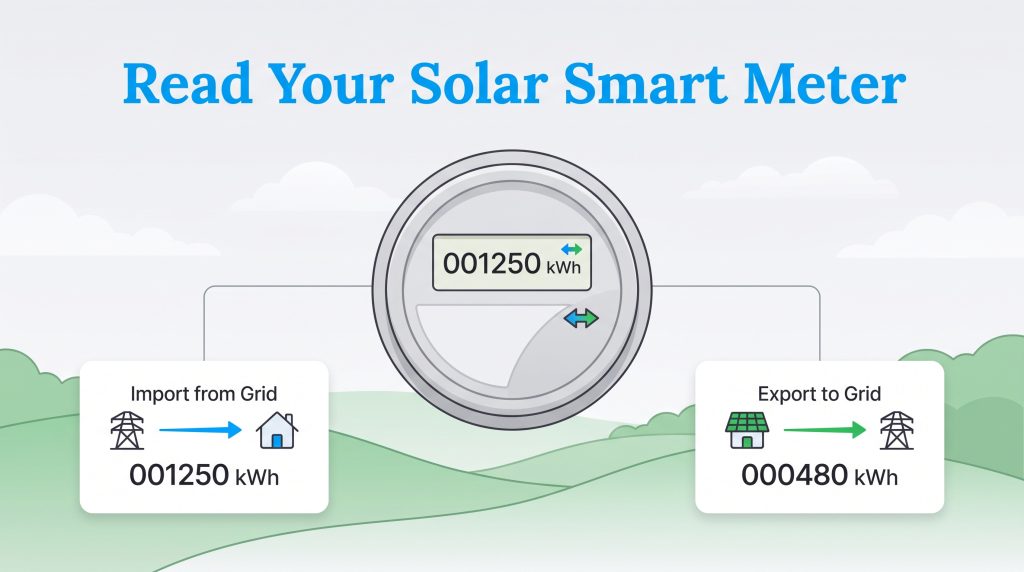
If you generate your own renewable energy on the roof, figuring out how to do a bidirectional smart meter reading solar check involves just one extra layer of detail. Many solar customers utilize a specialized bidirectional smart meter that precisely tracks both the electricity delivered from the grid and the excess electricity received from your solar system. Your financial credit for this production depends heavily on your utility’s specific solar billing policy, which may be officially called net metering, net billing, or another regional export-credit program.
Because your panels generate massive amounts of power during the bright afternoons, your home will likely produce far more electricity than it actually needs at that moment. When that happens, your smart meter seamlessly sends that excess energy backward into the local grid to be used by your neighbors. Conversely, when the sun finally goes down and your panels completely stop producing, you will begin pulling electricity from the grid just like a standard, non-solar home.
To accurately track this constant two-way flow, your meter’s digital screen will steadily alternate between two distinct kWh readings. The first data screen displays the total cumulative energy you have imported from the utility company over time. The second data screen clearly displays the surplus energy you have exported back out to the grid. Mastering this give-and-take data relationship is one of the most rewarding and financially beneficial aspects of transitioning to solar energy for your home.
Calculating Your Utility Bill From a Smart Meter
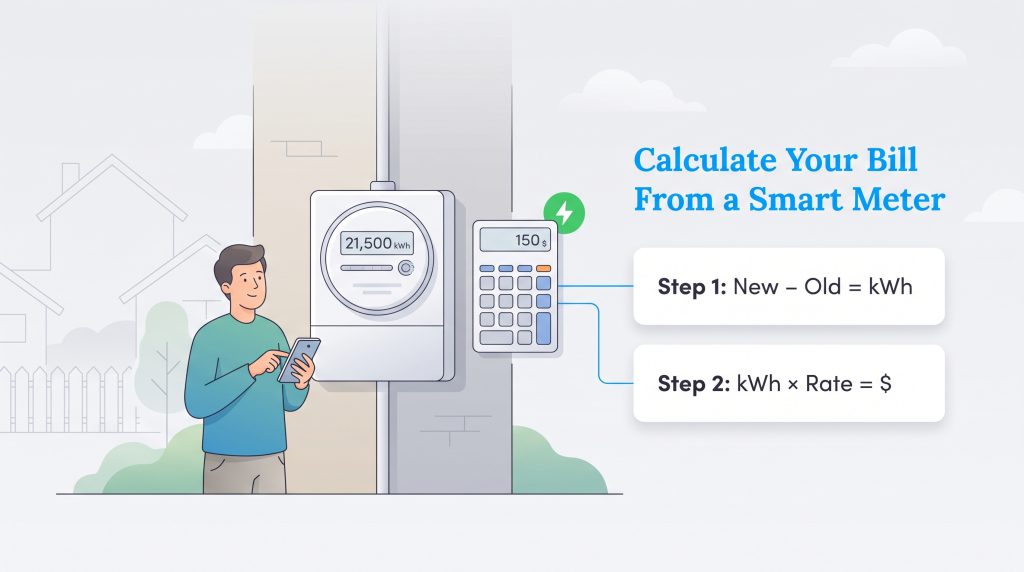
Once you have confidently captured your current readings, knowing how to calculate electric bill from smart meter data gives you a powerful tool to predict your monthly expenses with basic math. Your digital meter displays a cumulative number, meaning it constantly counts upward without resetting, much like the total mileage odometer in your car. To figure out exactly how much power you consumed during a specific billing cycle, you simply subtract last month’s manual reading from your current reading.
For example, if your previous month’s electricity reading was 20,500 kWh and your newly recorded reading is 21,500 kWh, you used exactly 1,000 kWh of electricity. Next, multiply that total usage by your plan’s electricity supply rate to estimate your upcoming bill. If you currently pay 15 cents per kWh, you would multiply 1,000 by $0.15, bringing your estimated energy supply cost to $150. Keep in mind that this gives you a rough estimate of your energy supply cost, not your full final bill. Standard delivery charges, fixed monthly connection fees, local taxes, and time-of-use pricing adjustments will slightly change the final amount.
If you are also tracking a gas smart meter, the process involves one extra step. Your gas meter typically measures usage in hundreds of cubic feet (CCF), but your utility company likely bills you in a thermal unit called Therms. To estimate your gas bill, you subtract your previous CCF reading from the current one to find the volume used, then multiply that number by your utility’s thermal conversion factor (usually printed on your past bills, hovering around 1.03). Finally, multiply those resulting Therms by your plan’s natural gas rate. Keeping a close eye on these calculations across both your electric and gas meters naturally opens the door to smarter strategies to reduce your monthly electricity costs and overall utility budget.
📌 Quick Fact: If you are entirely unsure what you currently pay per kWh, you can quickly check the U.S. Energy Information Administration’s state electricity profiles to find the average retail rate in your specific area.
Tracking Energy With an In-Home Display
While taking a brisk walk out to your yard to physically read the outdoor meter is great for a quick check, you can get much deeper insights without ever leaving the house by using an in-home display for smart meter tracking. An In-Home Display (IHD) is a small, portable electronic monitor that sits conveniently on your kitchen counter or bedside table. It connects wirelessly to your smart meter — often using a secure Zigbee radio connection — to instantly beam real-time energy usage data right into your living space.
Instead of merely showing you a cumulative string of confusing numbers, a quality IHD translates that raw meter data into clear, actionable metrics. A quick glance at the colorful screen will tell you exactly how many kilowatts you are drawing in real-time, how much that power is costing you per hour, and whether your current usage is considered high or low based on a visual traffic light system (green, yellow, red). This immediate feedback is invaluable for spotting energy-hogging habits, such as accidentally leaving the basement lights on or running the heavy air conditioner during peak hours.
If you are currently exploring energy plans for a new home, these digital IHD insights are utterly crucial for choosing a customized plan that perfectly fits your exact lifestyle. Tracking your daily household peaks via a smart display also clearly reveals when it might be time to confidently invest in an ENERGY STAR home upgrade, as swapping out those notoriously old, inefficient appliances can significantly lower those daily meter readings and effectively shrink your overall carbon footprint.
Common Smart Meter Reading Mistakes to Avoid
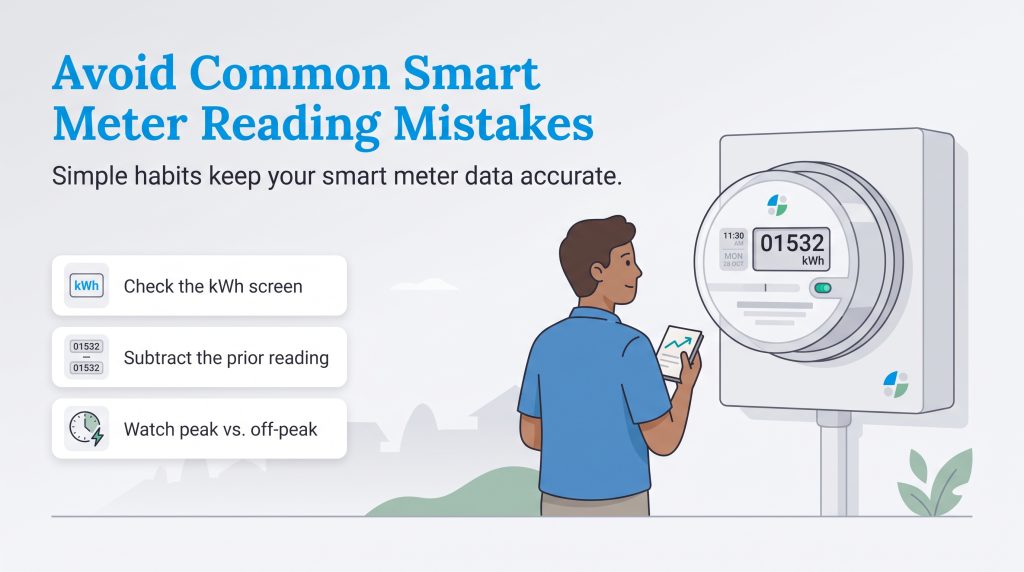
Even with an exceptionally clear, brightly lit digital screen, it is quite simple to make a few minor errors when you first start tracking your household energy usage. Avoiding these frequent, frustrating missteps will ensure you are getting the most accurate data possible from your meter every single time.
- Reading the wrong digital screen: Ensure you are patiently looking at the kWh screen for electricity (or Volume for gas), rather than accidentally writing down the date, time, or complex diagnostic register.
- Forgetting the cumulative total math: Remember that your primary kWh total constantly counts upward, so you absolutely must subtract your previous reading from your current one to find your usage for the month.
- Ignoring time-of-use pricing periods: If your chosen rate plan includes peak and off-peak pricing, tracking your overall usage is only half the battle. You must pay close attention to the separate Rate 1 and Rate 2 registers.
- Overestimating final bill accuracy: Comparing your simple estimated energy charge to your full monthly bill without factoring in standard delivery fees, fixed connection charges, and local taxes will always result in a mismatched number.
- Assuming all digital codes are universal: Meter codes can vary significantly between utility companies and manufacturers, so always take a moment to verify unusual abbreviations with your specific provider.
When to Call Your Utility Company
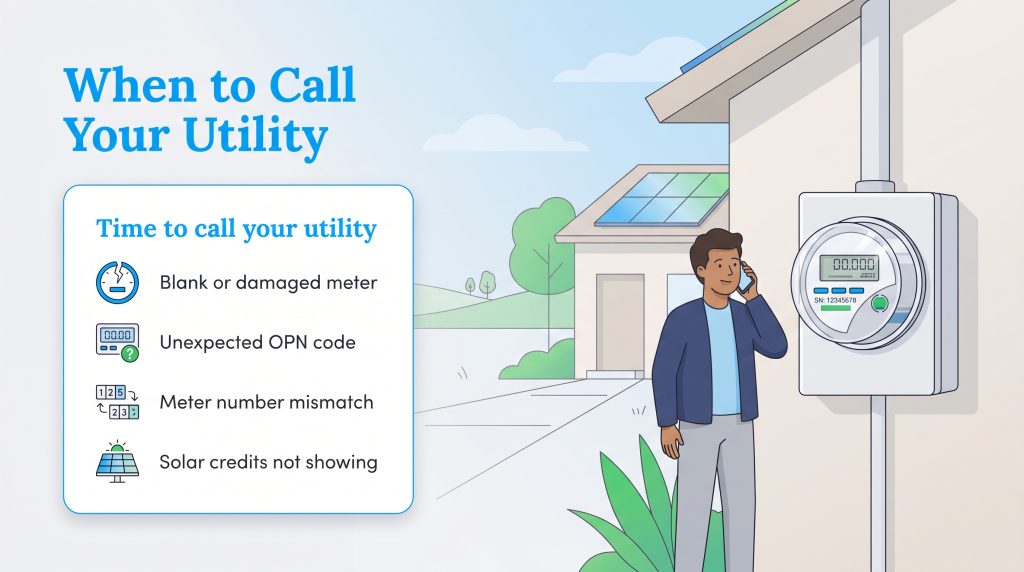
While your newly acquired knowledge successfully empowers you to handle the vast majority of your daily data collection, some specific situations require prompt professional intervention. Attempting advanced smart meter reading troubleshooting on your own can sometimes be dangerous or void utility equipment agreements. Always play it safe and contact your electricity or gas provider directly if you encounter any of the following concerning scenarios:
- Your digital meter display remains completely blank after pressing the wake-up button, or the glass casing is noticeably physically damaged.
- The OPN code stubbornly appears on the screen, indicating a closed connection, and you certainly weren’t expecting a scheduled service disconnection.
- The official meter number printed at the top of your monthly bill doesn’t accurately match the stamped serial number on the meter outside your home.
- Your latest utility bill shows energy usage that seems entirely impossible or vastly inflated compared to the manual readings you have been tracking.
- You have active solar panels installed and producing, but your hard-earned exported energy credits aren’t appearing on your recent billing statements.
Empowering Your Household Energy Strategy
Gaining the confidence to properly read your smart meter transforms you from a passive utility consumer into an incredibly active, knowledgeable manager of your household power. The rolling data flashing on that digital screen is not some locked-away secret code — it is the primary key to deeply understanding your daily habits. By keeping a close track of your kilowatt-hours and identifying exactly when you draw the most electricity or natural gas, you can start making meaningful, eco-conscious adjustments to your busy daily routine. Understanding your raw energy data is truly the very first step toward successfully lowering your utility bills, reducing your home’s environmental impact, and creating a far more efficient, comfortable living space for years to come.
Frequently Asked Questions About How to Read a Smart Meter
How do I check my smart meter reading online?
What does a flashing light on my smart meter mean?
What do the A and B buttons do on my smart meter?
How do I read a smart meter with two tariffs?
Why is my smart meter reading jumping around?
Can I buy a smart meter in-home display?
What should I do if my smart meter display is blank?
About the Author

David has been an integral part of some of the biggest utility sites on the internet, including InMyArea.com, HighSpeedInternet.com, BroadbandNow.com, and U.S. News. He brings over 15 years of experience writing about, compiling and analyzing utility data.

LaLeesha has a Masters degree in English and enjoys writing whenever she has the chance. She is passionate about gardening, reducing her carbon footprint, and protecting the environment. She also recently served as President of the Board for City Sprouts (a community garden).

Jared Evans is a licensed electrician and the owner of Full Circuit Electric in Omaha, Nebraska. As an expert reviewer for UtilitiesForMyHome.com, Jared uses his 10+ years of hands-on experience to ensure our electrical advice is safe, accurate, and easy to follow. Whether he's troubleshooting a complex wiring issue or sharing tips on green energy upgrades, Jared is dedicated to helping you power your home efficiently — and safely.