


Smart Plugs Can Help Reduce Wasted Electricity When You Use Them on the Right Devices and Schedules
Key Takeaways
- Vampire power can drain your wallet, but using smart plugs effectively cuts off standby electricity from your home’s most power-hungry devices.
- Automating your electronics with schedules is one of the easiest smart plug uses for energy saving without sacrificing your daily convenience.
- Energy-monitoring smart plugs provide real-time data, allowing you to identify exactly which appliances are inflating your utility costs.
Opening an unexpectedly high utility bill is a frustration we all know too well, especially when you feel like you’ve done everything possible to keep the lights turned off. You might be surprised to learn that your appliances are secretly sipping electricity even when they appear completely powered down. Tackling this hidden drain doesn’t require a complicated home rewiring project or expensive new gadgets. In fact, uncovering the best smart plug uses for energy saving provides a practical tool for combating energy waste and lowering your carbon footprint. These unassuming little adapters bridge the gap between your wall outlet and your electronics, giving you more control over how and when your home consumes power. By learning how to use smart plugs to save energy effectively, you can effortlessly transform your living space into a highly efficient environment.
Do Smart Plugs Actually Save Energy?
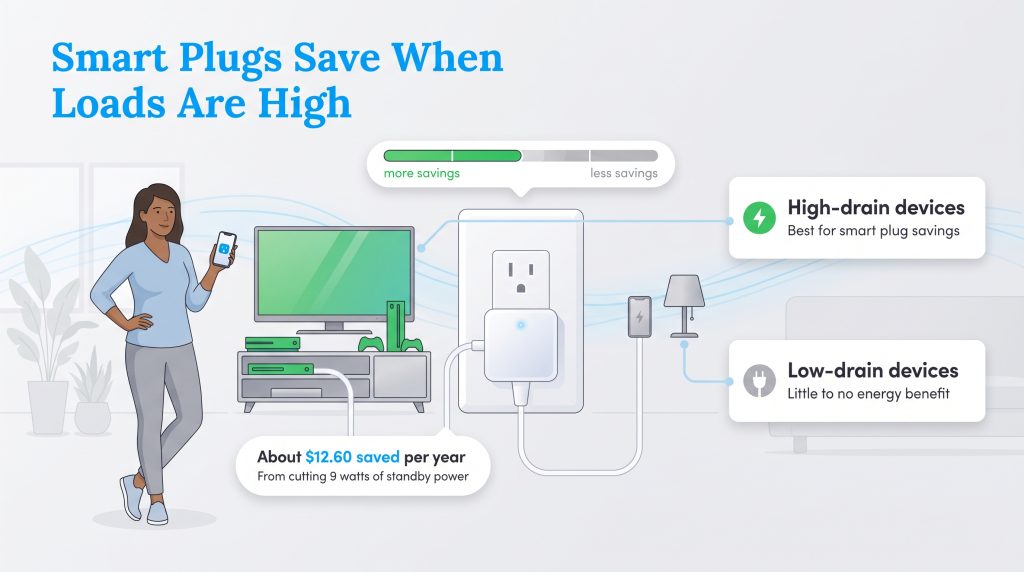
Let’s get straight to the facts: yes, these devices can genuinely lower your utility bills, but you must implement a strategic approach to see a measurable difference. If you often find yourself asking, “Do smart plugs save money on electric bills?” you certainly aren’t alone in your skepticism. A common hesitation is the realization that smart plugs themselves require a tiny bit of electricity — typically drawing between 1 to 1.5 watts continuously — just to maintain an active connection to your home’s network. They only generate a positive financial return when they prevent more power waste than they consume. However, when deployed correctly on energy-hogging electronics, the amount of electricity they stop other items from wasting easily outpaces their own minimal operational cost.
To determine if a smart plug is worth your investment, it helps to look at the typical payback period. An average smart plug costs around $15 at most major retailers. If you use it to cut 10 watts of standby power that usually runs 24/7, you save about $14 per year before subtracting the smart plug’s own electricity use. If the smart plug itself uses 1 watt, the net savings from a 10-watt standby device is closer to 9 watts, or about $12.60 per year at an average rate of $0.16 per kilowatt-hour. In that realistic scenario, a $15 smart plug pays for itself in just over a year, launching you into ongoing savings year after year. Conversely, using a smart adapter for a 0.2-watt idle phone charger will never break even on energy savings alone.
💡 Pro Tip: You can maximize your return on investment by strategically placing your smart plugs on high-drain electronics rather than low-impact items like bedside LED lamps.
Vampire Power Costs: How Much Energy Are Your Devices Wasting?
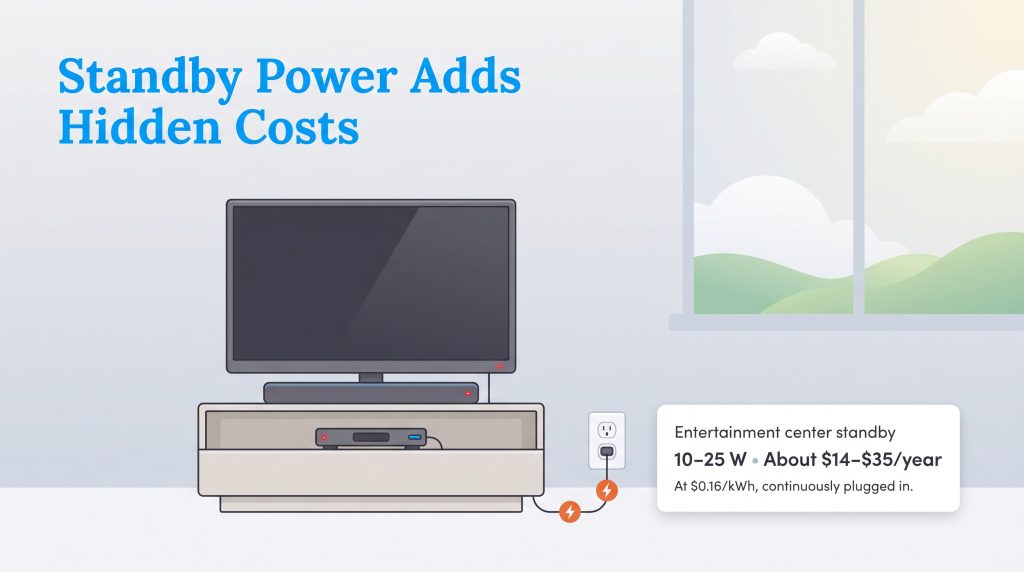
Vampire power, routinely known as standby power, refers to the hidden electricity your household electronics consume while they are switched off but still plugged into the wall. Modern appliances are constantly waiting for your next command, which means they continuously draw current to power digital clocks, maintain network connections, or download background software updates. To stop phantom power drain, you first need to identify the top offenders in your home. The five worst vampire power culprits typically include:
- Entertainment centers: Televisions, soundbars, and cable boxes continuously communicate with remotes and networks.
- Game consoles: Systems left in “instant-on” mode draw surprisingly high wattage to download large game updates overnight.
- Desktop computers: PC towers left in sleep mode, along with connected printers and monitors, constantly sip power.
- Smart speakers: Always-listening voice assistants require a constant connection to process commands instantly.
- Kitchen gadgets with displays: Coffee makers and microwaves with bright digital clocks pull a slow but steady stream of electricity.
While a few watts here and there might seem entirely insignificant, outfitting a residence with these modern conveniences creates a cumulative effect that directly impacts your budget. The U.S. Department of Energy highlights how seemingly dormant appliances contribute to unnecessary utility waste across the country. Check out the table below to see a snapshot of what leaving these vampire power devices to unplug 24/7 might cost you annually and monthly. These estimates rely on the average U.S. residential electricity rate of about $0.16 per kWh.
| Household Device | Estimated Standby Draw | Annual Cost Before Smart Plug | Estimated Monthly Savings | Smart Plug Worth It? |
|---|---|---|---|---|
| Entertainment center with multiple devices | 10–25W | About $14–$35 | $1.16–$2.91 | Usually yes |
| Game console in instant-on/rest mode | 1–13W | About $1–$18 | $0.08–$1.50 | Sometimes |
| Desktop computer and monitors in sleep mode | 5–20W | About $7–$28 | $0.58–$2.33 | Often |
| Coffee maker with clock/display | 1–3W | About $1–$4 | $0.08–$0.33 | Maybe |
| Idle phone charger | Less than 0.5W | Less than $1 | Less than $0.08 | Usually no |
10 Smart Plug Uses for Energy Saving to Reduce Your Electric Bill
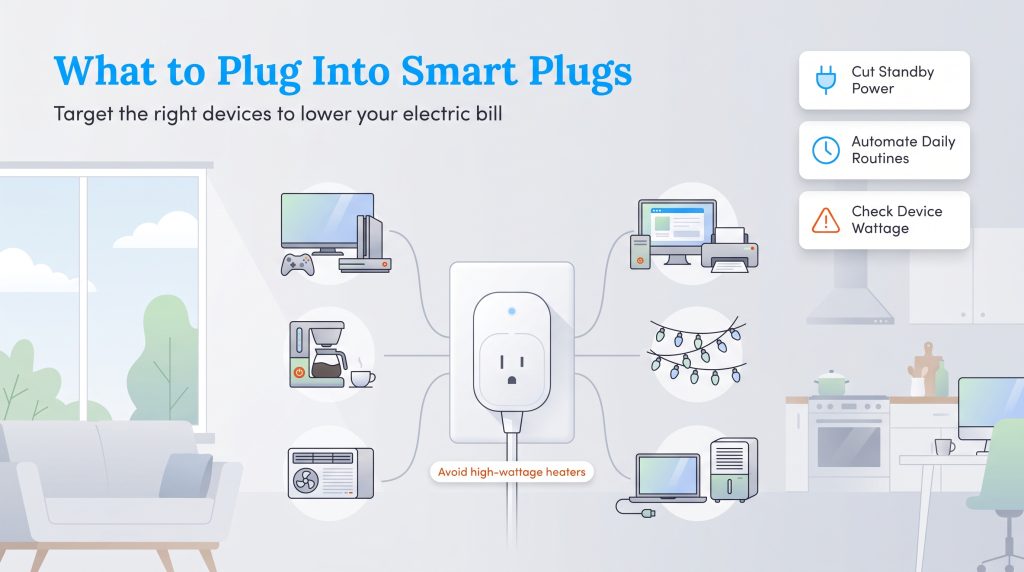
Determining exactly which appliances should be connected to your new smart home setup dictates just how quickly you can start padding your wallet. The most effective candidates are devices that draw standby power all day or run significantly longer than necessary. Before you begin automating home electronics with smart plugs, always double-check the device wattage to ensure the adapter is rated to handle the electrical load. If you want to build a comprehensive efficiency strategy, combine these smart plug routines and schedules with our proven ways to save on your overall electrical usage.
1. Automate Entertainment Centers and Game Consoles
Your living room television setup likely houses a cluster of energy-draining equipment, including soundbars, streaming boxes, subwoofers, and modern gaming consoles. Systems like the Xbox or PlayStation often draw significant wattage while quietly sitting in instant-on mode to install background patches. By creating a strict power schedule through your smart plug application, you effortlessly cut off this constant power drain during the hours you are at the office or fast asleep. You won’t notice any difference in your daily entertainment experience, but you will absolutely notice the drop in your monthly energy statement over the course of a year.
2. Schedule Coffee Makers and Kitchen Gadgets
Today’s coffee makers frequently feature bright digital clocks, keep-warm thermoblock heaters, and programmable brewing features that demand continuous electricity to function. Setting up a smart plug to activate your espresso machine roughly ten minutes before you wake up retains all the luxury of a hot morning brew while eliminating the baseline energy wasted during the remaining 23 hours of the day. This tactic works best with older coffee makers that utilize a physical on/off toggle switch and auto-resume behavior after power is restored. Just make sure you are not disrupting the primary functions of highly advanced, Wi-Fi-enabled kitchen appliances that require their own internal timers.
3. Regulate Window AC Units and Fans
Seasonal climate control devices are notorious for running far longer than necessary, cooling or circulating air through entirely empty rooms while you run errands. Automating compatible box fans and analog window AC units guarantees they turn off the moment you leave for your morning commute and boot back up just 30 minutes prior to your arrival. This straightforward routine creates a perfectly comfortable living space without the unnecessary expense of continuous daytime operation. Just verify your window unit uses a mechanical dial rather than a digital interface so it powers back on automatically.
4. Cut Power to Home Office Equipment
With the widespread adoption of remote and hybrid work schedules, our home offices are packed with high-end desktop computers, external monitors, standing desks, and robust speaker systems. These devices often sit completely idle from Friday evening until Monday morning, quietly spinning hard drives or illuminating standby lights. Connecting your entire desk arrangement to a dedicated smart plug routine guarantees that your home workstation isn’t racking up utility charges over the weekend while you are officially off the clock.
5. Sync Holiday Lighting and Decor to Sunrise and Sunset
Whether you are stringing up festive winter string lights or maintaining outdoor patio lanterns during the summer, decorative lighting left burning during daylight hours is a major culprit of residential energy waste. Most robust smart plugs offer astronomical scheduling features, allowing you to sync your displays to local sunrise and sunset data automatically. This hands-off approach turns your decorations on exactly when it gets dark and shuts them down when the sun rises. Always ensure you purchase outdoor-rated smart plugs that feature weatherproofing if you plan to use them on your exterior outlets.
6. Limit Idle Device Chargers
Most of us are guilty of leaving laptop power bricks and tablet chargers plugged directly into the wall long after our electronics have reached 100% battery capacity. While an idle phone charger only draws a minuscule amount of power and offers very minimal financial savings, smart plugs can drastically improve your overall battery care routines. Cutting the current after a strict three-hour time limit prevents continuous micro-charging. Over time, reducing this heat and strain can actually extend the overall lifespan of your expensive laptop and tablet batteries.
7. Control Humidifiers and Dehumidifiers
Air quality appliances typically do not need to operate around the clock to remain highly effective. Scheduling a humidifier to run solely during your prime nighttime sleeping hours, or programming a dehumidifier to tackle only the muggiest parts of the afternoon, significantly scales back their continuous operation. Because heavy-duty dehumidifiers can draw hundreds of watts to run their internal compressors, minimizing their uptime guarantees a lower electric bill. Always check the appliance’s electrical rating and ensure your smart adapter is built to safely handle that specific wattage load.
8. Trigger Geofencing for Away Modes
If you want to move beyond basic time-based schedules, utilizing geofencing technology is a fantastic method for maximizing your standby power reduction. Geofencing utilizes your smartphone’s built-in GPS location services to create a virtual boundary around your property. You can program your smart home application to automatically cut power to non-essential devices — like floor lamps, box fans, and entertainment centers — the exact moment your phone leaves a one-mile radius of your house. When you cross back into that boundary upon returning home, your preferred devices power up seamlessly, ensuring you never cool, heat, or light an empty house.
9. Use Voice Commands to Power Down Zones
Eliminating the friction of manual operation is the key to maintaining long-term energy efficiency habits. By integrating your smart plugs with ecosystems like Amazon Alexa or Google Assistant, you can group multiple outlets into customized “Zones.” For instance, grouping your living room TV, lamp, and sound system into a “Downstairs” zone allows you to simply say, “Alexa, turn off downstairs,” as you head up to bed. This convenient functionality removes the hassle of checking every individual switch, virtually guaranteeing that no heavy-draw electronics are accidentally left running overnight.
10. Upgrade to Smart Power Strips for Device Clusters
For high-density areas like entertainment centers and intricate home office setups, relying on a single smart plug creates a bottleneck that limits your control. Upgrading to a comprehensive smart power strip offers a superior solution. These advanced surge protectors function just like traditional strips but allow you to control each individual socket independently through the companion app. You can program the strip to keep your Wi-Fi router fully powered at all times while systematically cutting the electricity to your external monitors and printer the minute your workday concludes.
Wi-Fi vs. Zigbee Smart Plugs: Which Uses Less Idle Power?
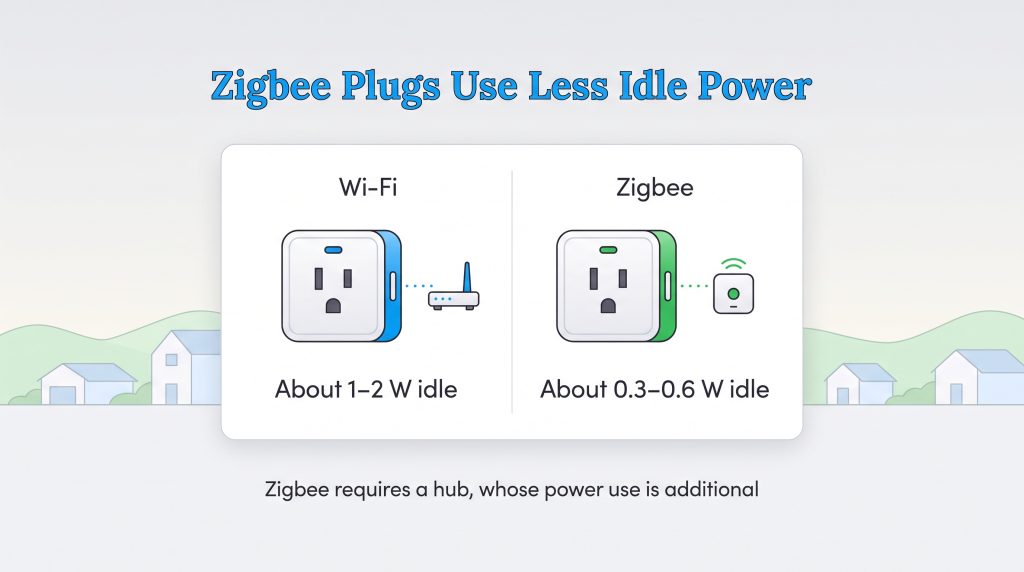
As you dive deeper into tracking your smart plug energy consumption, you will quickly discover that the communication protocol your device utilizes makes a noticeable difference in baseline power draw. The vast majority of affordable plugs on the market connect directly to your home’s Wi-Fi router. Because Wi-Fi is a relatively heavy and demanding signal protocol, these standard plugs continuously draw about 1 to 2 watts to maintain their connection. While this seems incredibly low, installing 15 Wi-Fi plugs throughout your home means you are constantly burning 15 to 30 watts of continuous baseline power, which eats into your overall savings.
Conversely, when comparing Zigbee vs Wi-Fi smart plugs energy use, Zigbee and Z-Wave adapters operate on a highly efficient, low-bandwidth mesh network. Because they don’t communicate directly with the internet but instead ping a localized central smart hub, they typically draw a negligible 0.3 to 0.6 watts while idle. If you plan to automate just one or two lamps, standard Wi-Fi plugs are perfectly fine and require no extra hardware. However, if you intend to outfit your entire household with dozens of automated switches, investing in a central hub and utilizing low-draw Zigbee smart plugs is the environmentally mindful choice that maximizes your net energy savings.
When Smart Plugs Aren’t the Best Energy-Saving Choice
While smart plugs are incredibly versatile tools for managing your electrical grid, there are specific situations where they simply aren’t the right fit. Knowing exactly when to bypass home automation protects your vital appliances and drastically reduces potential safety hazards in your residence.
🚩 Heads Up: Never overload a smart plug with space heaters. High-draw thermal devices easily exceed the amperage rating of most smart plugs, creating a severe overheating risk and potential fire hazard. If your appliance manual prohibits the use of external timers or extension cords, do not use a smart plug under any circumstances.
For your own safety and the longevity of your equipment, you should avoid automating the following devices:
- Refrigerators and freezers that require constant power to keep food safe.
- Medical devices that must remain on and fully functional at all times.
- Space heaters, unless explicitly approved by the manufacturer and used with a properly rated plug.
- Sump pumps that actively protect your home from sudden flooding damage.
- Security systems designed to monitor your property for intrusion.
- Routers or modems if you rely on a constant internet connection for other smart home devices.
- Phone chargers with tiny idle draw, as the savings won’t justify the cost of the plug.
- Any appliance that exceeds the maximum wattage or 15A rating of the smart plug.
How to Choose the Best Smart Plugs for Energy Monitoring
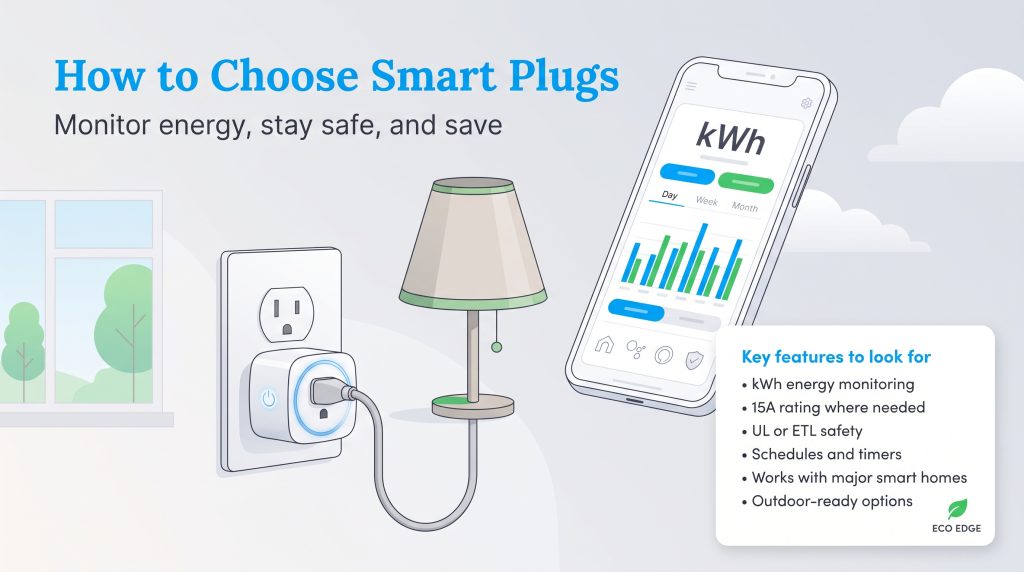
Not all smart home devices are manufactured to the same standard, so knowing exactly what technical features to prioritize is vital when shopping for the best smart plugs for energy monitoring. You want robust hardware that pairs seamlessly with a well-designed companion app capable of displaying real-time voltage and historical kilowatt-hour (kWh) data. This level of granular detail allows you to act as a localized energy detective, uncovering precisely which appliances in your home operate as heavy-draw energy hogs.
When you have actionable, accurate data at your fingertips, you can make smarter, more sustainable choices about your family’s daily habits. Ensure the hardware you purchase integrates effortlessly with major smart home ecosystems like Amazon Alexa, Google Home, and Apple HomeKit, which guarantees your automation setups won’t become obsolete if you switch mobile platforms. Look for reputable brands that offer intuitive graphing features within their apps to track daily, weekly, and monthly usage trends effortlessly. Staying informed not only slashes your utility costs but also provides peace of mind knowing you are taking measurable steps to reduce your environmental impact.
To ensure you get the absolute most out of your purchase, look for these specific key features:
- Energy monitoring in kWh to track your actual, tangible savings over time.
- A 15A rating for higher-load devices, which is standard for modern outlets.
- Safety certifications like UL or ETL ratings to ensure fire safety compliance.
- Scheduling and timer functions paired with advanced away modes or sunrise/sunset automation.
- Smart home compatibility with expansive platforms like Matter, Amazon Alexa, Google Home, or Apple HomeKit.
- Outdoor weather ratings to protect exterior lighting setups from rain and moisture.
🌱 Eco Edge: Prioritizing energy-efficient, low-impact smart products provides an environmentally mindful choice that further optimizes your home’s overall carbon footprint.
How to Estimate Your Smart Plug Savings
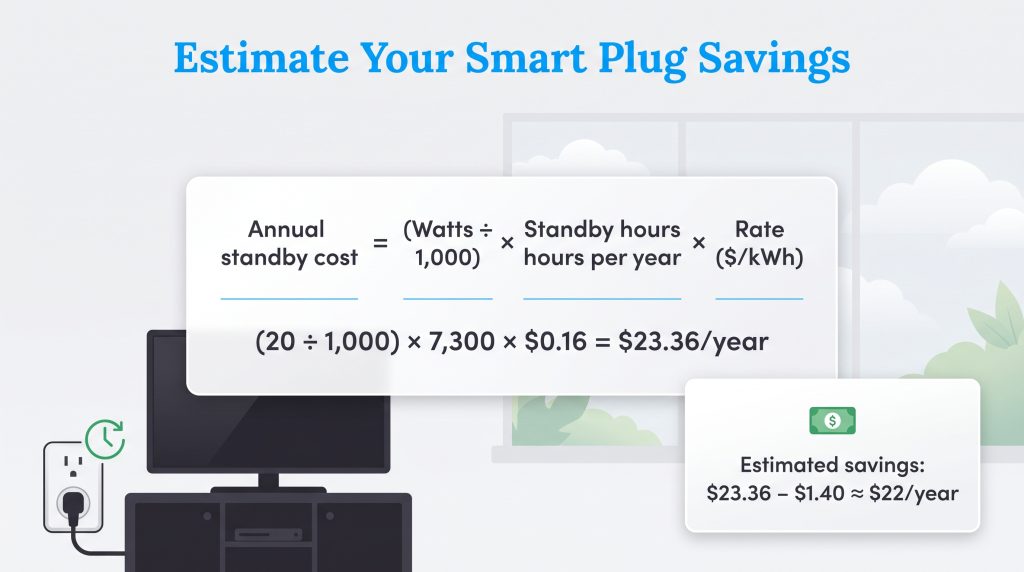
If you want to know exactly how much money a smart routine will put back into your wallet, you can run a simple, straightforward calculation using your device’s exact standby wattage and your local utility rate. The mathematical formula is quite simple to execute: Annual cost = (Watts ÷ 1,000) × Hours used per year × Electric rate.
💸 Money-Saver: For example, if you have an entertainment center that draws 20 watts in standby mode for 20 hours a day, it runs in standby for 7,300 hours a year. Dividing 20 watts by 1,000 gives you 0.02 kilowatts. Multiply that by 7,300 hours to get 146 kWh per year. If your electricity rate is $0.16 per kWh, that standby power costs you $23.36 annually. Subtracting the roughly $1.40 it costs to power the smart plug itself leaves you with over $21 in ongoing annual savings.
To get started effectively, follow this simple setup checklist to test your electronics before completely integrating them into permanent schedules:
- Check the printed appliance wattage on the manufacturer’s label.
- Confirm your smart plug’s safe amperage and wattage rating.
- Use energy monitoring for one full week before setting up any schedules.
- Create a dynamic schedule based entirely on your actual household use.
- Review the companion app data extensively after 30 days.
- Move the plug to a different device if your baseline savings are minimal.
Maximizing Your Smart Home Efficiency
Tackling your household electricity usage absolutely does not have to be an overwhelming process, nor does it require a massive upfront financial investment. Smart plugs offer an affordable, highly accessible gateway into managing wasted electricity, but they excel only when you deploy them thoughtfully. To make the most out of your home automation journey, keep these primary concepts in mind as you map out your living space:
- Focus your efforts entirely on high-standby electronics rather than low-impact items.
- Rely on verifiable energy-monitoring data to confirm your automation schedules are actively reducing consumption.
- Avoid overloading adapters, and respect all safety ratings regarding high-wattage thermal appliances.
By identifying these hidden power drains and establishing firm automated routines, you take immediate, actionable control over your monthly utility expenses. If you want to keep optimizing your living space for maximum eco-friendly impact, take a moment to explore our sustainable living hub and discover more ways to manage your home electricity so your hard-earned money stays right where it belongs.
Frequently Asked Questions About Smart Plug Uses for Energy Saving
If you are still curious about the best ways to completely automate your home for efficiency, we have compiled some of the most common inquiries related to smart plug functionality. Read through these frequently asked questions to ensure you are setting up your new gadgets safely and effectively.
Do smart plugs use electricity when off?
How can I measure the energy saved by a smart plug?
Do smart plugs lower electricity prices?
How much electricity does a smart plug consume when connected to Wi-Fi?
Can a smart plug automatically turn off when a device is fully charged?
Can you plug a power strip into a smart plug?
Do I need a smart hub to use smart plugs?
What should you not plug into a smart plug?
Are smart plugs worth it for renters?
Can smart plugs help lower peak-hour electricity costs?
About the Author

LaLeesha has a Masters degree in English and enjoys writing whenever she has the chance. She is passionate about gardening, reducing her carbon footprint, and protecting the environment. She also recently served as President of the Board for City Sprouts (a community garden).

David has been an integral part of some of the biggest utility sites on the internet, including InMyArea.com, HighSpeedInternet.com, BroadbandNow.com, and U.S. News. He brings over 15 years of experience writing about, compiling and analyzing utility data.

Jared Evans is a licensed electrician and the owner of Full Circuit Electric in Omaha, Nebraska. As an expert reviewer for UtilitiesForMyHome.com, Jared uses his 10+ years of hands-on experience to ensure our electrical advice is safe, accurate, and easy to follow. Whether he's troubleshooting a complex wiring issue or sharing tips on green energy upgrades, Jared is dedicated to helping you power your home efficiently — and safely.