
Take control of your home energy usage by learning exactly what those rotating dials and digital numbers mean.
Key Takeaways
- Identify your meter type first, as reading an older analog dial meter requires a different method than modern digital or smart meters.
- Read analog dials from right to left and always record the lower number if the pointer is between two digits (unless between 9 and 0).
- Calculate your exact usage by subtracting last month’s reading from your current reading and multiplying by your electricity rate.
Opening your monthly electricity bill can sometimes feel like a gamble. Will it be reasonable, or will the total shock you? Instead of waiting anxiously for the envelope to arrive, you can take control by learning how to read your electric meter yourself. Think of this skill as your own consumer audit. It helps you make sure you are paying only for the electricity you actually used, not an estimate based on past behavior. We will walk you through analog, digital, and solar meters so you can turn those confusing dials or flashing numbers into actionable data, helping you spot billing errors and track your household’s energy efficiency in real time.
Why You Should Read Your Own Electric Meter
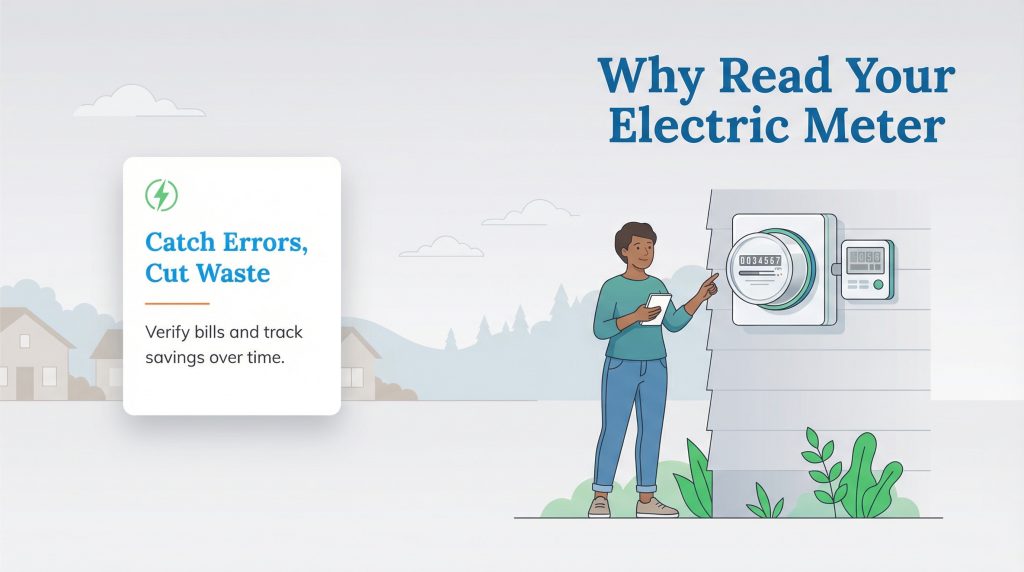
Most utility companies are reliable, but they aren’t perfect. There are times when a meter reader cannot access your property due to weather, locked gates, or pets. In these cases, the utility company will estimate your usage based on your history. While this is often close, an estimated bill can sometimes be significantly higher than your actual consumption. By learning to read your meter, you can verify these numbers and request a correction if you have been overcharged.
Beyond billing accuracy, reading your meter helps you track the success of your energy-saving efforts. If you install a new energy-efficient appliance or change your thermostat habits, checking the meter daily or weekly gives you immediate feedback. This allows you to save on your electric bill by adjusting your usage before the billing cycle ends, rather than reacting to a high cost after the fact. Over time, this habit doesn’t just protect your wallet; it also helps you spot waste and make more environmentally mindful choices about when and how you use electricity.
Identifying Your Electric Meter Type
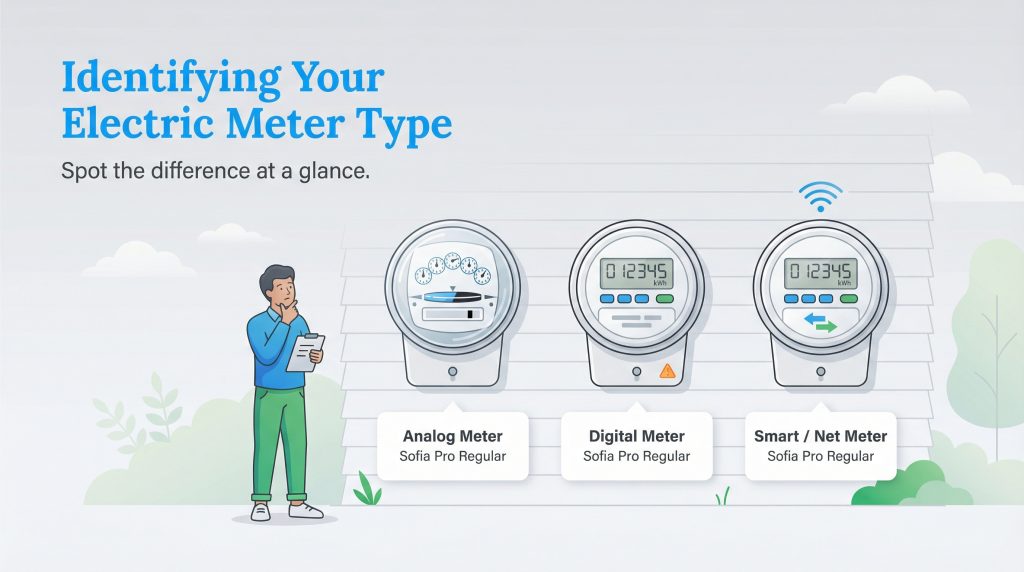
Before you can record your usage, you need to know which type of hardware is attached to your home. If you live in a newer home or recently had an upgrade, you probably have a digital or smart meter. However, many older properties still use analog systems. Most residential meters fall into one of three categories, which we have outlined below.
| Meter Type | Appearance | How to Read It | What It Shows |
|---|---|---|---|
| Analog | Glass dome with clock-like faces and a spinning disk | Read dials right to left | Running total of kWh via dial positions |
| Digital | LCD screen like a digital watch | Read numbers directly on screen | Cumulative kWh usage |
| Smart / Net | LCD screen with wireless symbols or arrows | Read numbers and direction arrows | Energy used vs. energy sent back to grid |
- Analog (Mechanical) Meters: These are the traditional meters housed in a glass dome. They feature a series of clock-like faces with rotating hands and a spinning horizontal disk.
- Digital (Standard) Meters: These modern devices have replaced many analog meters. They feature an LCD display similar to a digital watch and are much easier to read at a glance.
- Smart / Net Meters: These look like standard digital meters but are equipped with wireless technology to communicate directly with the utility company. If you have solar panels, you likely have a net meter that tracks energy flow in both directions.
How to Read an Analog Meter (The Dials)
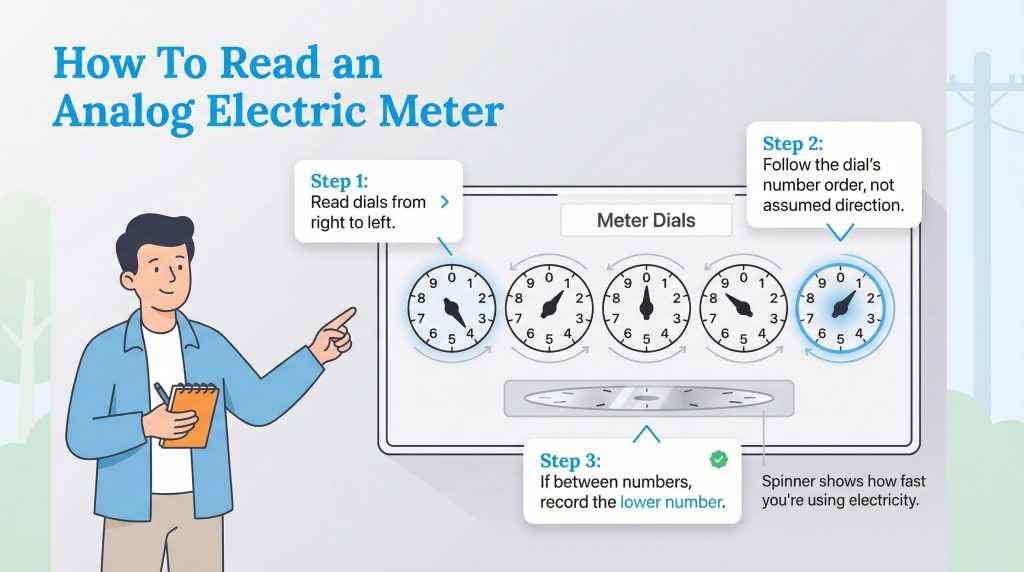
Analog meters can be intimidating because they rely on a series of dials that don’t all turn in the same direction. However, when you are learning how to read electric meter dials, remember that once you follow the standard rule of reading from right to left, the process becomes straightforward.
Imagine a meter face with five distinct dials. To get an accurate reading, you must ignore the chaos of the spinning disk and focus solely on the position of the hands on these dials.
Step 1: Read Right to Left
Start with the dial on the far right. This represents the single kilowatt-hours (kWh). Write down this number, then move to the dial immediately to its left. Continue this process until you have recorded numbers for all five dials. Reading in this direction helps you determine the correct number if a hand is landing on a borderline position. You will write the numbers down in the order you read them, but the final reading is interpreted as a normal whole number (e.g., 1-2-3-4-5).
Step 2: Note the Direction
Pay close attention to the numbers on each face. Some dials rotate clockwise, while others rotate counter-clockwise. Always follow the sequence of numbers (0, 1, 2…) rather than assuming the direction of the hand.
Step 3: The “Lower Number” Rule
If the pointer is resting between two numbers, you almost always record the lower number. For example, if the hand is between the 4 and the 5, you write down 4. This is true even if the hand looks closer to the 5.
There is one important exception to this rule: the crossing from 9 to 0. If the pointer is between 9 and 0, think of the 0 as representing a 10. In this case, the “lower” number is 9, so you record the 9.
Step 4: Verify with the Spinner
Beneath the dials, you will see a flat, rotating metal disk. This disk spins faster as you consume more electricity. If it is whirring rapidly, high-demand appliances like your air conditioner or dryer are likely running. If it is crawling slowly, your energy usage is currently low.
How to Read a Digital or Smart Meter
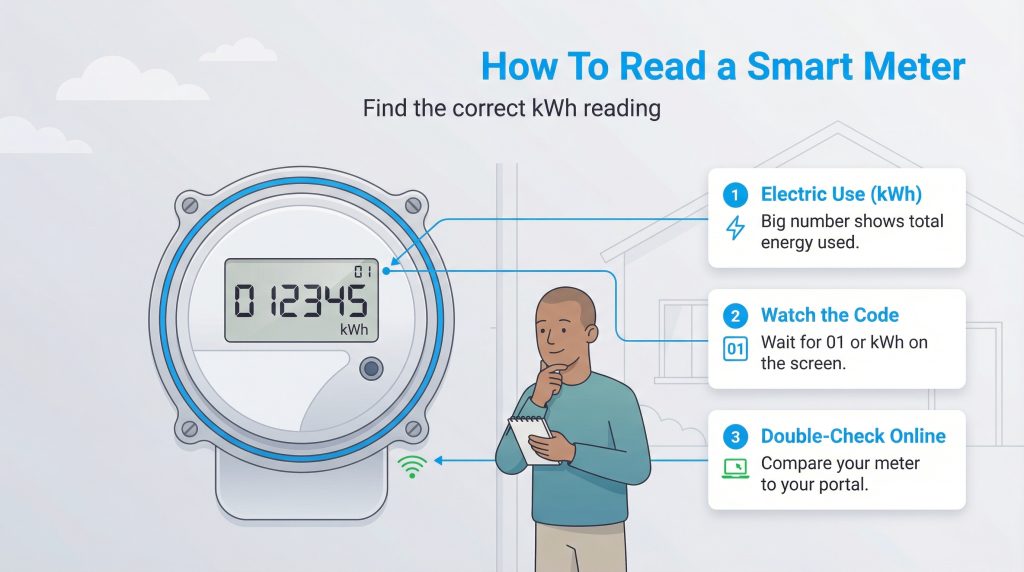
Digital meters remove the guesswork associated with interpreting dial positions. However, if you are figuring out how to read a smart meter, you still need to know what you are looking at to get the correct data.
The Display
The large number in the center of the LCD screen usually represents the total cumulative kilowatt-hours (kWh) of energy used since the meter was installed. This is your electric meter reading in kWh — the same unit your utility uses to calculate your bill. It reads like a car odometer.
Cycling Codes
Unlike a static analog display, digital meters often cycle through various information screens. You might see the date, the time, or a system status code before the usage number appears. Watch the screen and wait for a code like “01” or the abbreviation “kWh” to appear. This indicates that the number currently on the screen is your electricity usage. Exact codes vary by meter model; check your provider’s documentation if yours looks different.
Smart Features
If you have a smart meter, it sends your usage data to the utility company automatically. Providers like Gexa Energy and others often provide online portals where you can view this data. However, reading the physical meter manually is a great way to double-check their work and ensure the digital signal matches reality. If your online usage seems off, checking the physical reading is the easiest way to confirm the numbers.
How to Read a Solar Net Meter
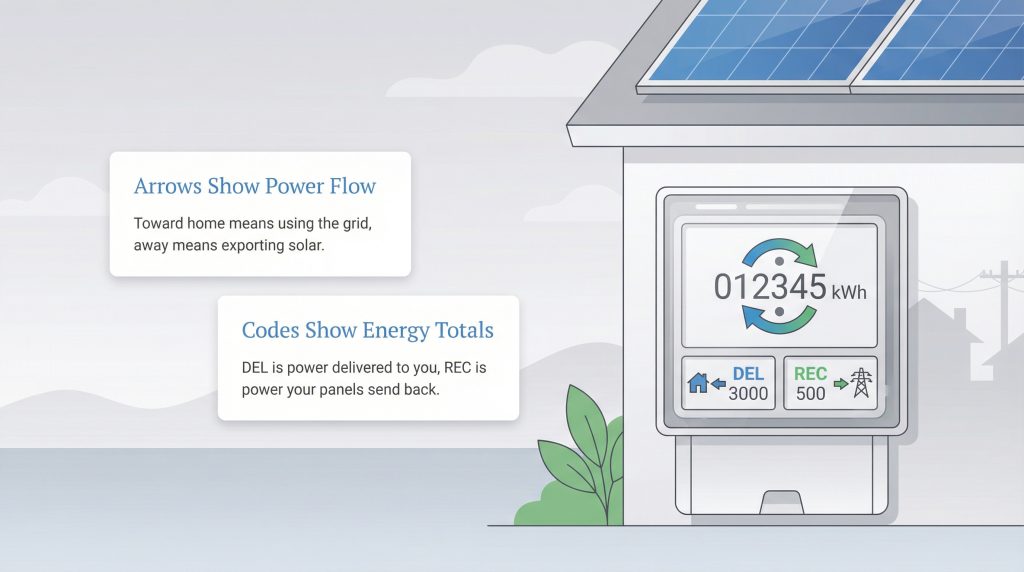
For homeowners with solar panels, the electric meter does double duty. A net meter is a bi-directional device that measures both the electricity you pull from the grid and the excess electricity your home solar system sends back to it.
Bi-Directional Arrows
Look for arrows on the digital display. An arrow pointing toward your home usually means you are drawing power from the utility grid. An arrow pointing away from your home indicates you are generating surplus solar energy and exporting it to the grid.
Positive vs. Negative Numbers
Different manufacturers display “net” usage differently. Some use a minus sign to show exported energy, while others use specific codes. You might see “DEL” (Delivered) for energy the utility sent you and “REC” (Received) for energy the utility received from your panels. For example, if your meter shows DEL 3000 and REC 500, it means the utility has delivered 3,000 kWh to you and received 500 kWh from your solar panels. Understanding these codes helps you verify the eco-conscious impact of your solar investment. That exported energy helps lower your net usage and supports a more eco-conscious grid.
Calculating Your Bill From the Reading
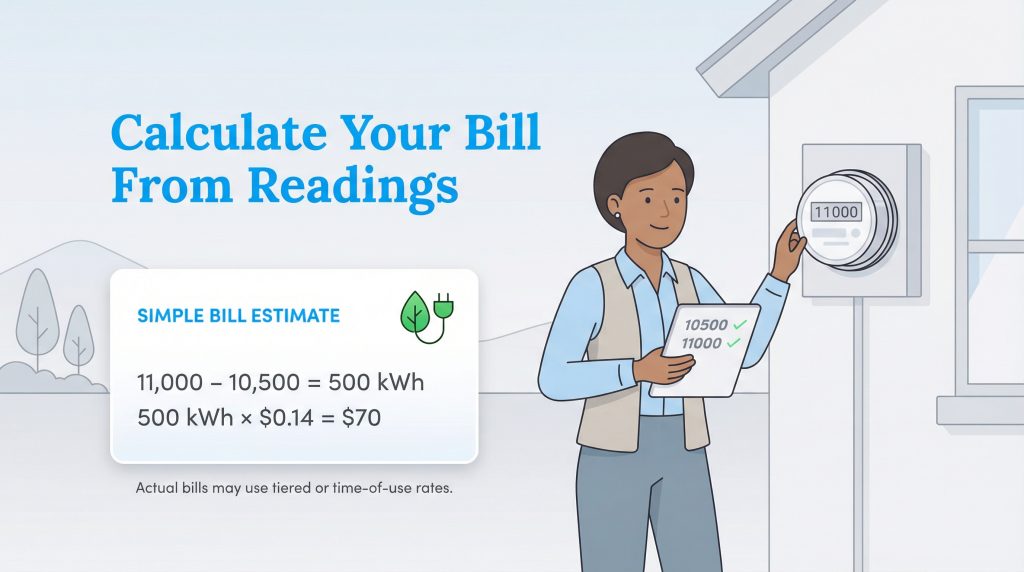
Once you have your numbers, you can estimate your upcoming bill. The math is simple and requires just two readings: one from your last billing statement and the one you just took. You can calculate your electricity bill from meter readings using this simple formula.
The Formula
Subtract your previous reading from your current reading to find your total usage.
(Current Reading) – (Previous Reading) = Total kWh Used
The Cost
Multiply that total usage by your electricity rate (found on your bill) to see the supply cost.
Total kWh x Rate per kWh = Supply Cost
Some utilities use tiered or time-of-use rates, so your actual bill might break this cost into different price levels or time periods depending on when you used the power.
Example Calculation
Let’s say your meter read 10,500 kWh last month. Today, you go outside and read 11,000 kWh.
11,000 – 10,500 = 500 kWh used.
If your electricity rate is 14 cents per kWh ($0.14), the calculation is 500 x 0.14 = $70.
Troubleshooting Common Meter Questions
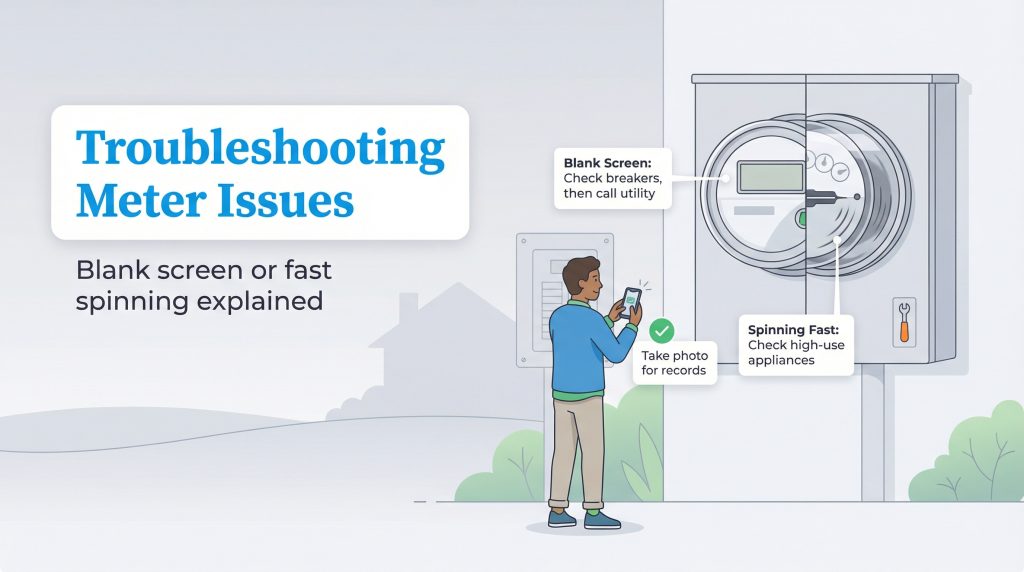
Sometimes you might encounter something unexpected when checking your meter. Here are a few common issues and what they mean.
Blank Screen
If your digital meter screen is completely blank, check your main breaker panel first to ensure you haven’t lost power. If your power is on but the screen is off, there may be a malfunction with the display itself. You should contact your utility provider to report the issue.
Spinning Fast
On an analog meter, a rapidly spinning disk means a large amount of energy is being consumed right now. If you didn’t expect this, check to see if a high-load appliance like an HVAC unit, oven, or water heater is running. You can verify the accuracy of your meter by turning off all breakers; the disk should stop completely.
If you need to contact your utility provider about any of these issues, be sure to write down the reading and take a clear photo of the meter display for your records. For more information on consumer rights regarding meter accuracy and testing, you can visit the Department of Energy website or your state’s Public Utility Commission page.
Empower Yourself with Accurate Data
Reading your electric meter is a simple habit that puts you firmly in control of your household budget. Whether you rent an apartment or own a home, possessing the skill to audit your energy usage ensures you never pay more than your fair share. By monitoring your consumption and verifying your bills, you become a smarter, more efficient consumer who can confidently manage your home’s energy footprint. The more you understand your usage, the easier it is to cut waste, lower your carbon footprint, and make smarter energy choices at home.
FAQs About Reading Electric Meters
How often should I read my electric meter?
What do the numbers on my electric meter mean?
How can I tell if my electric meter reading is accurate?
What should I do if my bill is marked “Estimated”?
Why is my digital electric meter flashing?
How do I submit a meter reading to my utility company?
Does reading my meter help me save money?
About the Author

LaLeesha has a Masters degree in English and enjoys writing whenever she has the chance. She is passionate about gardening, reducing her carbon footprint, and protecting the environment.